
TypoScript MenuProcessor专用=目录::页面类型快捷方式
我已经定义了以下的打字本或我的任务:
dataProcessing {
    10 = TYPO3\CMS\Frontend\DataProcessing\MenuProcessor
    10 {
        special = directory
        special.value.field = pages
        dataProcessing {
            10 = TYPO3\CMS\Frontend\DataProcessing\FilesProcessor
            10 {
                references.fieldName = media
            }
            20 = TYPO3\CMS\Frontend\DataProcessing\FilesProcessor
            20 {
                references.fieldName = teaser_image
                as = teaserImage
            }
        }
    }
}
页面的值来自be中的配置(从页面树中选择页面)。
这很好,但是如果选择了具有类型快捷方式(4)的页面,则不会生成任何内容。我正在寻找一种方法来实现,如果选择一个快捷方式,该快捷方式的目标页面菜单正在生成。
对于页面类型快捷方式,我想要显式地解决这个问题,而不是针对页面类型挂载点。不幸的是,当页面类型是快捷方式时,我仍然无法在变量菜单中获得任何数据。
回答 2
Stack Overflow用户
发布于 2022-02-10 09:07:19
为求澄清,这是行政长官的全部打字本:
 ############################################
#### CTYPE:menu_distribution ####
############################################
tt_content.menu_distribution =< lib.contentElement
tt_content.menu_distribution {
    templateName = MenuDistribution
    dataProcessing {
        10 = TYPO3\CMS\Frontend\DataProcessing\MenuProcessor
        10 {
            special = directory
            special.value.field = pages
            as = menu
            dataProcessing {
                10 = TYPO3\CMS\Frontend\DataProcessing\FilesProcessor
                10 {
                    references.fieldName = media
                }
                20 = TYPO3\CMS\Frontend\DataProcessing\FilesProcessor
                20 {
                    references.fieldName = teaser_image
                    as = teaserImage
                }
            }
        }
    }
    stdWrap {
        editIcons = tt_content: header [header_layout], pages
        editIcons {
            iconTitle.data = LLL:EXT:fluid_styled_content/Resources/Private/Language/FrontendEditing.xlf:editIcon.menu
        }
    }
}
在ce的模板中,如果选择了类型为快捷方式的页,则变量菜单不包含任何内容。
TCA:
'pages' => [
                'exclude' => true,
                'label' => 'LLL:EXT:core/Resources/Private/Language/locallang_general.xlf:LGL.startingpoint',
                'config' => [
                    'type' => 'group',
                    'internal_type' => 'db',
                    'allowed' => 'pages',
                    'size' => 3,
                    'maxitems' => 1,
                    'minitems' => 1
                ]
],Stack Overflow用户
发布于 2022-02-10 09:38:52
当然,您的快捷方式在菜单中是可见的吗?
FSCs的“菜单->子页”(CType 'menu_pages')几乎是这样做的:
# Menu of subpages of selected pages:
# ...
#
# CType: menu_subpages

tt_content.menu_subpages =< lib.contentElement
tt_content.menu_subpages {
    templateName = MenuSubpages
    dataProcessing {
        10 = TYPO3\CMS\Frontend\DataProcessing\MenuProcessor
        10 {
            special = directory
            special.value.field = pages
            dataProcessing {
                10 = TYPO3\CMS\Frontend\DataProcessing\FilesProcessor
                10 {
                    references.fieldName = media
                }
            }
        }
    }
}
在一个测试(TYPO3 v10)中,这个CE向我展示了标准页面和快捷方式。
也许,你混淆了“捷径”和“登山点”.
示例
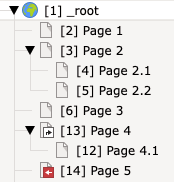
在Contentelement的“子页面”( pages )字段(CType menu_subpages)中选择“Page2”显示:
- Page2.1
- Page2.2
选择“第4页”(它的类型为“快捷方式”并指向“第2页”)显示了它自己的子页:
- Page4.1
选择“Page5”(类型为"Mountpoint“并安装”第2页“)显示已挂载页的子页:
- Page2.1
- Page2.2
https://stackoverflow.com/questions/71036283
复制相似问题
腾讯云开发者

Copyright © 2013 - 2026 Tencent Cloud. All Rights Reserved. 腾讯云 版权所有
深圳市腾讯计算机系统有限公司 ICP备案/许可证号:粤B2-20090059  粤公网安备44030502008569号
腾讯云计算(北京)有限责任公司 京ICP证150476号 | 京ICP备11018762号