
序贯gganimate图
序贯gganimate图
提问于 2022-02-07 12:39:20
我正在尝试使用gganimate创建一个动画时间序列情节。下面的代码几乎产生了所需的输出。它创建两个随机时间序列,构造一个数据帧并呈现所需的动画:
# necessary packages
require(ggplot2)
require(gganimate)
require(transformr)
require(gifski)

# construct data frame with two random time series and time index t
TS      = matrix(rnorm(100 * 2), 100, 2)
plot.df = data.frame(TS, t = 1:100)
plot.df = reshape2::melt(plot.df, id.vars = "t")

# usual ggplot line plot structure
p = ggplot(plot.df, aes(x = t, y = value, col = variable)) +
  geom_line()

# animation that reveals time series along time dimension (= x-axis)
play = p + transition_reveal(t)

# render plot using gifski
animate(play,renderer = gifski_renderer())在输出中,两个时间序列同时显示。是否有一种选择:首先显示第一个时间序列,然后在第一个时间序列之上显示第二个时间序列?
回答 1
Stack Overflow用户
回答已采纳
发布于 2022-02-07 15:53:33
一个能帮上忙的解决办法呢。这样做的目的是创建一个从数据集的1到nrow的渐进式列,并在transition_reveal()中使用它:显然,数据集应该按照时间和变量排序,就像在数据中一样。
# necessary packages
require(ggplot2)
require(gganimate)
require(gifski)

# construct data frame with two random time series and time index t
TS      <- matrix(rnorm(100 * 2), 100, 2)
plot.df <- data.frame(TS, t = 1:100)
plot.df <- reshape2::melt(plot.df, id.vars = "t")

# reorder in case
# plot.df <- plot.df[order(plot.df$variable,plot.df$t),]

# adding a new column to make progressive the reveal of the data
plot.df$transition_value <- 1:nrow(plot.df)

# your ggplot plot
p <- ggplot(plot.df, aes(x = t, y = value, col = variable)) +
  geom_line()

# reveal with the new value
play <- p + transition_reveal(transition_value)

# render plot using gifski
animate(play,renderer = gifski_renderer())
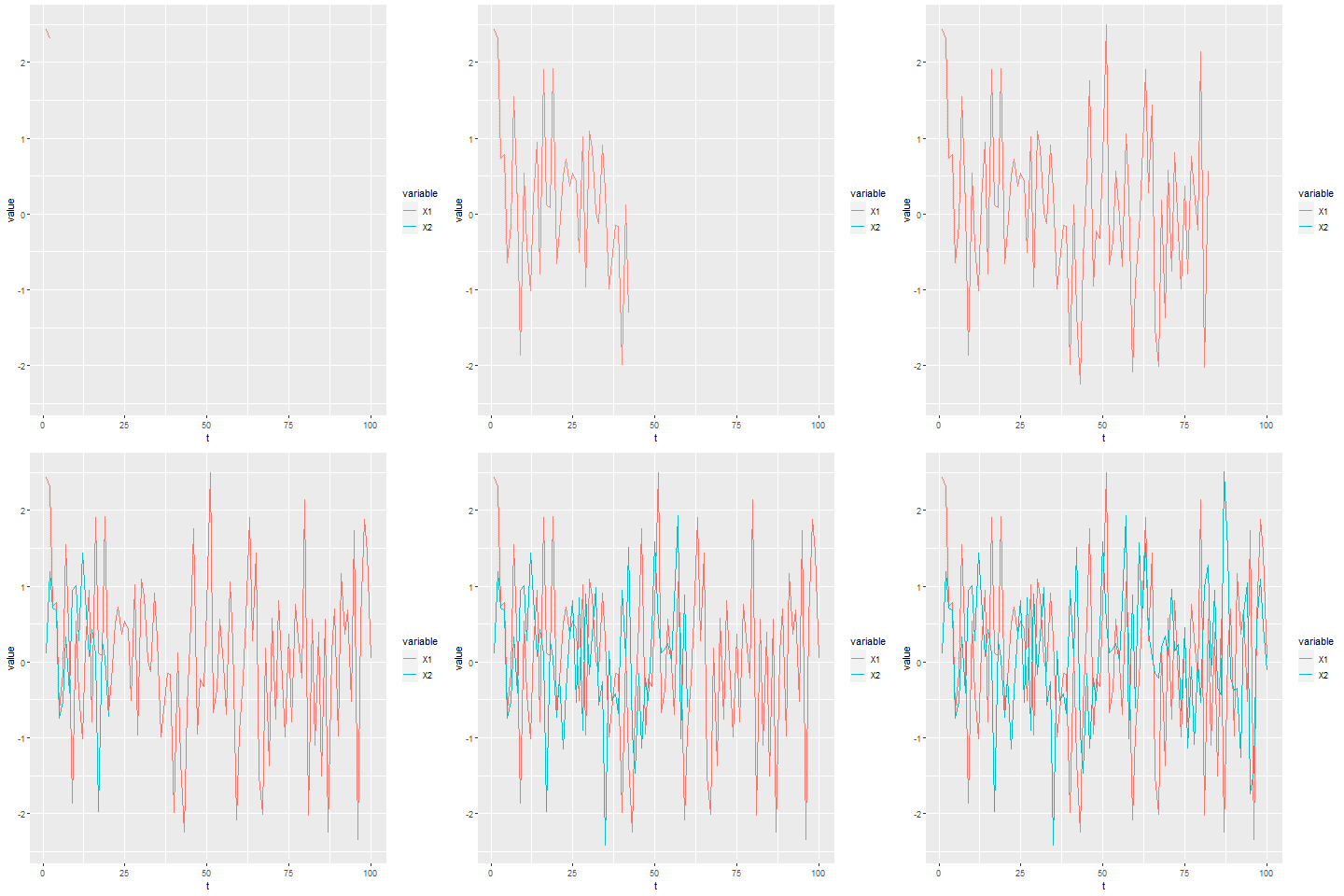
页面原文内容由Stack Overflow提供。腾讯云小微IT领域专用引擎提供翻译支持
原文链接:
https://stackoverflow.com/questions/71018725
复制相关文章
相似问题
腾讯云开发者

Copyright © 2013 - 2026 Tencent Cloud. All Rights Reserved. 腾讯云 版权所有
深圳市腾讯计算机系统有限公司 ICP备案/许可证号:粤B2-20090059  粤公网安备44030502008569号
腾讯云计算(北京)有限责任公司 京ICP证150476号 | 京ICP备11018762号