
如何舒展这个扣子?
如何舒展这个扣子?
提问于 2022-02-05 21:49:38
我正在学习颤栗,面对这个问题:
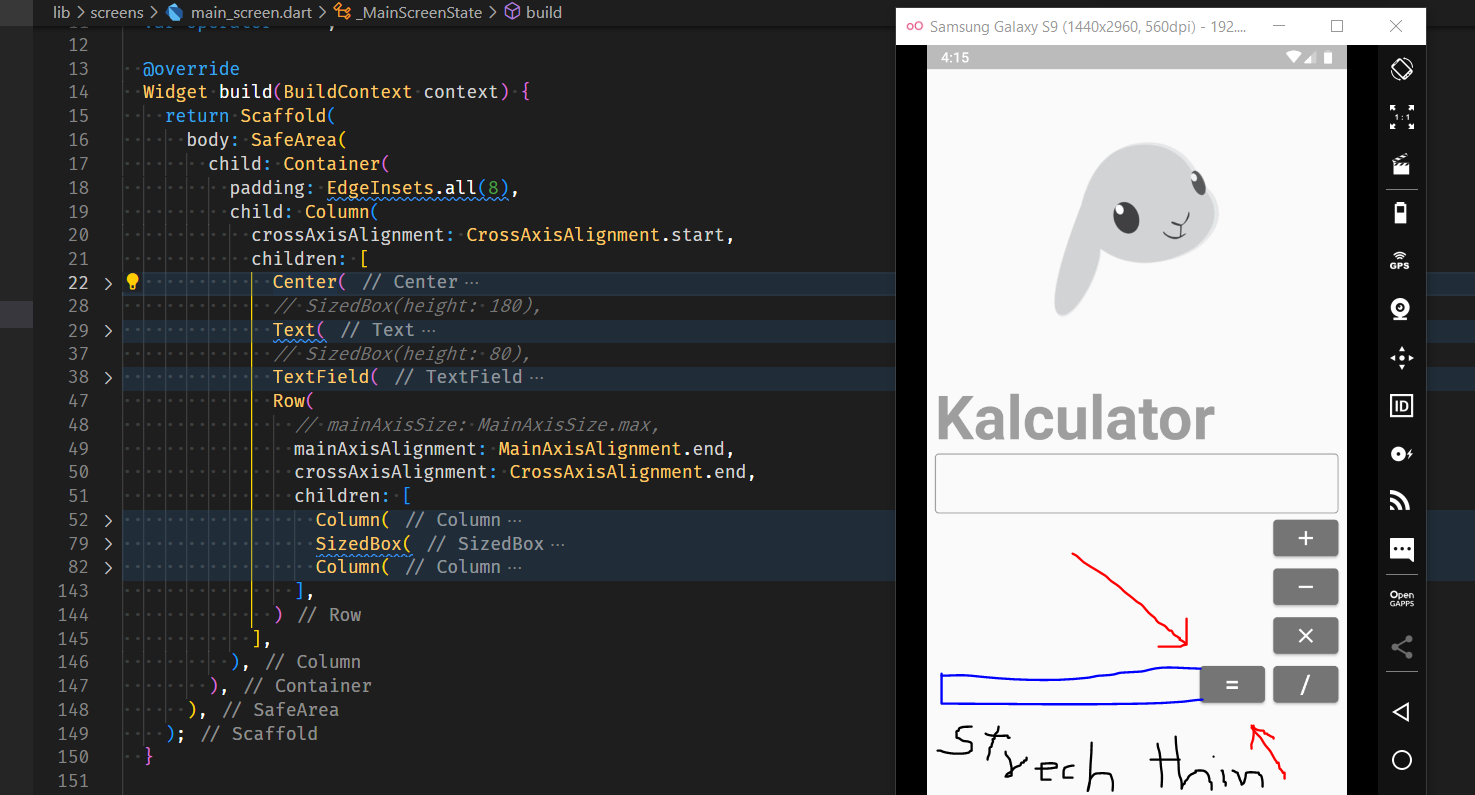
我希望相等按钮延伸到左边,覆盖整个绿色区域,如图所示。
相等按钮位于一列中,其他四个按钮位于另一列中。反过来,这两列都是一排排的。i.e
Column:
  Row:
    Column 1:
      Equal-Button // If I warp it in expended, it goes out of sight.
    Column 2:
      the other four buttons
修复它的正确方法是什么,而不仅仅是黑客。你会怎么做?
下面是完整的代码:Github吉斯特
回答 3
Stack Overflow用户
发布于 2022-02-05 22:03:15
您需要将它放在自己的列中,然后使用crossAxisAlignment.stretch.只要确保它有一个有限的空间
Stack Overflow用户
发布于 2022-02-05 22:03:24
您可以用大小为大小的框包装高架按钮,并给它您选择的宽度,如果您想将'=‘字符串放在右边而不是中间,您只需将文本用对齐方式包装,并根据您的选择设置对齐方式。
 SizedBox(
              width: 300,
              child: ElevatedButton(
                style: ButtonStyle(
                  backgroundColor:
                      MaterialStateProperty.all(Colors.grey.shade600),
                ),
                child: Align(
                  alignment: Alignment.centerRight,
                  child: Text(
                    "=",
                    style: TextStyle(fontSize: 26),
                  ),
                ),
                onPressed: () {},
              ),
)Stack Overflow用户
发布于 2022-02-06 05:53:44
假设=按钮和/按钮都在Row小部件中,您可以将=按钮包装在Expanded小部件中,迫使它占用=小部件上的所有可用空间。下面是一个简单的例子:
class Sample extends StatelessWidget {
  const Sample({Key? key}) : super(key: key);

  @override
  Widget build(BuildContext context) {
    return Row(
      children: [
        Expanded(child: Container(color: Colors.red, height: 50)),
        Container(
          height: 50,
          width: 100,
          color: Colors.green,
          margin: const EdgeInsets.symmetric(horizontal: 10),
        )
      ],
    );
  }
}页面原文内容由Stack Overflow提供。腾讯云小微IT领域专用引擎提供翻译支持
原文链接:
https://stackoverflow.com/questions/71002435
复制相关文章
相似问题
腾讯云开发者

Copyright © 2013 - 2026 Tencent Cloud. All Rights Reserved. 腾讯云 版权所有
深圳市腾讯计算机系统有限公司 ICP备案/许可证号:粤B2-20090059  粤公网安备44030502008569号
腾讯云计算(北京)有限责任公司 京ICP证150476号 | 京ICP备11018762号