
具有多个数据输入的WPF c# onStartUp()视图模型问题
嘿,我为我的WPF桌面应用程序提供了以下,该应用程序位于本地目录并收集该文件夹中的所有图像(box1是下面的示例代码):
public partial class App : Application
{
    protected override void OnStartup(StartupEventArgs e)
    {
        base.OnStartup(e);

        // set the update interval
        var imageSource = new ImageSource(Path.Combine(@"C:\photos\boxes\", "box1"), TimeSpan.FromHours(1));
        var viewModel = new MainWindowViewModel(imageSource);

        var window = new MainWindow()
        {
            DataContext = viewModel
        };

        window.Closed += (s, a) => { viewModel.Dispose(); };
        window.Show();
    }
}
这对于我在MainWindow.xaml上拥有的标签为 box1 的组件来说工作得很好,但是其他的2-9框不会从各自的文件夹中加载自己的图像--它们都显示与box1相同的图像。
目录的结构如下:
 C:\
  |-photos\
     |boxes\
       |box1
       |box2
       |box3
       |box4
       |box5
       |box6
       |box7
       |box8
       |box9
|box10在MainWindow上,我有这样的代码,它允许将每个目录中的所有照片放入自己的元素中:
 <Window.Resources>
    <!-- List of supported animations -->
    <FluidKit:SlideTransition x:Key="SlideTransition" x:Shared="False"/>
    <FluidKit:CubeTransition x:Key="CubeTransition" Rotation="BottomToTop" x:Shared="False"/>
    <FluidKit:FlipTransition x:Key="FlipTransition" x:Shared="False"/>
    <local:ImageSourceConverter x:Key="ImageSourceConverter"/>
    <!-- Data template for animations -->
    <DataTemplate x:Key="ItemTemplate" x:Shared="False">
        <Image Source="{Binding Path, Converter={StaticResource ImageSourceConverter}}"
               Stretch="Fill"/>
    </DataTemplate>
</Window.Resources>
<Grid>
    <FluidKit:TransitionPresenter RestDuration="0:0:3"
                                      IsLooped="True"
                                    Transition="{StaticResource FlipTransition}"
                                   ItemsSource="{Binding box1}"
                                         Width="357"
                                        Height="272"
                           HorizontalAlignment="Left"
                             VerticalAlignment="Top"
                                  ItemTemplate="{StaticResource ItemTemplate}"
                                        x:Name="box1"
                                        Margin="0,0,0,454"/>
    <FluidKit:TransitionPresenter RestDuration="0:0:3"
                                      IsLooped="True"
                                    Transition="{StaticResource FlipTransition}"
                                   ItemsSource="{Binding box2}"
                                         Width="357"
                                        Height="272"
                           HorizontalAlignment="Left"
                             VerticalAlignment="Top"
                                  ItemTemplate="{StaticResource ItemTemplate}"
                                        x:Name="box2"
                                        Margin="357,0,0,0"/>
ETC.......正如我前面所说的,第一个元素ItemsSource="{Binding box1}"加载图像,就像它们应该来自box1目录一样,但是所有其他的2-9都是加载的,与box1.加载的图像相同。
mainWindowViewModel代码如下所示:
public class MainWindowViewModel : IDisposable
{
    private readonly IDisposable _token1;
    private readonly IDisposable _token2;
    ...ETC

    public MainWindowViewModel(IImageSource imageSource)
    {
        // subscribe to update images at regular intervals
        _token1 = imageSource
            .GetImages().ObserveOn(DispatcherScheduler.Current)
            .Subscribe(i => UpdateImages(i, box1), ex => ShowError(ex));

        _token2 = imageSource
            .GetImages().ObserveOn(DispatcherScheduler.Current)
            .Subscribe(i => UpdateImages(i, box2), ex => ShowError(ex));
        ETC...
    }

    private void ShowError(Exception ex)
    {
        MessageBox.Show(ex.Message, "Photo Gallery", MessageBoxButton.OK, MessageBoxImage.Error);
    }

    /// <summary>
    /// Updates the animation's images.
    /// </summary>
    /// <param name="images">The images to update with</param>
    /// <param name="animation">The animation to update</param>
    private void UpdateImages(IEnumerable<string> images, ObservableCollection<ImageViewModel> animation)
    {
        animation.Clear();

        foreach (var i in images)
        {
            animation.Add(new ImageViewModel { Path = i });
        }
    }

    /// <summary>
    /// Gets or sets a collection of images used for the first animation.
    /// </summary>
    public ObservableCollection<ImageViewModel> box1 { get; set; } =
        new ObservableCollection<ImageViewModel>();

    public ObservableCollection<ImageViewModel> box2 { get; set; } =
        new ObservableCollection<ImageViewModel>();

    ETC...

    public void Dispose()
    {
        _token1.Dispose();
        _token2.Dispose();
        ETC...
    }
}
循环以获取目录中的每个文件映像的函数如下:
public class ImageSource : IImageSource
{
    private readonly string _path;
    private readonly TimeSpan _interval;

    public ImageSource(string path, TimeSpan interval)
    {
        _path = path;
        _interval = interval;
    }

    public IObservable<IEnumerable<string>> GetImages()
    {
        if (!Directory.Exists(_path))
        {
            return Observable.Empty<IEnumerable<string>>();
        }

        return Observable.Create<IEnumerable<string>>(observer =>
        {
            return TaskPoolScheduler.Default.ScheduleAsync(async (ctrl, ct) =>
            {
                for (;;)
                {
                    if (ct.IsCancellationRequested)
                    {
                        break;
                    }

                    try
                    {
                        var images = Directory.GetFiles(_path, "*.jpg");

                        // Don’t do anything unless there are a minimum of 10 images.
                        if (images.Count() > 9)
                        {
                            observer.OnNext(images.PickRandom());
                        }
                    }
                    catch (Exception ex)
                    {
                        observer.OnError(ex);
                        throw;
                    }

                    await ctrl.Sleep(_interval).ConfigureAwait(false);
                 }
            });
        });
}当前,代码将传递到每个ObservableCollection<ImageViewModel> box[X] { get; set; },并设置该文件夹中每个图像的路径。当然,Box2-10是与方框1相同的文件。
我如何修改该onStartup()代码以允许它使用每个盒子文件夹的文件并将它们放置到适当的box #组件中,而不是仅仅使用该box1文件?
谢谢!
更新#1
看起来我在MainWindowViewModel.cs上有两个错误
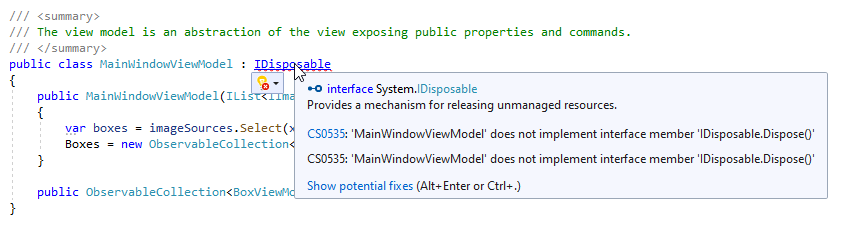
Error CS0535 'MainWindowViewModel‘不实现接口成员IDisposable.Dispose()
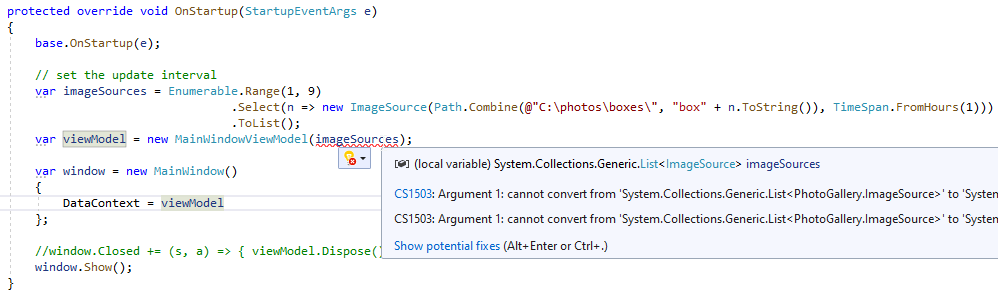
'System.Collections.Generic.List‘错误CS1503参数1:无法从
转换为CS1503
回答 1
Stack Overflow用户
发布于 2022-02-05 19:35:36
您需要数据结构层次结构中的另一个级别: BoxViewModel
public class BoxViewModel : IDisposable
{
   private IDisposable _token;

   public void Dispose() { /* dispose _token */}

   public BoxViewModel (IImageSource imageSource)
   {
       // init _token, load Images
   }

   public ObservableCollection<ImageViewModel> Images { get; set; } =
        new ObservableCollection<ImageViewModel>();
}
MainWindowViewModel被简化了:没有令牌,没有图像加载,只有BoxViewModels的集合:
public class MainWindowViewModel : IDisposable
{

    public MainWindowViewModel(Ilist<IImageSource> imageSources)
    {
         var boxes = imageSources.Select(x => new BoxViewModel(x));
         Boxes = new ObservableCollection<BoxViewModel>(boxes);
    }

    public ObservableCollection<BoxViewModel> Boxes { get; set; }
}
init MainWindowViewModel和list:
protected override void OnStartup(StartupEventArgs e)
{
    base.OnStartup(e);

    // set the update interval
    var imageSources = Enumerale.Range(1,9)
                                .Select(n => new ImageSource(Path.Combine(@"C:\photos\boxes\", "box"+n.ToString()), TimeSpan.FromHours(1)))
                                .ToList();
    var viewModel = new MainWindowViewModel(imageSources);

    var window = new MainWindow()
    {
        DataContext = viewModel
    };
    ...
}
并在视图中使用ItemsControl:
<Grid>
 <ItemsControl ItemsSource="{Binding Boxes}">
  <ItemsControl.ItemTemplate>
   <DataTemplate>
    <FluidKit:TransitionPresenter RestDuration="0:0:3"
                                      IsLooped="True"
                                    Transition="{StaticResource FlipTransition}"
                                   ItemsSource="{Binding Images}"
                                         Width="357"
                                        Height="272"
                           HorizontalAlignment="Left"
                             VerticalAlignment="Top"
                                  ItemTemplate="{StaticResource ItemTemplate}"/>
   </DataTemplate>
  </ItemsControl.ItemTemplate>
 </ItemsControl>
</Grid>https://stackoverflow.com/questions/71000705
复制相似问题
腾讯云开发者

Copyright © 2013 - 2026 Tencent Cloud. All Rights Reserved. 腾讯云 版权所有
深圳市腾讯计算机系统有限公司 ICP备案/许可证号:粤B2-20090059  粤公网安备44030502008569号
腾讯云计算(北京)有限责任公司 京ICP证150476号 | 京ICP备11018762号