
从Classpath资源文件夹中获取文件列表?
我试图从一个资源文件夹中设置一个JFX ImageView映像,但似乎无法获得一个不会抛出异常的适当的URL/String文件路径。
var x = getRandomImageFromPackage("pictures").toString();
var y = getClass().getClassLoader().getResource("pictures/mindwave/active/Super Saiyan.gif").toString();
this.iconImageView.setImage(new Image(x));x返回
/home/sarah/Desktop/Dropbox/School/Current/MAX MSP Utilities/MindWaveMobileDataServer/target/classes/pictures/0515e3b7cb30ac92ebfe729440870a5c.jpg而y返回的内容如下:
file:/home/sarah/Desktop/Dropbox/School/Current/MAX%20MSP%20Utilities/MindWaveMobileDataServer/target/classes/pictures/mindwave/active/Super%20Saiyan.gif从理论上讲,这两种方法都是可以接受的,但是,只有x才会抛出一个异常,如果它放在setImage(String)行下面。
是否有任何方法可以在包中获得图像列表,以便我可以选择一个随机的图像并设置ImageView?
我知道有一个定制的扫描器选项,但它似乎已经过时了(已经超过11年了,当时还没有得到真正的支持):
例行事务:
/**
 * Gets a picture from the classpath pictures folder.
 *
 * @param packageName The string path (in package format) to the classpath
 * folder
 * @return The random picture
 */
private Path getRandomImageFromPackage(String packageName) {
    try {
        var list = Arrays.asList(new File(Thread.currentThread().getContextClassLoader().getResource(packageName)
                .toURI()).listFiles());
        var x = list.get(new Random().nextInt(list.size())).toString();
        return list.get(new Random().nextInt(list.size())).toPath();

    } catch (URISyntaxException ex) {
        throw new IllegalStateException("Encountered an error while trying to get a picture from the classpath"
                + "filesystem", ex);
    }
}
供参考,这是资源文件夹:
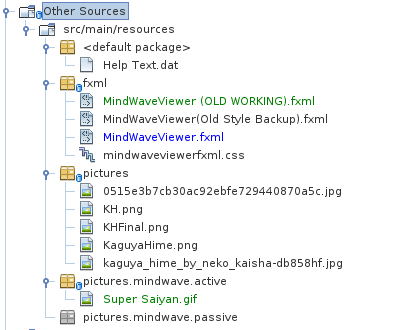
回答 2
Stack Overflow用户
发布于 2022-02-05 10:04:53
与您的方法有关
你没有一个格式良好的url
新图像(字符串url)接受一个url作为参数。
空格不是URL的有效字符:
这就是为什么您的x字符串不是有效的URL,不能用于构造图像。
您需要提供图像构造函数可识别的输入
请注意,它稍微复杂一些,因为从图像javadoc中,url参数可以是一些东西,而不是一个直接的url,但即使是这样,它们也没有一个与您试图查找的内容匹配。
如果将URL字符串传递给构造函数,则为下列任一项:
- 可由此线程的上下文ClassLoader解析的资源的名称。
- 可由文件解析的文件路径
- 可以通过URL解析并存在协议处理程序的URL。
除了为应用程序注册的协议处理程序之外,还支持URL的RFC 2397“数据”方案。如果URL使用“数据”方案,则数据必须是base64 64编码的,MIME类型必须是空的或图像类型的子类型。
假设资源位于文件系统中,但这并不总是有效的
如果您将资源打包到一个jar中,那么这将无法工作:
Arrays.asList(
    new File(
        Thread.currentThread()
            .getContextClassLoader()
            .getResource(packageName)
            .toURI()
    ).listFiles()
);这不起作用,因为jar中的文件是使用jar:协议而不是file:协议定位的。因此,您将无法从jar:协议URI创建getResource返回的文件对象。
推荐的方法:使用Spring
从jar中获取资源列表实际上是一件非常棘手的事情。从您所链接的问题来看,最简单的解决方案是使用
不幸的是,这意味着需要依赖Spring框架来使用它,这对于这个任务来说完全是多余的。。。然而,我不知道任何其他简单的健壮解决方案。但是,至少您可以调用Spring实用程序类,您不需要启动一个完整的spring依赖注入容器来使用它,所以您根本不需要知道任何Spring,也不需要为此承担任何Spring开销。
因此,您可以编写类似的内容(ResourceLister是我创建的类,以及toURL方法,参见示例应用程序):
public List<String> getResourceUrls(String locationPattern) throws IOException {
    ClassLoader classLoader = ResourceLister.class.getClassLoader();
    PathMatchingResourcePatternResolver resolver = new PathMatchingResourcePatternResolver(classLoader);

    Resource[] resources = resolver.getResources(locationPattern);

    return Arrays.stream(resources)
            .map(this::toURL)
            .filter(Objects::nonNull)
            .collect(Collectors.toList());
}
可执行示例
ResourceLister.java
import org.springframework.core.io.Resource;
import org.springframework.core.io.support.PathMatchingResourcePatternResolver;

import java.io.IOException;
import java.util.*;
import java.util.stream.Collectors;

public class ResourceLister {
    // currently, only gets pngs, if needed, can add
    // other patterns and union the results to get
    // multiple image types.
    private static final String IMAGE_PATTERN =
            "classpath:/img/*.png";

    public List<String> getImageUrls() throws IOException {
        return getResourceUrls(IMAGE_PATTERN);
    }

    public List<String> getResourceUrls(String locationPattern) throws IOException {
        ClassLoader classLoader = ResourceLister.class.getClassLoader();
        PathMatchingResourcePatternResolver resolver = new PathMatchingResourcePatternResolver(classLoader);

        Resource[] resources = resolver.getResources(locationPattern);

        return Arrays.stream(resources)
                .map(this::toURL)
                .filter(Objects::nonNull)
                .collect(Collectors.toList());
    }

    private String toURL(Resource r) {
        try {
            if (r == null) {
                return null;
            }

            return r.getURL().toExternalForm();
        } catch (IOException e) {
            return null;
        }
    }

    public static void main(String[] args) throws IOException {
        ResourceLister lister = new ResourceLister();
        System.out.println(lister.getImageUrls());
    }
}
AnimalApp.java
import javafx.application.Application;
import javafx.geometry.*;
import javafx.scene.Scene;
import javafx.scene.control.Button;
import javafx.scene.image.*;
import javafx.scene.layout.VBox;
import javafx.stage.Stage;

import java.io.IOException;
import java.util.*;
import java.util.stream.Collectors;

public class AnimalApp extends Application {
    private static final double ANIMAL_SIZE = 512;

    // remove the magic seed if you want a different random sequence all the time.
    private final Random random = new Random(42);

    private final ResourceLister resourceLister = new ResourceLister();

    private List<Image> images;

    @Override
    public void init() {
        List<String> imageUrls = findImageUrls();
        images = imageUrls.stream()
                .map(Image::new)
                .collect(Collectors.toList());
    }

    @Override
    public void start(Stage stage) {
        ImageView animalView = new ImageView();
        animalView.setFitWidth(ANIMAL_SIZE);
        animalView.setFitHeight(ANIMAL_SIZE);
        animalView.setPreserveRatio(true);

        Button findAnimalButton = new Button("Find animal");
        findAnimalButton.setOnAction(e ->
                animalView.setImage(randomImage())
        );

        VBox layout = new VBox(10,
                findAnimalButton,
                animalView
        );
        layout.setPadding(new Insets(10));
        layout.setAlignment(Pos.CENTER);

        stage.setScene(new Scene(layout));
        stage.show();
    }

    private List<String> findImageUrls() {
        try {
            return resourceLister.getImageUrls();
        } catch (IOException e) {
            e.printStackTrace();
        }

        return new ArrayList<>();
    }

    /**
     * Chooses a random image.
     *
     * Allows the next random image chosen to be the same as the previous image.
     *
     * @return a random image or null if no images were found.
     */
    private Image randomImage() {
        if (images == null || images.isEmpty()) {
            return null;
        }

        return images.get(random.nextInt(images.size()));
    }

    public static void main(String[] args) {
        launch(args);
    }
}
pom.xml
<?xml version="1.0" encoding="UTF-8"?>
<project xmlns="http://maven.apache.org/POM/4.0.0"
         xmlns:xsi="http://www.w3.org/2001/XMLSchema-instance"
         xsi:schemaLocation="http://maven.apache.org/POM/4.0.0 https://maven.apache.org/xsd/maven-4.0.0.xsd">
    <modelVersion>4.0.0</modelVersion>

    <groupId>com.example</groupId>
    <artifactId>resource-lister</artifactId>
    <version>1.0-SNAPSHOT</version>
    <name>resource-lister</name>

    <properties>
        <project.build.sourceEncoding>UTF-8</project.build.sourceEncoding>
        <junit.version>5.7.1</junit.version>
    </properties>

    <dependencies>
        <dependency>
            <groupId>org.openjfx</groupId>
            <artifactId>javafx-controls</artifactId>
            <version>17.0.2</version>
        </dependency>

        <dependency>
            <groupId>org.springframework</groupId>
            <artifactId>spring-core</artifactId>
            <version>LATEST</version>
        </dependency>
    </dependencies>

    <build>
        <plugins>
            <plugin>
                <groupId>org.apache.maven.plugins</groupId>
                <artifactId>maven-compiler-plugin</artifactId>
                <version>3.8.1</version>
                <configuration>
                    <source>17</source>
                    <target>17</target>
                </configuration>
            </plugin>
        </plugins>
    </build>
</project>
图片
放在src/main/resources/img中。
- chicken.png
- cow.png
- pig.png
- sheep.png




执行命令
为JavaFX SDK安装设置VM参数:
-p C:\dev\javafx-sdk-17.0.2\lib --add-modules javafx.controlsStack Overflow用户
发布于 2022-02-05 08:50:04
没有一种简单可靠的方法可以做到这一点。因此,我创建一个库存文件并将其放入我的资源文件夹。因此,在运行时,我可以读取它,然后使我所需要的所有文件名都可以使用。
下面是一个小小的测试,展示了我如何创建该文件:
public class ListAppDefaultsInventory {

    @Test
    public void test() throws IOException {
        List<String> inventory = listFilteredFiles("src/main/resources/app-defaults", Integer.MAX_VALUE);
        assertFalse("Directory 'app-defaults' is empty.", inventory.isEmpty());
        System.out.println("# src/main/resources/app-defaults-inventory.txt");
        inventory.forEach(s -> System.out.println(s));
    }

    public List<String> listFilteredFiles(String dir, int depth) throws IOException {
        try (Stream<Path> stream = Files.walk(Paths.get(dir), depth)) {
            return stream
                .filter(file -> !Files.isDirectory(file))
                .filter(file -> !file.getFileName().toString().startsWith("."))
                .map(Path::toString)
                .map(s -> s.replaceFirst("src/main/resources/app-defaults/", ""))
                .collect(Collectors.toList());
        }
    }

}https://stackoverflow.com/questions/70995461
复制相似问题
腾讯云开发者

Copyright © 2013 - 2026 Tencent Cloud. All Rights Reserved. 腾讯云 版权所有
深圳市腾讯计算机系统有限公司 ICP备案/许可证号:粤B2-20090059  粤公网安备44030502008569号
腾讯云计算(北京)有限责任公司 京ICP证150476号 | 京ICP备11018762号