
有更好的办法吗?可扩展行
有更好的办法吗?可扩展行
提问于 2022-02-03 11:31:05
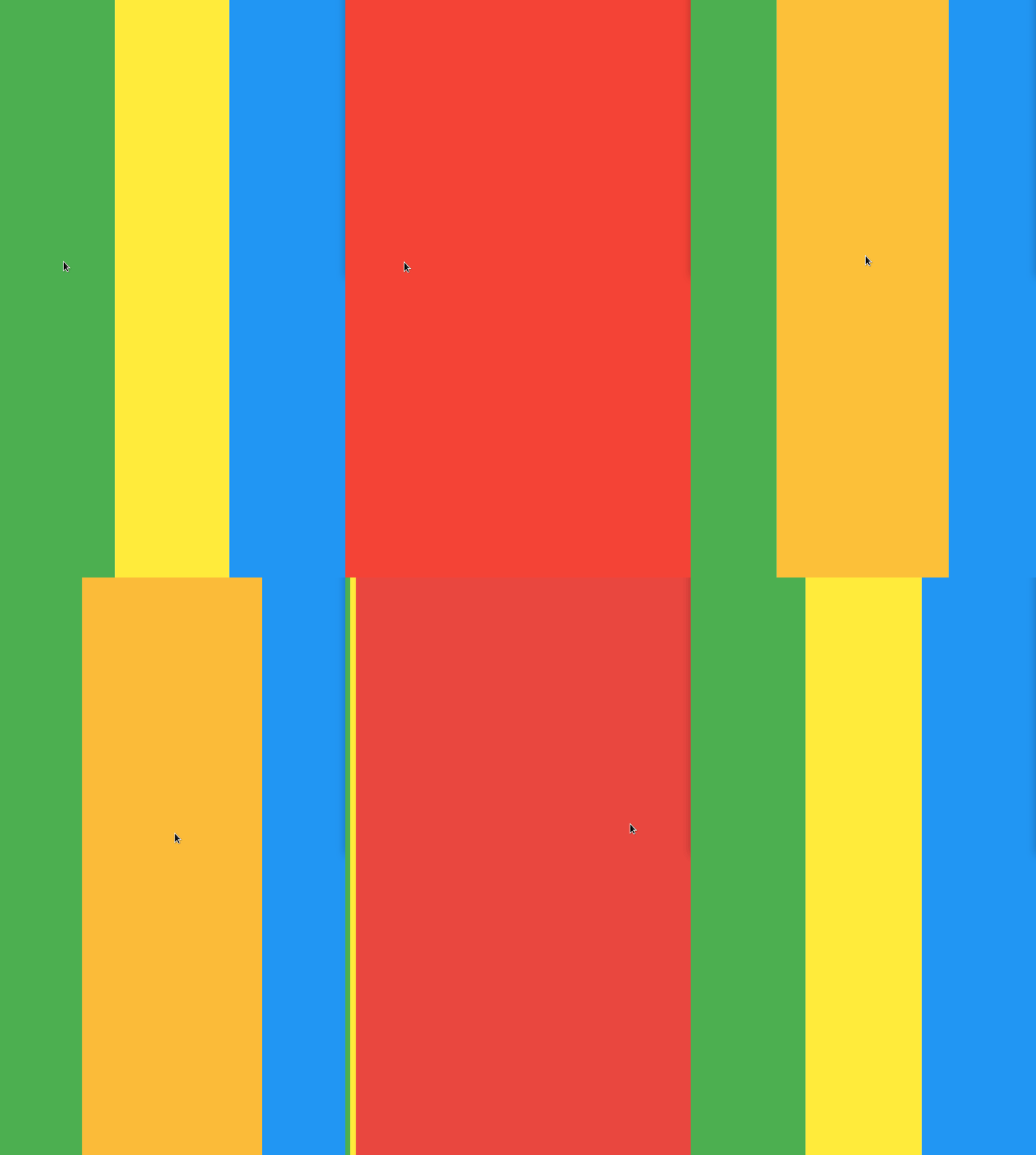
你好。我在这个问题上被困了一段时间,但是我用下面的代码实现了gif中显示的内容:
class _EntitiesState extends State<Entities> {
  bool selected = false;
  bool selected2 = false;
  bool selected3 = false;

  var xwidth = 1;

  final activeColor = Colors.red;

  var flex1 = 1;
  var flex2 = 1;
  var flex3 = 1;

  @override
  Widget build(BuildContext context) {
    return Row(
      children: [
        Expanded(
          flex: flex1,
          child: GestureDetector(
            onTap: () => {
              setState(() {
                flex1 = 0;
                flex2 = 1;
                flex3 = 1;
                selected3 = !selected3;
              })
            },
            child: AnimatedContainer(
              color: selected3 ? activeColor : Colors.green,
              width: MediaQuery.of(context).size.width *
                  (selected3 ? xwidth : 0.33),
              duration: const Duration(seconds: 1),
              child: Container(),
            ),
          ),
        ),
        Expanded(
          flex: flex2,
          child: GestureDetector(
            onTap: () => {
              setState(() {
                flex1 = 1;
                flex2 = 0;
                flex3 = 1;
                selected2 = !selected2;
              })
            },
            child: AnimatedContainer(
              color: selected2 ? activeColor : Colors.yellow,
              width: MediaQuery.of(context).size.width *
                  (selected2 ? xwidth : 0.33),
              duration: const Duration(seconds: 1),
              child: Container(),
            ),
          ),
        ),
        Expanded(
          flex: flex3,
          child: GestureDetector(
            onTap: () => {
              setState(() {
                flex1 = 1;
                flex2 = 1;
                flex3 = 0;
                selected = !selected;
              })
            },
            child: AnimatedContainer(
              color: selected ? activeColor : Colors.blue,
              width: MediaQuery.of(context).size.width *
                  (selected ? xwidth : 0.33),
              duration: const Duration(seconds: 1),
              child: Container(),
            ),
          ),
        ),
      ],
    );
  }
}
我有个问题。有没有更好、更优雅的方法来做这件事?也许有一个合适的颤振元素可以做到这一点?我的解决方案有点原始,在许多可扩展的行中不能很好地工作。
回答 1
Stack Overflow用户
回答已采纳
发布于 2022-02-03 13:57:47
可以使用可空的selectedIndex,int? selectedIndex;对其进行简化。
Container的颜色和width逻辑将是
color: selectedIndex == null && selectedIndex == index
    ? Colors.red
    : colors[index],
width: selectedIndex == null
    ? constraints.maxWidth / totalItem
    : selectedIndex == index
        ? constraints.maxWidth
        : 0,
而索引选择逻辑将是
onTap: () {
  selectedIndex == null
      ? selectedIndex = index
      : selectedIndex = null;
  setState(() {});
},在dartPad上运行
class Entities extends StatefulWidget {
  const Entities({Key? key}) : super(key: key);

  @override
  State<Entities> createState() => _EntitiesState();
}

class _EntitiesState extends State<Entities> {
  int? selectedIndex;
  int totalItem = 3;
  late List<Color> colors;

  @override
  void initState() {
    colors = List.generate(
        totalItem,
        (index) =>
            Color((Random().nextDouble() * 0xFFFFFF).toInt()).withOpacity(1.0));
    super.initState();
  }

  @override
  Widget build(BuildContext context) {
    return LayoutBuilder(
      builder: (context, constraints) => Row(
        children: List.generate(
          totalItem,
          (index) => GestureDetector(
            onTap: () {
              selectedIndex == null
                  ? selectedIndex = index
                  : selectedIndex = null;
              setState(() {});
            },
            child: AnimatedContainer(
              key: ValueKey(index),
              height: constraints.maxHeight,
              color: selectedIndex == null && selectedIndex == index
                  ? Colors.red
                  : colors[index],
              width: selectedIndex == null
                  ? constraints.maxWidth / totalItem
                  : selectedIndex == index
                      ? constraints.maxWidth
                      : 0,
              duration: const Duration(seconds: 1),
              alignment: Alignment.center,
              child: Text("$index"),
            ),
          ),
        ),
      ),
    );
  }
}页面原文内容由Stack Overflow提供。腾讯云小微IT领域专用引擎提供翻译支持
原文链接:
https://stackoverflow.com/questions/70970534
复制相关文章
相似问题
腾讯云开发者

Copyright © 2013 - 2026 Tencent Cloud. All Rights Reserved. 腾讯云 版权所有
深圳市腾讯计算机系统有限公司 ICP备案/许可证号:粤B2-20090059  粤公网安备44030502008569号
腾讯云计算(北京)有限责任公司 京ICP证150476号 | 京ICP备11018762号