
如何使用纯Javascript在harp中挤出geojson多边形?
我们正在试验harp,以取代geojson的自定义构建工具。我想用挤压多边形技术来可视化我的多边形。来自MapBox GL,我能够在自己的geojson feature.properties上拥有两个属性,称为高度和基础高度。所以我有一些用于测试的GeoJson。我似乎不能让挤压的多边形出现。我正在使用https://unpkg.com/@@here/harp.gl/dist/harp.js源代码用Javascript编写这篇文章。我能在地图上渲染点。只是不是这些多边形。(暂时别管墙壁,我想先看看地板)
我想要达到的目标(在MapBox中是这样的):
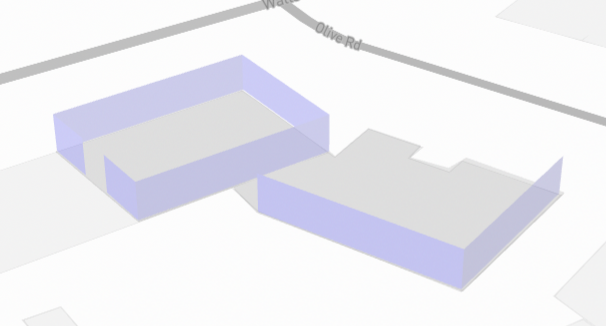
重新分配建筑物数据的功能:
    resetBuildings: function (data) {
        const dataProvider = new harp.GeoJsonDataProvider("buildings", data);
        var geoJsonBuildingDataSource;
        if (this.mapView.getDataSourceByName("buildings") == null) {
            geoJsonBuildingDataSource = new harp.VectorTileDataSource({
                dataProvider,
                name: "buildings",
                styleSetName: "geojson",
            });
            this.mapView.addDataSource(geoJsonBuildingDataSource);
        }
        else { geoJsonBuildingDataSource = this.mapView.getDataSourceByName("buildings") }
        const theme = {
            styles: {
                geojson: this.getStyleSet()
            },
        };
        geoJsonBuildingDataSource.setTheme(theme);
我的StyleSet定义(?):
    getStyleSet: function(){
        return [
            {
                when: ["==", ["geometry-type"], "Polygon"],
                technique: "extruded",
                renderOrder: 1000,
                constantHeight: true,
                color: "#FF0000",
                transparent: false,
                opacity: 0.8,
                lineWidth: 1,
                lineColor: "#003344",
                height: ["number", ["get", "base_height"], 10],
                floorHeight: ["number", ["get", "base_height"], 0]
            }
        ];
}我的测试GeoJson:{"type":"FeatureCollection","features":[{"id":"6223a3f0-2835-4ad8-8456-3ccbefc0d19c","type":"Feature","properties":{"level":1,"name":"base","height":0.2,"base_height":0,"color":"grey","message":"","coordinates":null},"geometry":{"type":"Polygon","coordinates":[[[174.81047388530345,-36.909499151794726],[174.81050337403076,-36.90965937993286],[174.8107788255581,-36.909634193592254],[174.8107567090126,-36.9094734295196],[174.81047388530345,-36.909499151794726]]]}},{"id":"a0583d91-f038-4d6e-8e32-99db806982bc","type":"Feature","properties":{"level":0,"name":"Wall","height":5,"base_height":0.2,"color":"blue","message":"","coordinates":null},"geometry":{"type":"LineString","coordinates":[[174.8104752256997,-36.909499687675165],[174.81075804940883,-36.90947396540121],[174.81078083615245,-36.90963526535126],[174.81050337403076,-36.909658844053574],[174.81049399125453,-36.909598825525144],[174.81050337403076,-36.909658844053574],[174.81078083615245,-36.90963526535126],[174.81075804940883,-36.90947396540121],[174.8104752256997,-36.909499687675165]]}},{"id":"ec219095-8891-440b-9fea-2db9cf74c7e0","type":"Feature","properties":{"level":0,"name":"Wall","height":5,"base_height":0.2,"color":"blue","message":"","coordinates":null},"geometry":{"type":"LineString","coordinates":[[174.8104752256997,-36.90950022355558],[174.81048594887454,-36.909558634520565],[174.8104752256997,-36.90950022355558]]}},{"id":"628a2754-c1b6-43a4-975b-eb45084d3853","type":"Feature","properties":{"level":1,"name":"base","height":0.2,"base_height":0,"color":"grey","message":"","coordinates":null},"geometry":{"type":"Polygon","coordinates":[[[174.8106367829821,-36.909648805405354],[174.81078191913713,-36.90963279956284],[174.81078129891483,-36.909646601064004],[174.81085540198825,-36.90961396183521],[174.81089173813234,-36.90967024159831],[174.81086324249378,-36.90968392941179],[174.8108926788683,-36.909721493301554],[174.8109264286474,-36.90971335389515],[174.81098518665493,-36.909814312925626],[174.81076392360183,-36.90990054860199],[174.81063578104482,-36.90969921056885],[174.8106354709525,-36.909651008673336],[174.8106367829821,-36.909648805405354]]]}},{"id":"d5a1c90d-295e-463b-9530-7643e411ca38","type":"Feature","properties":{"level":0,"name":"Wall","height":5,"base_height":0.2,"color":"blue","message":"","coordinates":null},"geometry":{"type":"LineString","coordinates":[[174.81063687126533,-36.909700434854784],[174.81076318373476,-36.90989889886059],[174.8109779359279,-36.90981381148965],[174.81076318373476,-36.90989889886059],[174.81063687126533,-36.909700434854784]]}}]}
提前谢谢你!
回答 1
Stack Overflow用户
发布于 2022-02-04 01:33:01
我想通了。我使用了错误的数据源。我需要使用FeaturesDataSource。我的样式集定义也是错误的,我没有将其设置为地图主题。
我现在如何初始化地图:
        this.styleSet = this.getStyleSet();
        hereMapsHelper.geoJsonObj = JSON.parse(GeoJson);
        const canvas = document.getElementById(mapContainerId);
        var options = {
            canvas,
            theme: {
                extends: "https://unpkg.com/@here/harp-map-theme@latest/resources/berlin_tilezen_base.json",
                styles: {
                    geojson: this.styleSet,
                }
            }
        }
        var map = new harp.MapView(options);
建筑物的功能:
    resetBuildings: function (data) {
        var geoJsonBuildingDataSource;
        if (this.mapView.getDataSourceByName("buildings") != null) {
            var existingBuildingDataSource = this.mapView.getDataSourceByName("buildings")
            this.mapView.removeDataSource(existingBuildingDataSource);
        }
        geoJsonBuildingDataSource = new harp.FeaturesDataSource({
            geojson: data,
            name: "buildings",
            styleSetName: "geojson",
            maxGeometryHeight: 30000
        });
        this.mapView.addDataSource(geoJsonBuildingDataSource);
    },
函数定义样式集:
    getStyleSet: function () {
        const color = new THREE.Color("blue");
        const colorString = "#" + color.getHexString();
        return [
            {
                description: "geoJson property-based style",
                when: ["==", ["geometry-type"], "Polygon"],
                technique: "extruded-polygon",
                renderOrder: 1000,
                height: ["number", ["get", "base_height"], 10],
                floorHeight: ["number", ["get", "base_height"], 0],
                attr: {
                    color: colorString,
                    transparent: true,
                    opacity: 0.8,
                    boundaryWalls: false,
                    constantHeight: true,
                    lineWidth: 1,
                    lineColor: "#003344",
                    emissive: colorString,
                    emissiveIntensity: 0.45
                },
            },
            {
                description: "geoJson property-based style",
                when: ["==", ["geometry-type"], "Point"],
                technique: "circles",
                renderOrder: 2000,
                color: "#00FF00",
                size: 15,
            }
        ];
    },
这只是渲染地板,因为我还没有定义的风格,为墙壁。但它的进步!
https://stackoverflow.com/questions/70964659
复制相似问题
腾讯云开发者

Copyright © 2013 - 2026 Tencent Cloud. All Rights Reserved. 腾讯云 版权所有
深圳市腾讯计算机系统有限公司 ICP备案/许可证号:粤B2-20090059  粤公网安备44030502008569号
腾讯云计算(北京)有限责任公司 京ICP证150476号 | 京ICP备11018762号