
rmarkdown powerpoint:在一张幻灯片上有两个可选
rmarkdown powerpoint:在一张幻灯片上有两个可选
提问于 2022-02-02 16:53:24
在本例中,每个kable都是在一张幻灯片上生成的,尽管幻灯片足够大,可以容纳2。
---
title: "Untitled"
author: ""
date: "2/2/2022"
output: powerpoint_presentation
---

```{r setup, include=FALSE}
knitr::opts_chunk$set(echo = FALSE,message = FALSE,warning = FALSE,fig.height=5,fig.width=10)
## Slide with R Output

```{r}
针织品::kable(头(小车),2)
```{r}针织品::kable(头(小车),2)
给出输出:
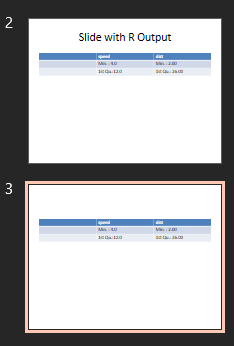
如何使两个kable在一个幻灯片上一个接一个。
回答 1
Stack Overflow用户
发布于 2022-02-02 17:48:36
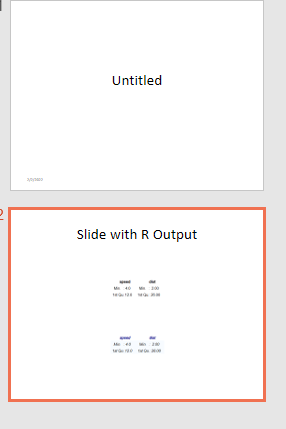
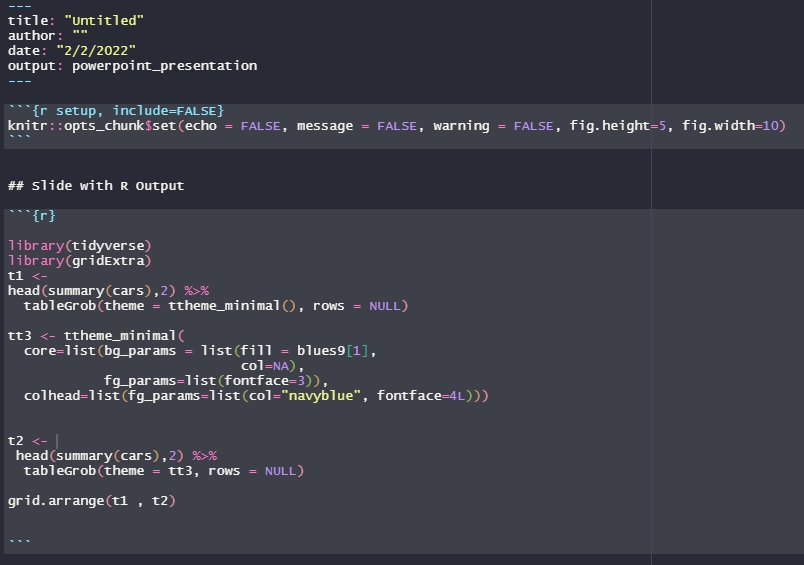
您可以使用gridExtra包https://cran.r-project.org/web/packages/gridExtra/vignettes/tableGrob.html文档提供了有关控制格式设置的其他详细信息。我举了一个例子来说明。
library(tidyverse)
library(gridExtra)
t1 <-
head(summary(cars),2) %>%
  tableGrob(theme = ttheme_minimal(), rows = NULL)

tt3 <- ttheme_minimal(
  core=list(bg_params = list(fill = blues9[1],
                             col=NA),
            fg_params=list(fontface=3)),
  colhead=list(fg_params=list(col="navyblue", fontface=4L)))


t2 <-
 head(summary(cars),2) %>%
  tableGrob(theme = tt3, rows = NULL)

grid.arrange(t1 , t2)
页面原文内容由Stack Overflow提供。腾讯云小微IT领域专用引擎提供翻译支持
原文链接:
https://stackoverflow.com/questions/70959604
复制相关文章
相似问题
腾讯云开发者

Copyright © 2013 - 2026 Tencent Cloud. All Rights Reserved. 腾讯云 版权所有
深圳市腾讯计算机系统有限公司 ICP备案/许可证号:粤B2-20090059  粤公网安备44030502008569号
腾讯云计算(北京)有限责任公司 京ICP证150476号 | 京ICP备11018762号