
反流边不可见
反流边不可见
提问于 2022-02-02 13:33:37
我在我的existig项目中安装了react-flow,按照这里的说明,https://reactflow.dev/在这里列出了package.json内容;
"dependencies": {
    "@types/humanize-duration": "^3.18.1",
    "@types/jest": "^26.0.14",
    "@types/js-base64": "^3.0.0",
    "@types/js-cookie": "^2.2.6",
    "@types/lodash": "^4.14.162",
    "@types/react": "^16.9.53",
    "@types/react-dom": "^16.9.8",
    "@types/react-modal": "1.6.8",
    "@types/react-select": "3.0.22",
    "ansi-to-react": "^5.1.1",
    "humanize-duration": "^3.24.0",
    "js-base64": "^2.6.4",
    "js-cookie": "^2.2.1",
    "lodash": "^4.17.19",
    "protobufjs": "^6.10.2",
    "react": "^16.14.0",
    "react-dom": "^16.14.0",
    "react-flow-renderer": "^9.7.2",
    "react-modal": "^3.11.2",
    "react-scripts": "^3.4.3",
    "react-select": "^3.1.0",
    "react-swipeable": "^5.5.1",
    "react-switch": "^5.0.1",
    "sass": "^1.43.4",
    "swagger-parser": "^7.0.1",
    "typescript": "4.0.3",
    "xterm": "^3.14.5",
    "yaml": "^1.10.0"
  },
所有渲染完美罚款,但边缘是不可见的(即使我可以看到svg路径在铬检查器);
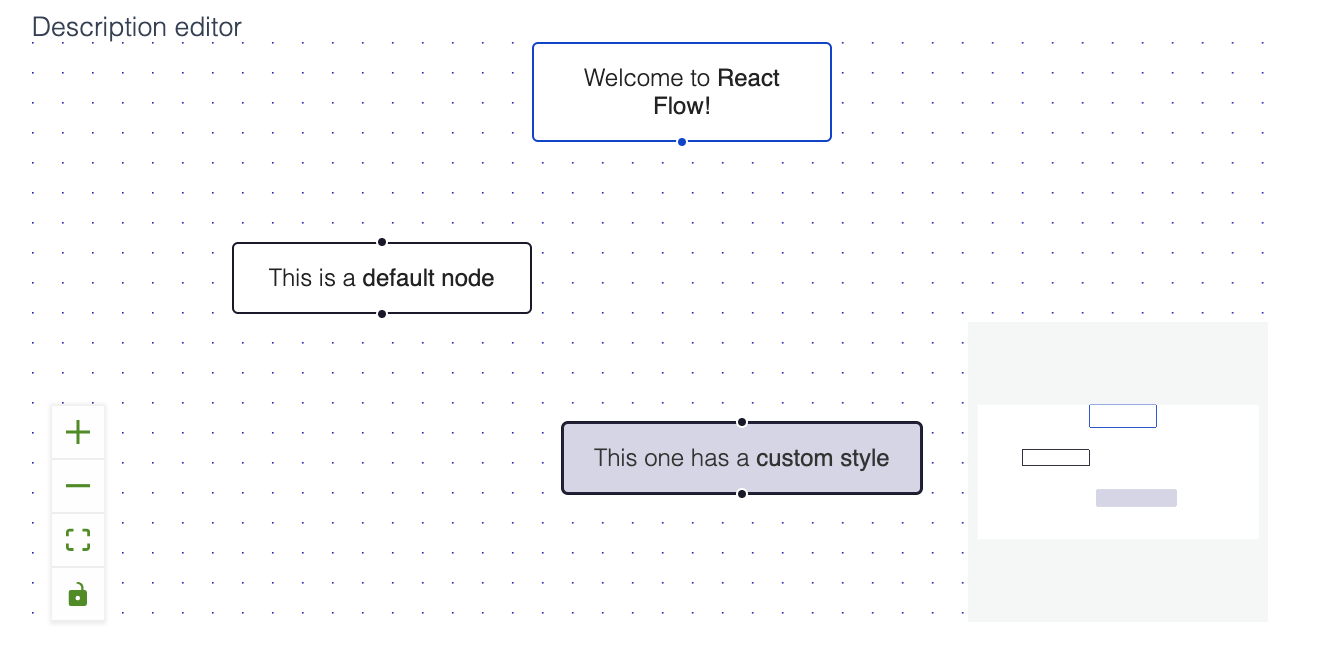
我的组件代码在这里呈现ReactFlow组件
import React, { Component } from 'react';

import ReactFlow, {
  removeElements, addEdge,
  ReactFlowProvider,
  MiniMap,
  Controls,
  Background,
} from 'react-flow-renderer';

type Props = {

}

type State = {
  filter: string;
  elements: any[];
}

export default class Editor extends Component<Props, State> {

  state: State = {
    filter: '',
    elements: [
      {
        id: '1',
        type: 'input',
        data: {
          label: (
            <>
              Welcome to <strong>React Flow!</strong>
            </>
          ),
        },
        position: { x: 250, y: 0 },
      },
      {
        id: '2',
        data: {
          label: (
            <>
              This is a <strong>default node</strong>
            </>
          ),
        },
        position: { x: 100, y: 100 },
      },
      {
        id: '3',
        data: {
          label: (
            <>
              This one has a <strong>custom style</strong>
            </>
          ),
        },
        position: { x: 400, y: 100 },
        style: {
          background: '#D6D5E6',
          color: '#333',
          border: '1px solid #222138',
          width: 180,
        },
      },
      { id: 'e1-2', source: '1', target: '2', label: 'this is an edge label',arrowHeadType: 'arrowclosed', animated: true, type: 'smoothstep' },
      // { id: 'e1-3', source: '1', target: '3', labelStyle: { fill: '#f6ab6c', fontWeight: 700 },style: { zIndex:999, stroke: "red", strokeWidth: 30, cursor: "pointer" } }
    ]
  };

  onElementRemove(elem: any) {
    console.log(elem);
  }

  onConnect(params:any, comp:any){
    console.log(params);
    addEdge(params, comp)
  }

  onClick(ev:any, el:any, elem:any) {
      console.log(el);
    }

    onLoad(){
      console.log('loaded')
    }
    onNodeStrokeColor(n:any){
      if (n.style?.background) return n.style.background;
      if (n.type === 'input') return '#0041d0';
      if (n.type === 'output') return '#ff0072';
      if (n.type === 'default') return '#1a192b';

      return '#eee';
    }
    onNodeColor(n:any){
      if (n.style?.background) return n.style.background;
      return '#fff';
    }

  render() {
    const { elements, filter } = this.state;

    return (
      <div style={{ height: 300 }}>
        <ReactFlow elements={elements}
        onElementsRemove={x=>this.onElementRemove(x)}
        onConnect={params => this.onConnect(params, elements)}
        onElementClick={(ev, el) =>this.onClick(ev, el, elements)}
        onlyRenderVisibleElements={false}
        deleteKeyCode={46}
        onLoad={this.onLoad}
        snapToGrid={true}
        snapGrid={[15, 15]}
        >
          <MiniMap style={{ width: 150, height:150 }}
            nodeStrokeColor={n => this.onNodeStrokeColor(n)}
            nodeColor={n => this.onNodeColor(n)}
            nodeBorderRadius={2}
      />
      <Controls />
      <Background color="#00a" gap={15} />
          </ReactFlow>
      </div>
    );
  }
}
任何帮助都将不胜感激!
回答 1
Stack Overflow用户
发布于 2022-02-13 10:07:12
我发现了这个问题,结果发现我有一个scss文件,它覆盖了SVG风格的反作用流呈现器。
svg {
    ...
    width: 25px;
    height: 25px;
}页面原文内容由Stack Overflow提供。腾讯云小微IT领域专用引擎提供翻译支持
原文链接:
https://stackoverflow.com/questions/70956567
复制相关文章
相似问题
腾讯云开发者

Copyright © 2013 - 2026 Tencent Cloud. All Rights Reserved. 腾讯云 版权所有
深圳市腾讯计算机系统有限公司 ICP备案/许可证号:粤B2-20090059  粤公网安备44030502008569号
腾讯云计算(北京)有限责任公司 京ICP证150476号 | 京ICP备11018762号