
火花连接方式在气流中不显示
火花连接方式在气流中不显示
提问于 2022-01-31 08:38:34
我有一个码头-撰写文件,在其中定义的服务气流,火花,postgreSQL和雷迪斯。当我执行对接-撰写和打开气流UI,我尝试添加一个火花连接类型,以便我可以运行火花作业内部气流在码头。但是,正如您可以看到的那样,Spark作为连接类型不可见:
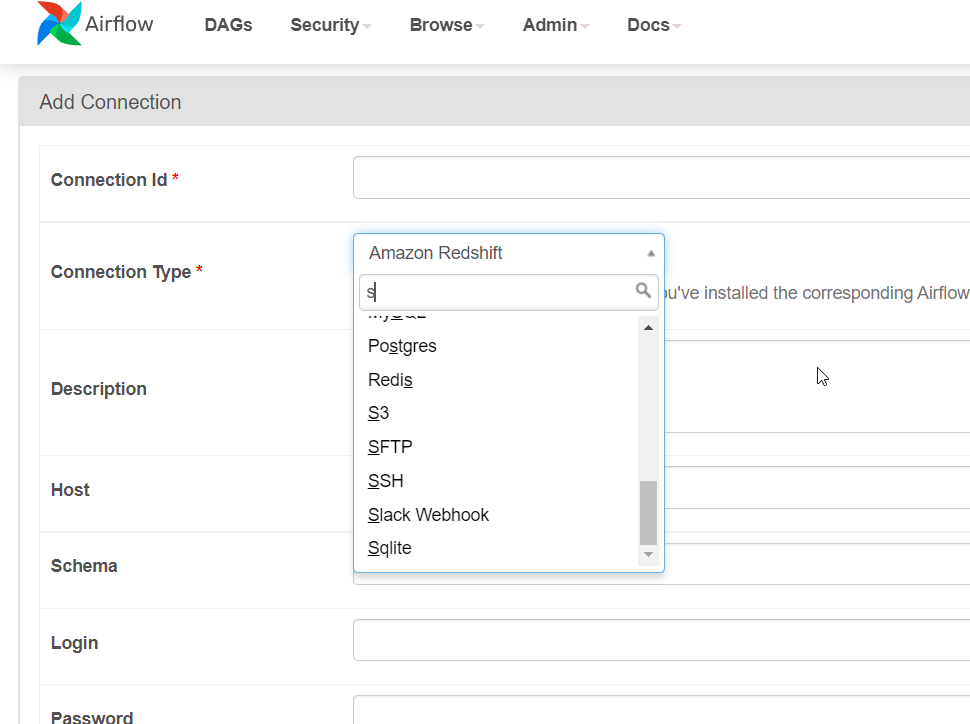
这是我的停靠-撰写文件:
# Feel free to modify this file to suit your needs.
---
version: '3'
x-airflow-common:
  &airflow-common
  # In order to add custom dependencies or upgrade provider packages you can use your extended image.
  # Comment the image line, place your Dockerfile in the directory where you placed the docker-compose.yaml
  # and uncomment the "build" line below, Then run `docker-compose build` to build the images.
  image: ${AIRFLOW_IMAGE_NAME:-apache/airflow:2.2.3}
  # build: .
  environment:
    &airflow-common-env
    AIRFLOW__CORE__EXECUTOR: CeleryExecutor
    AIRFLOW__CORE__SQL_ALCHEMY_CONN: postgresql+psycopg2://airflow:airflow@postgres/airflow
    AIRFLOW__CELERY__RESULT_BACKEND: db+postgresql://airflow:airflow@postgres/airflow
    AIRFLOW__CELERY__BROKER_URL: redis://:@redis:6379/0
    AIRFLOW__CORE__FERNET_KEY: ''
    AIRFLOW__CORE__DAGS_ARE_PAUSED_AT_CREATION: 'true'
    AIRFLOW__CORE__LOAD_EXAMPLES: 'false'
    AIRFLOW__API__AUTH_BACKEND: 'airflow.api.auth.backend.basic_auth'
    ADDITIONAL_AIRFLOW_EXTRAS: apache.spark
    _PIP_ADDITIONAL_REQUIREMENTS: ${_PIP_ADDITIONAL_REQUIREMENTS:-}
  volumes:
    - ./dags:/opt/airflow/dags
    - ./logs:/opt/airflow/logs
    - ./plugins:/opt/airflow/plugins
  user: "${AIRFLOW_UID:-50000}:0"
  depends_on:
    &airflow-common-depends-on
    redis:
      condition: service_healthy
    postgres:
      condition: service_healthy

services:
  postgres:
    image: postgres:13
    environment:
      POSTGRES_USER: airflow
      POSTGRES_PASSWORD: airflow
      POSTGRES_DB: airflow
    volumes:
      - postgres-db-volume:/var/lib/postgresql/data
    healthcheck:
      test: ["CMD", "pg_isready", "-U", "airflow"]
      interval: 5s
      retries: 5
    restart: always

  redis:
    image: redis:latest
    expose:
      - 6379
    healthcheck:
      test: ["CMD", "redis-cli", "ping"]
      interval: 5s
      timeout: 30s
      retries: 50
    restart: always

  airflow-webserver:
    <<: *airflow-common
    command: webserver
    ports:
      - '8282:8080'
    healthcheck:
      test: ["CMD", "curl", "--fail", "http://localhost:8080/health"]
      interval: 10s
      timeout: 10s
      retries: 5
    restart: always
    depends_on:
      <<: *airflow-common-depends-on
      airflow-init:
        condition: service_completed_successfully

  airflow-scheduler:
    <<: *airflow-common
    command: scheduler
    healthcheck:
      test: ["CMD-SHELL", 'airflow jobs check --job-type SchedulerJob --hostname "$${HOSTNAME}"']
      interval: 10s
      timeout: 10s
      retries: 5
    restart: always
    depends_on:
      <<: *airflow-common-depends-on
      airflow-init:
        condition: service_completed_successfully

  airflow-worker:
    <<: *airflow-common
    command: celery worker
    healthcheck:
      test:
        - "CMD-SHELL"
        - 'celery --app airflow.executors.celery_executor.app inspect ping -d "celery@$${HOSTNAME}"'
      interval: 10s
      timeout: 10s
      retries: 5
    environment:
      <<: *airflow-common-env
      # Required to handle warm shutdown of the celery workers properly
      # See https://airflow.apache.org/docs/docker-stack/entrypoint.html#signal-propagation
      DUMB_INIT_SETSID: "0"
    restart: always
    depends_on:
      <<: *airflow-common-depends-on
      airflow-init:
        condition: service_completed_successfully

  airflow-triggerer:
    <<: *airflow-common
    command: triggerer
    healthcheck:
      test: ["CMD-SHELL", 'airflow jobs check --job-type TriggererJob --hostname "$${HOSTNAME}"']
      interval: 10s
      timeout: 10s
      retries: 5
    restart: always
    depends_on:
      <<: *airflow-common-depends-on
      airflow-init:
        condition: service_completed_successfully

  airflow-init:
    <<: *airflow-common
    entrypoint: /bin/bash
    # yamllint disable rule:line-length
    command:
      - -c
      - |
        function ver() {
          printf "%04d%04d%04d%04d" $${1//./ }
        }
        airflow_version=$$(gosu airflow airflow version)
        airflow_version_comparable=$$(ver $${airflow_version})
        min_airflow_version=2.2.0
        min_airflow_version_comparable=$$(ver $${min_airflow_version})
        if (( airflow_version_comparable < min_airflow_version_comparable )); then
          echo
          echo -e "\033[1;31mERROR!!!: Too old Airflow version $${airflow_version}!\e[0m"
          echo "The minimum Airflow version supported: $${min_airflow_version}. Only use this or higher!"
          echo
          exit 1
        fi
        if [[ -z "${AIRFLOW_UID}" ]]; then
          echo
          echo -e "\033[1;33mWARNING!!!: AIRFLOW_UID not set!\e[0m"
          echo "If you are on Linux, you SHOULD follow the instructions below to set "
          echo "AIRFLOW_UID environment variable, otherwise files will be owned by root."
          echo "For other operating systems you can get rid of the warning with manually created .env file:"
          echo "    See: https://airflow.apache.org/docs/apache-airflow/stable/start/docker.html#setting-the-right-airflow-user"
          echo
        fi
        one_meg=1048576
        mem_available=$$(($$(getconf _PHYS_PAGES) * $$(getconf PAGE_SIZE) / one_meg))
        cpus_available=$$(grep -cE 'cpu[0-9]+' /proc/stat)
        disk_available=$$(df / | tail -1 | awk '{print $$4}')
        warning_resources="false"
        if (( mem_available < 4000 )) ; then
          echo
          echo -e "\033[1;33mWARNING!!!: Not enough memory available for Docker.\e[0m"
          echo "At least 4GB of memory required. You have $$(numfmt --to iec $$((mem_available * one_meg)))"
          echo
          warning_resources="true"
        fi
        if (( cpus_available < 2 )); then
          echo
          echo -e "\033[1;33mWARNING!!!: Not enough CPUS available for Docker.\e[0m"
          echo "At least 2 CPUs recommended. You have $${cpus_available}"
          echo
          warning_resources="true"
        fi
        if (( disk_available < one_meg * 10 )); then
          echo
          echo -e "\033[1;33mWARNING!!!: Not enough Disk space available for Docker.\e[0m"
          echo "At least 10 GBs recommended. You have $$(numfmt --to iec $$((disk_available * 1024 )))"
          echo
          warning_resources="true"
        fi
        if [[ $${warning_resources} == "true" ]]; then
          echo
          echo -e "\033[1;33mWARNING!!!: You have not enough resources to run Airflow (see above)!\e[0m"
          echo "Please follow the instructions to increase amount of resources available:"
          echo "   https://airflow.apache.org/docs/apache-airflow/stable/start/docker.html#before-you-begin"
          echo
        fi
        mkdir -p /sources/logs /sources/dags /sources/plugins
        chown -R "${AIRFLOW_UID}:0" /sources/{logs,dags,plugins}
        exec /entrypoint airflow version
    # yamllint enable rule:line-length
    environment:
      <<: *airflow-common-env
      _AIRFLOW_DB_UPGRADE: 'true'
      _AIRFLOW_WWW_USER_CREATE: 'true'
      _AIRFLOW_WWW_USER_USERNAME: ${_AIRFLOW_WWW_USER_USERNAME:-airflow}
      _AIRFLOW_WWW_USER_PASSWORD: ${_AIRFLOW_WWW_USER_PASSWORD:-airflow}
    user: "0:0"
    volumes:
      - .:/sources

  airflow-cli:
    <<: *airflow-common
    profiles:
      - debug
    environment:
      <<: *airflow-common-env
      CONNECTION_CHECK_MAX_COUNT: "0"
    # Workaround for entrypoint issue. See: https://github.com/apache/airflow/issues/16252
    command:
      - bash
      - -c
      - airflow

  flower:
    <<: *airflow-common
    command: celery flower
    ports:
      - 5555:5555
    healthcheck:
      test: ["CMD", "curl", "--fail", "http://localhost:5555/"]
      interval: 10s
      timeout: 10s
      retries: 5
    restart: always
    depends_on:
      <<: *airflow-common-depends-on
      airflow-init:
        condition: service_completed_successfully

  spark:
    image: docker.io/bitnami/spark:3
    environment:
      - SPARK_MODE=master
      - SPARK_RPC_AUTHENTICATION_ENABLED=no
      - SPARK_RPC_ENCRYPTION_ENABLED=no
      - SPARK_LOCAL_STORAGE_ENCRYPTION_ENABLED=no
      - SPARK_SSL_ENABLED=no
    ports:
      - '8080:8080'
    volumes:
      - ./spark-apps:/opt/spark-apps
  spark-worker:
    image: docker.io/bitnami/spark:3
    environment:
      - SPARK_MODE=worker
      - SPARK_MASTER_URL=spark://spark:7077
      - SPARK_WORKER_MEMORY=1G
      - SPARK_WORKER_CORES=1
      - SPARK_RPC_AUTHENTICATION_ENABLED=no
      - SPARK_RPC_ENCRYPTION_ENABLED=no
      - SPARK_LOCAL_STORAGE_ENCRYPTION_ENABLED=no
      - SPARK_SSL_ENABLED=no
    ports:
    - '8081:8081'

volumes:
postgres-db-volume:回答 1
Stack Overflow用户
发布于 2022-10-11 09:21:25
我也有过类似的经验,尝试在Docker上建立一个带有气流的Databricks连接,并设法通过添加Dockerfile来解决这个问题--同样的方法也适用于添加Spark提供者。
在网上进行了相当多的挖掘,但是在&airflow_common下面的docker-复合文件中的注释中的面包屑让我找到了这份文件。
我正在使用Docker桌面版本4.12.0和VS代码版本1.62.3作为参考。
步骤:
- 在保存
docker-compose.yaml模板的同一个目录中,您需要添加另一个简单名为Dockerfile的文件(即没有文件扩展名)。 - 在保存之前,打开Dockerfile并添加以下代码行(根据需要更改气流和火花版本)
FROM apache/airflow:2.3.0
RUN pip install --no-cache-dir apache-airflow-providers-apache-spark==2.1.3- 打开
docker-compose.yaml文件,注释掉image行,取消注释下面的build行:
# image: ${AIRFLOW_IMAGE_NAME:-apache/airflow:2.2.3}
build: .- 保存了docker-组合文件之后,首先需要使用下面的bash命令构建映像:
docker-compose build- 如果上面的命令执行时没有错误,那么您就可以使用以下内容旋转您的气流实例,包括新添加的提供程序:
docker-compose up -d一旦Docker完成了对气流实例的初始化和web服务器的启动,您就应该看到Spark在Providers页面下列出,并在UI中的连接类型下拉式下找到:
看哪!希望这解决了这个问题,为您和其他任何人遇到问题时,与气流供应商运行码头。
页面原文内容由Stack Overflow提供。腾讯云小微IT领域专用引擎提供翻译支持
原文链接:
https://stackoverflow.com/questions/70923132
复制相关文章
相似问题
腾讯云开发者

Copyright © 2013 - 2026 Tencent Cloud. All Rights Reserved. 腾讯云 版权所有
深圳市腾讯计算机系统有限公司 ICP备案/许可证号:粤B2-20090059  粤公网安备44030502008569号
腾讯云计算(北京)有限责任公司 京ICP证150476号 | 京ICP备11018762号