
如何创建一个灵活的数据分层表?
在处理数据时,对我来说,所有的道路都会导致“分层表”,因此人们可以感觉到数据的分散性。可视化既包括数字表,也包括图表。
有人能推荐一种灵活的方法来生成分层表吗?我的意思是用户可以在哪里输入分层参数?在下面的代码中,我给出了一个示例数据框架,以及我希望用户最终能够切割(分层)数据的方式。
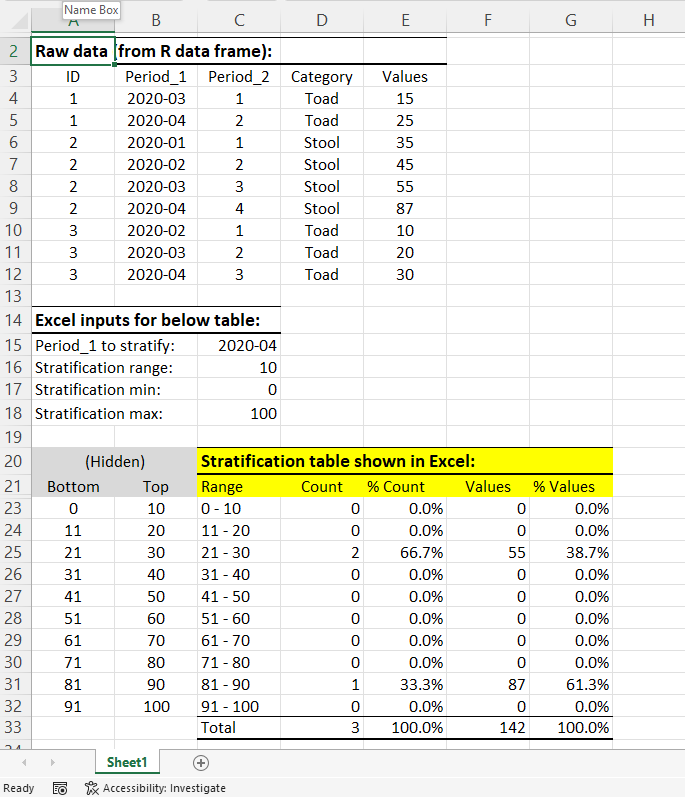
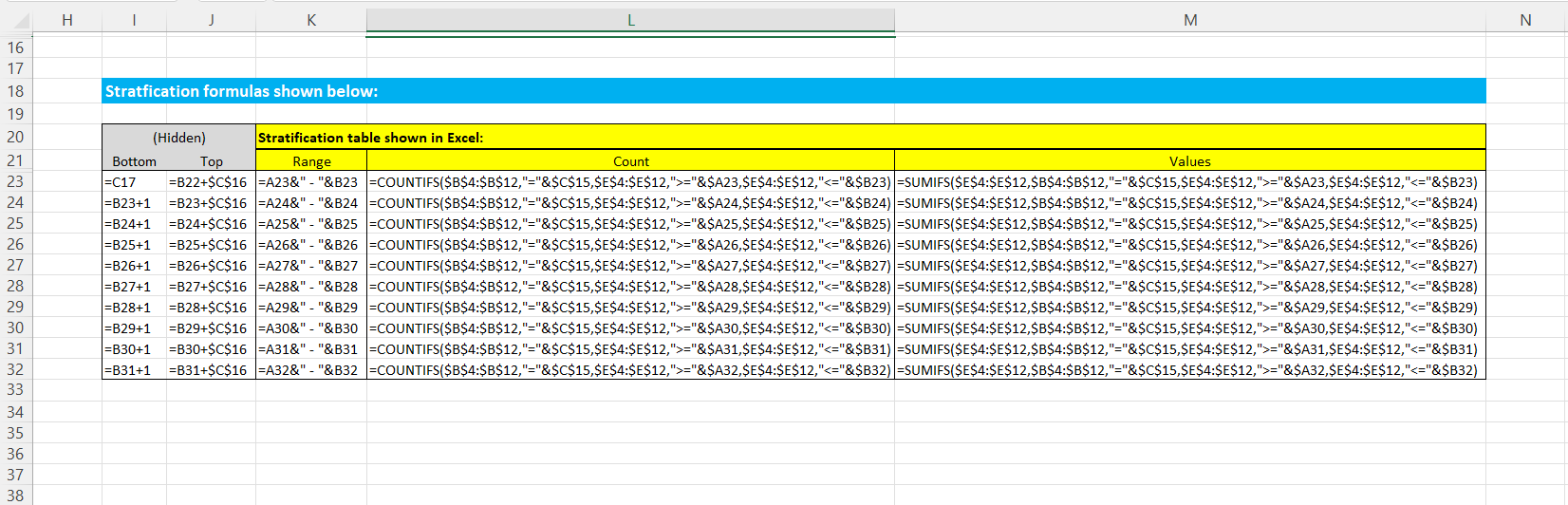
我对R很陌生,总是在Excel中进行分层。在底部的图像中,您可以看到我通常如何在Excel中分层,最终产品以黄色突出显示。我还包括第二张图像,它显示了用于生成第一幅图像中的分层表的公式。
我一直试图限制软件包的使用(除了闪亮和惊人的dplyr,DT),但我想也有一些很好的包运行分层。
注意,我的分层是作为一个特定的时间点运行的(在我的数据中,有两种测量时间的方法,通过Period_1和Period_2)。因此,只有那些符合时间标准的行才包含在分层中。
有人有这样做的建议吗?
代码:
library(shiny)
library(tidyverse)
library(shinyWidgets)

ui <-
  fluidPage(
    h5(strong("Raw data:")),
    tableOutput("data"),
    h5(strong("Grouped data:")),
      radioButtons(
        inputId = "grouping",
        label = NULL,
        choiceNames = c("By period 1", "By period 2"),
        choiceValues = c("Period_1", "Period_2"),
        selected = "Period_1",
        inline = TRUE
      ),
      tableOutput("summed_data"),
    h5(strong("Point-in-time stratification table:")),
      selectInput(inputId = "time",
                  label = "Choose a point-in-time:",
                  list(`By Period_1:` = list("2020-01", "2020-02", "2020-03", "2020-04"),
                       `By Period_2:` = list(1, 2, 3, 4)),
                  selected = "2020-04"),

      numericInput(label = "Stratify by range of values:", 'strat_gap','',value=5,step=1,width = '100%'),

      panel(
        checkboxGroupInput(
          inputId = "vars",
          label = "Select characteristics to filter data by:",
          choices = c("Category"),
          selected = c("Category"),
          inline = TRUE
        ),
        selectizeGroupUI(
          id = "my-filters",
          params = list(
            Category = list(inputId = "Category", title = "Category:")
          )
        ),
        status = "primary"
      ),

  )

server <- function(input, output, session) {
  data <- reactive({
    data.frame(
      ID = c(1,1,2,2,2,2,3,3,3),
      Period_1 = c("2020-03", "2020-04", "2020-01", "2020-02", "2020-03", "2020-04", "2020-02", "2020-03", "2020-04"),
      Period_2 = c(1, 2, 1, 2, 3, 4, 1, 2, 3),
      Category = c("Toad", "Toad", "Stool", "Stool", "Stool", "Stool","Toad","Toad","Toad"),
      Values = c(15, 25, 35, 45, 55, 87, 10, 20, 30)
    )
  })

  choice <- reactive(input$grouping)

  summed_data <- reactive({
    data() %>%
      group_by(across(choice())) %>%
      select("Values") %>%
      summarise(across(everything(), sum, na.rm = TRUE)) %>%
      filter(across(1,.fns = ~ .x %>% negate(is.na)() ))
  })

  output$data <- renderTable(data())
  output$summed_data <- renderTable(summed_data())
}

shinyApp(ui, server)
Excel示例(第二张图像显示分层公式):
回答 1
Stack Overflow用户
发布于 2022-01-26 14:52:26
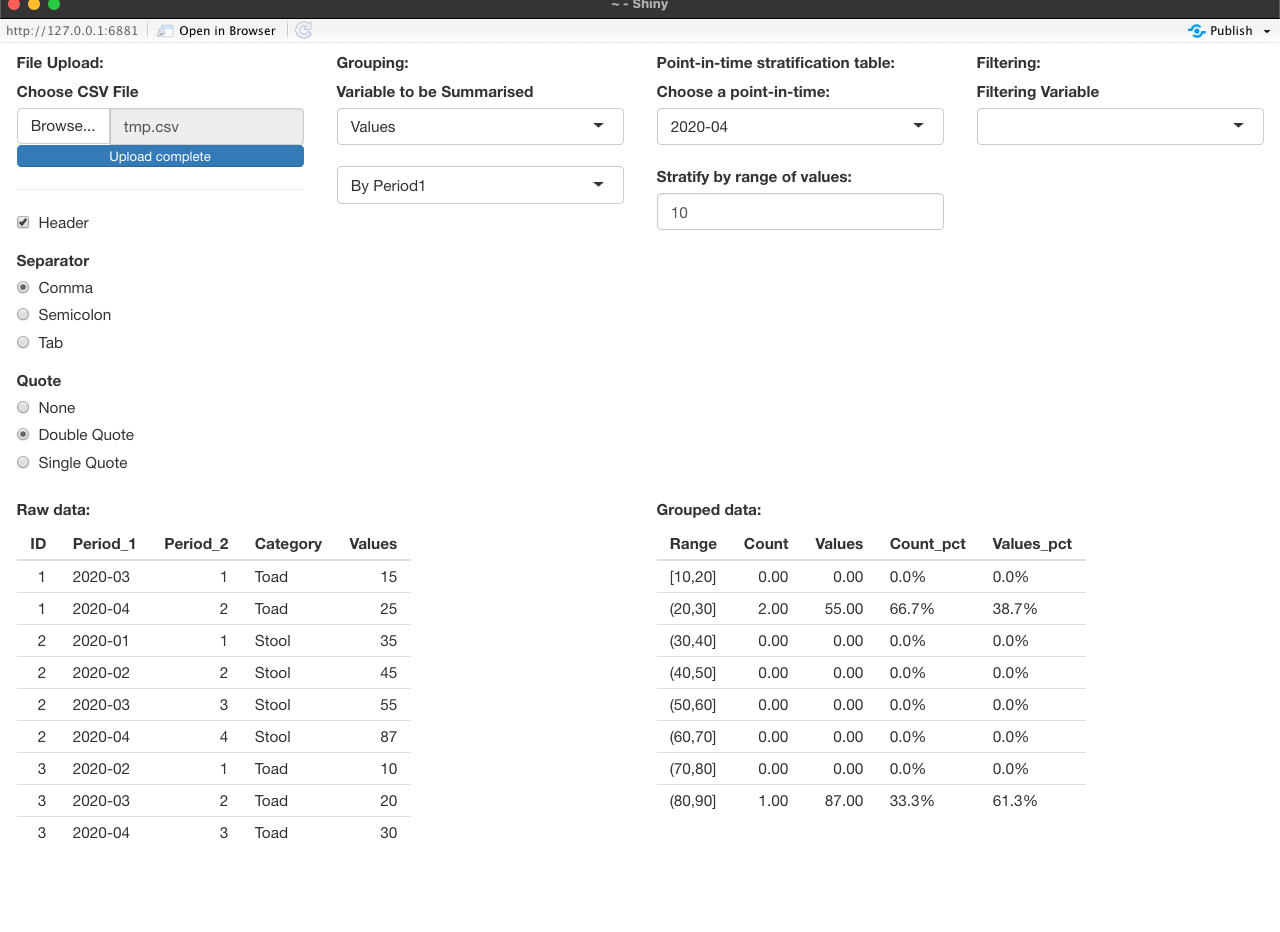
为了使这成为一个更普遍的努力,我将如何做到这一点。在UI中,您可以上传一个CSV文件,它从文件中的名称中获取要使用的变量的名称。这里有一个警告-分组变量必须在它们的名字中有“句号”。否则,您可以从变量名称列表中选择要求和的值。时间点值取自分层变量的观测值。您还可以选择对单变量进行筛选,并且可以从筛选变量的观察值中提取可以筛选的值。看上去是这样的:
这是密码:
library(shiny)
library(tidyverse)

ui <-
  fluidPage(
    fluidRow(column(3, h5(strong("File Upload:"))),
             column(3, h5(strong("Grouping:"))),
             column(3, h5(strong("Point-in-time stratification table:"))),
             column(3, h5(strong("Filtering:")))),
    fluidRow(
      column(3,
             #actionButton("browser", "Browser"),
             fileInput("file1", "Choose CSV File",
                       multiple = TRUE,
                       accept = c("text/csv",
                                  "text/comma-separated-values,text/plain",
                                  ".csv")),
             tags$hr(),

             # Input: Checkbox if file has header ----
             checkboxInput("header", "Header", TRUE),

             # Input: Select separator ----
             radioButtons("sep", "Separator",
                          choices = c(Comma = ",",
                                      Semicolon = ";",
                                      Tab = "\t"),
                          selected = ","),

             # Input: Select quotes ----
             radioButtons("quote", "Quote",
                          choices = c(None = "",
                                      "Double Quote" = '"',
                                      "Single Quote" = "'"),
                          selected = '"')),
      column(3,
             uiOutput("values"),
             uiOutput("period")),
      column(3,
             uiOutput("time"),
             numericInput(label = "Stratify by range of values:", 'strat_gap','',value=5,step=1,width = '100%'),
      ),
      column(3,
             uiOutput("filter_var"),
             uiOutput("filter_val")
      )),
    fluidRow(
      column(6,
            h5(strong("Raw data:")),
            tableOutput("data"),
            ),
      column(6,
             h5(strong("Grouped data:")),
             tableOutput("summed_data"),
      )
    )
  )

server <- function(input, output, session) {

  dat <- reactive({
                  req(input$file1)
                  read.csv(input$file1$datapath,
                  header = input$header,
                  sep = input$sep,
                  quote = input$quote)
                  })


  output$period <- renderUI({
    req(dat())
    pds <- dat() %>% select(contains("Period")) %>% names
    chc_pd <- pds
    names(chc_pd) <- paste0("By ", gsub("_", "", pds))
    selectInput(inputId = "period",
                 label = NULL,
                 choices = chc_pd,
                 selected = pds[1]
    )
  })
  output$time <- renderUI({
    req(dat())
    req(input$period)
    chc <- unique(na.omit(dat()[[input$period]]))
    selectInput(inputId = "time",
                label = "Choose a point-in-time:",
                choices = chc,
                selected = chc[1])
    })
  output$filter_var <- renderUI({
    req(dat())
    chc_filt <- names(dat())
    selectizeInput("filter_var",
                   label = "Filtering Variable",
                   choices = c("", names(dat())),
                   selected="")
  })
  output$filter_val <- renderUI({
    req(dat())
    if(input$filter_var != ""){
      chc_fv <- sort(unique(na.omit(dat()[[input$filter_var]])))
      selectizeInput("filter_vals",
                     label="Filter Values",
                     choices = c("", chc_fv),
                     selected="",
                     multiple=TRUE)
    }
  })
  output$values <- renderUI({
    req(dat())
    selectInput("vals",
                "Variable to be Summarised",
                choices = names(dat()),
                selected = names(dat())[ncol(dat())])
  })
  output$data <- renderTable(dat())
  output$summed_data <- renderTable({
    breaks <- seq(min(dat()[[input$vals]], na.rm=TRUE),
                  max(dat()[[input$vals]], na.rm=TRUE),
                  by=input$strat_gap)
    if(max(breaks) < max(dat()[[input$vals]], na.rm=TRUE)){
      breaks <- c(breaks, max(breaks) + input$strat_gap)
    }
    qs <- ifelse(is.character(dat()[[input$period]]), "'", "")
    filter_exp1 <- parse(text=paste0(input$period,  "==", qs,input$time, qs))
    tmp <- dat() %>%
      filter(eval(filter_exp1))
    if(input$filter_var != ""){
      if(is.character(dat()[[input$filter_var]])){
        fv <- paste("c(", paste("'", input$filter_vals, "'", collapse=",", sep=""), ")", sep="")
      }else{
        fv <- paste("c(", paste(input$filter_vals, collapse=",", sep=""), ")", sep="")
      }
      filter_exp2 <- parse(text=paste0(input$filter_var,  "%in%", fv))
      tmp <- tmp %>% filter(eval(filter_exp2))
    }
    tmp <- tmp %>%
      mutate(sumvar = cut(!!sym(input$vals), breaks=breaks, include.lowest=TRUE)) %>%
      group_by(sumvar) %>%
      summarise(Count = n(),
                Values = sum(!!sym(input$vals))) %>%
      complete(sumvar, fill = list(Count = 0,
                                   Values = 0)) %>%
      ungroup %>%
      mutate(Count_pct = sprintf("%.1f%%", (Count/sum(Count))*100),
             Values_pct = sprintf("%.1f%%", (Values/sum(Values))*100)) %>%
      dplyr::select(everything(), Count, Count_pct, Values, Values_pct)
    names(tmp)[1] <- "Range"
    tmp
  })
  # observeEvent(input$browser, {
  #   browser()
  # })

}

shinyApp(ui, server)https://stackoverflow.com/questions/70863525
复制相似问题
腾讯云开发者

Copyright © 2013 - 2026 Tencent Cloud. All Rights Reserved. 腾讯云 版权所有
深圳市腾讯计算机系统有限公司 ICP备案/许可证号:粤B2-20090059  粤公网安备44030502008569号
腾讯云计算(北京)有限责任公司 京ICP证150476号 | 京ICP备11018762号