
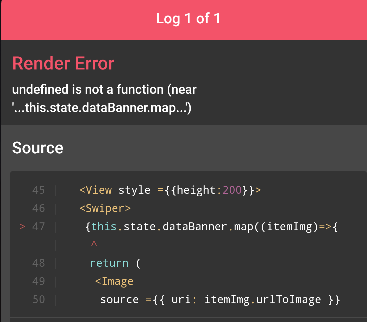
未定义不是函数(靠近‘...this.state.dataBanner.map.’)
未定义不是函数(靠近‘...this.state.dataBanner.map.’)
提问于 2022-01-25 23:47:17
我已经用同样的问题检查了一些类似的问题:ReactJS TypeError: undefined is not a function (near '...this.state.data.map...')
我遵循了每一个步骤:dataBanner:[]和dataBanner:responseJson
...
import Swiper from 'react-native-swiper'
...
constructor(props){
    super(props);
    this.state = {
        dataNews:[],
        dataBanner:[]
    }
}
componentDidMount(){
    return fetch(baseUrl)
    .then((response)=> response.json())
    .then((responseJson)=>{
        console.log(responseJson)
        this.setState({
            dataNews:responseJson,
            dataBanner:responseJson
        })
        //console.log(responseJson)
    })
    .catch((error)=>{
        console.log(error)
    })
}
但是下面的代码仍然给出了一个错误:
            <Swiper>
                {this.state.dataBanner.map((itemImg)=>{
                    return (
                        <Image
                            source ={{ uri: itemImg.urlToImage }}
                            style ={{height:"100%", width:"100%"}}
                        />
                    )
                })}
            </Swiper>
回答 1
Stack Overflow用户
回答已采纳
发布于 2022-01-26 03:17:38
你可以试试
        this.setState({
            dataNews:responseJson?.articles, // add articals here
            dataBanner:responseJson?.articles // add articals here
        })
而且您还可以验证
<Swiper>
    {this.state.dataBanner?.length > 0 && this.state.dataBanner.map((itemImg) => {
        return (
            <Image
                source={{ uri: itemImg.urlToImage }}
                style={{ height: "100%", width: "100%" }}
            />
        )
    })}
</Swiper>页面原文内容由Stack Overflow提供。腾讯云小微IT领域专用引擎提供翻译支持
原文链接:
https://stackoverflow.com/questions/70857132
复制相关文章
相似问题
腾讯云开发者

Copyright © 2013 - 2026 Tencent Cloud. All Rights Reserved. 腾讯云 版权所有
深圳市腾讯计算机系统有限公司 ICP备案/许可证号:粤B2-20090059  粤公网安备44030502008569号
腾讯云计算(北京)有限责任公司 京ICP证150476号 | 京ICP备11018762号