
在collectionView中手动调用单元格上下文菜单
我使用委托方法实现上下文菜单的方法,如下所示:
func collectionView(_ collectionView: UICollectionView, contextMenuConfigurationForItemAt indexPath: IndexPath, point: CGPoint) -> UIContextMenuConfiguration? {
    configureContextMenu(index: indexPath.row)
}

func configureContextMenu(index: Int) -> UIContextMenuConfiguration {
    let context = UIContextMenuConfiguration(identifier: nil, previewProvider: nil) { (action) -> UIMenu? in

        let edit = UIAction(title: "Edit", image: UIImage(systemName: "square.and.pencil"), identifier: nil, discoverabilityTitle: nil, state: .off) { (_) in
            print("edit button clicked")
        }
        let delete = UIAction(title: "Delete", image: UIImage(systemName: "trash"), identifier: nil, discoverabilityTitle: nil,attributes: .destructive, state: .off) { (_) in
            print("delete button clicked")
        }

        return UIMenu(title: "Options", image: nil, identifier: nil, options: UIMenu.Options.displayInline, children: [edit,delete])

    }
    return context
}
一切都很顺利,正如我所愿。但我的目标是像年长的观众,我不知道他们是否知道,他们可以容纳单元格的上下文菜单。所以我想在右角加上三个点,在点击后,它会显示相同的单元格上下文菜单。这是可能的吗?我如何手动调用它?
谢谢你的帮助
回答 2
Stack Overflow用户
发布于 2022-01-26 09:34:36
我认为手动调用UIContextMenus是不可能的,因为它们的交互触发器和事件管理是由内部按照医生的说法处理的。
一个上下文菜单交互对象跟踪支持3D触摸的设备上的Force 手势,以及不支持它的设备上的长按手势。
我能想到的唯一工作就是在集合视图单元格上使用UIMenu和一个UIButton。
我称它为工作,而不是解决方案,因为您将从一次点击用户体验中获得,但您将失去UIContextMenu为您提供的具有集合视图和表视图的用户交互的模糊背景和焦点。
尽管如此,这里是我的自定义UICollectionViewCell的实现,其中按钮引脚到单元格的边缘,但是您可以根据自己的意愿来调整它的大小。您可以检查这对于您的用例是否可行:
class ButtonCollectionViewCell: UICollectionViewCell
{
    static let reuseIdentifier = "ButtonCollectionViewCell"

    let titleLabel = UILabel()
    let hiddenButton = UIButton()

    override init(frame: CGRect)
    {
        super.init(frame: frame)
        contentView.backgroundColor = .yellow
        configureLabel()
        configureButton()
        layoutIfNeeded()
    }

    required init?(coder: NSCoder)
    {
        fatalError("init(coder:) has not been implemented")
    }

    private func configureLabel()
    {
        contentView.addSubview(titleLabel)

        // Auto layout config to pin label to the edges of the content view
        titleLabel.translatesAutoresizingMaskIntoConstraints = false
        titleLabel.leadingAnchor.constraint(equalTo: contentView.leadingAnchor).isActive = true
        titleLabel.topAnchor.constraint(equalTo: contentView.topAnchor).isActive = true
        titleLabel.trailingAnchor.constraint(equalTo: contentView.trailingAnchor).isActive = true
        titleLabel.bottomAnchor.constraint(equalTo: contentView.bottomAnchor).isActive = true
    }

    private func configureButton()
    {
        addSubview(hiddenButton)

        // I add this red color so you can see the button takes up the whole cell
        hiddenButton.backgroundColor = UIColor(red: 1.0, green: 0.0, blue: 0.0, alpha: 0.75)

        // Auto layout config to pin button to the edges of the content view
        hiddenButton.translatesAutoresizingMaskIntoConstraints = false
        hiddenButton.leadingAnchor.constraint(equalTo: leadingAnchor).isActive = true
        hiddenButton.topAnchor.constraint(equalTo: topAnchor).isActive = true
        hiddenButton.trailingAnchor.constraint(equalTo: trailingAnchor).isActive = true
        hiddenButton.bottomAnchor.constraint(equalTo: bottomAnchor).isActive = true

        // Configure menu
        hiddenButton.showsMenuAsPrimaryAction = true
        hiddenButton.menu = UIMenu(title: "Select an option", children: [

            UIAction(title: "Option 1") { action in
                // do your work
            },

            UIAction(title: "Option 2") { action in
                // do your work
            },
        ])
    }
}
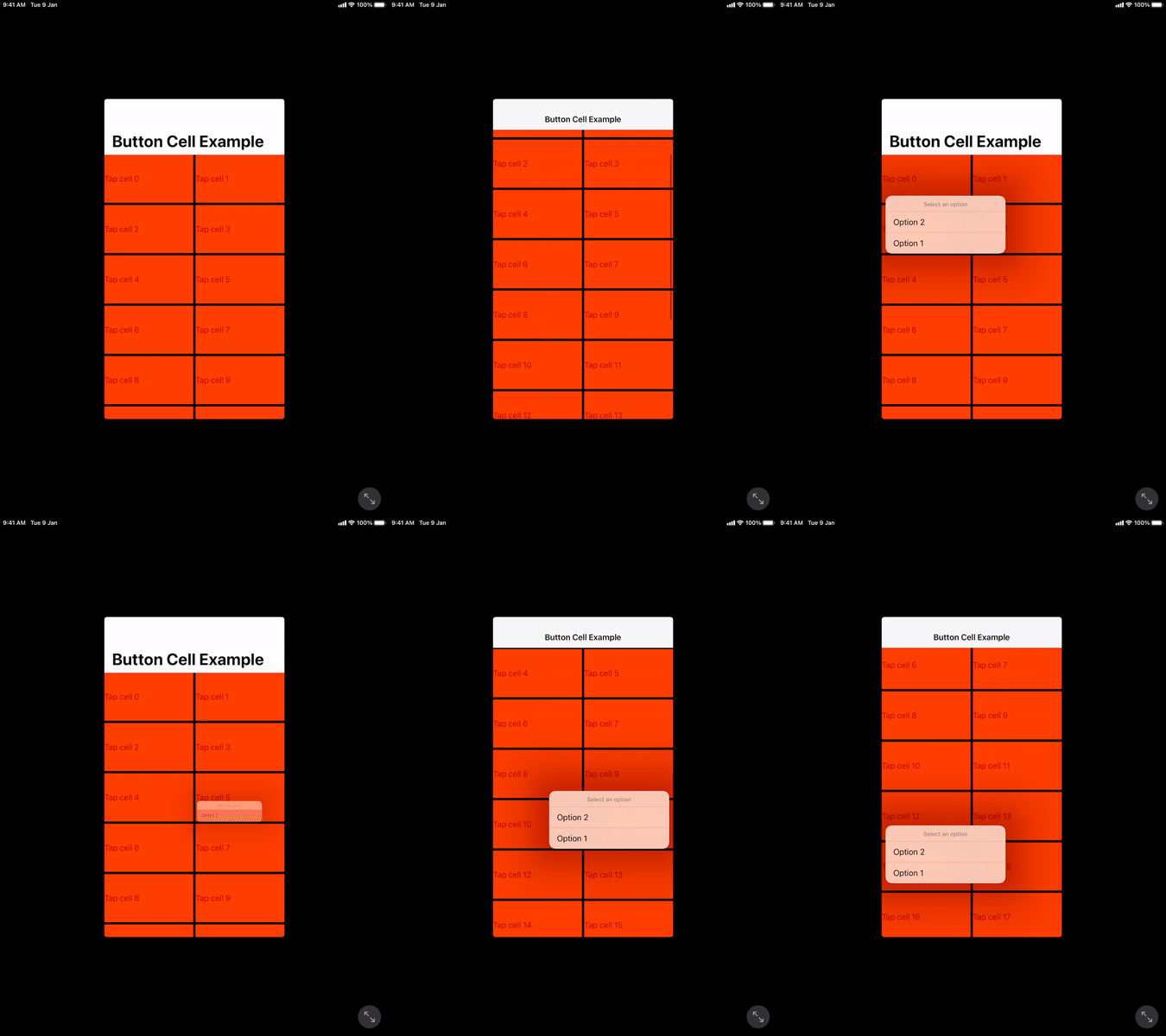
其结果是在单个抽头上得到以下结果:
Stack Overflow用户
发布于 2022-10-26 04:03:56
将上下文菜单添加到UIButton (使用Xcode 14.0)
let favorite = UIAction(title: "Favorite",
      image: UIImage(systemName: "heart.fill")) { _ in
      // Perform action
    }

let share = UIAction(title: "Share",
      image: UIImage(systemName: "square.and.arrow.up.fill")) { _ in
      // Perform action
    }


    let button = UIButton()
    button.showsMenuAsPrimaryAction = true
button.menu = UIMenu(title: "", children: [favorite, share])https://stackoverflow.com/questions/70854401
复制相似问题
腾讯云开发者

Copyright © 2013 - 2026 Tencent Cloud. All Rights Reserved. 腾讯云 版权所有
深圳市腾讯计算机系统有限公司 ICP备案/许可证号:粤B2-20090059  粤公网安备44030502008569号
腾讯云计算(北京)有限责任公司 京ICP证150476号 | 京ICP备11018762号