
在保存附件时将电子邮件添加到文件名
在保存附件时将电子邮件添加到文件名
提问于 2022-01-24 17:34:14
我的目标是提取.png文件的电子邮件在Outlook收件箱子文件夹名为。
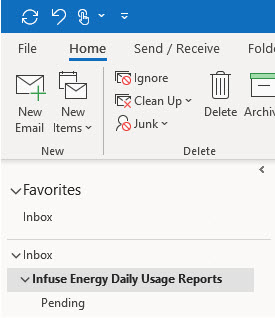
电子邮件中每个都包含6个png文件。最大的是我唯一需要的,它正好是37.6KB。下一个最大的文件是22.5KB。第三大是18.2KB。
密码主要是做我需要的。
我想将电子邮件的完整主题添加到文件名的开头。
文件名应为:
“电子邮件主题,创建时间("yyyymmdd_hhnnss_"),PNG图像的原始文件名。”。
Sub SaveAttachmentsToFolder()
' This Outlook macro checks a named subfolder in the Outlook Inbox
' (here the "Infuse Eneregy Daily Usage Reports" folder) for messages with attached
' files of a specific type (here file with a "png" extension)
' and saves them to disk. Saved files are timestamped. The user
' can choose to view the saved files in Windows Explorer.
' NOTE: make sure the specified subfolder and save folder exist
' before running the macro.
    On Error GoTo SaveAttachmentsToFolder_err
' Declare variables
    Dim ns As NameSpace
    Dim Inbox As MAPIFolder
    Dim SubFolder As MAPIFolder
    Dim Item As Object
    Dim Atmt As Attachment
    Dim FileName As String
    Dim i As Integer
    Dim varResponse As VbMsgBoxResult
    Set ns = GetNamespace("MAPI")
    Set Inbox = ns.GetDefaultFolder(olFolderInbox)
    Set SubFolder = Inbox.Folders("Infuse Energy Daily Usage Reports") ' Enter correct subfolder name.
    i = 0
' Check subfolder for messages and exit if none found
    If SubFolder.Items.Count = 0 Then
        MsgBox "There are no messages in the Infuse Energy Daily Usage folder.", vbInformation, _
               "Nothing Found"
        Exit Sub
    End If
' Check each message for attachments
    For Each Item In SubFolder.Items
        For Each Atmt In Item.Attachments
' Check filename of each attachment and save if it has "png" extension
            If Right(Atmt.FileName, 3) = "png" Then
            ' This path must exist! Change folder name as necessary.
                FileName = "C:\Desktop\Energy Comparisons\Infuse Reports (from email)\" & _
                Format(Item.CreationTime, "yyyymmdd_hhnnss_") & Atmt.FileName
                Atmt.SaveAsFile FileName
                i = i + 1
            End If
        Next Atmt
    Next Item
' Show summary message
    If i > 0 Then
        varResponse = MsgBox("I found " & i & " attached files." _
        & vbCrLf & "I have saved them into the Infuse Reports (from email)." _
        & vbCrLf & vbCrLf & "Would you like to view the files now?" _
        , vbQuestion + vbYesNo, "Finished!")
' Open Windows Explorer to display saved files if user chooses
        If varResponse = vbYes Then
            Shell "Explorer.exe /e,C:\Desktop\Energy Comparisons\Infuse Reports (from email)", vbNormalFocus
        End If
    Else
        MsgBox "I didn't find any attached files in your mail.", vbInformation, "Finished!"
    End If
' Clear memory
SaveAttachmentsToFolder_exit:
    Set Atmt = Nothing
    Set Item = Nothing
    Set ns = Nothing
    Exit Sub
' Handle Errors
SaveAttachmentsToFolder_err:
    MsgBox "An unexpected error has occurred." _
        & vbCrLf & "Please note and report the following information." _
        & vbCrLf & "Macro Name: GetAttachments" _
        & vbCrLf & "Error Number: " & Err.Number _
        & vbCrLf & "Error Description: " & Err.Description _
        , vbCritical, "Error!"
    Resume SaveAttachmentsToFolder_exit
End Sub回答 1
Stack Overflow用户
发布于 2022-01-25 22:48:42
首先,不需要对文件夹中的所有项进行迭代:
 For Each Item In SubFolder.Items
For Each Atmt In Item.Attachments这并不是一个好主意,因为迭代一个文件夹中的所有项目需要花费大量时间。相反,您需要使用Find/FindNext或限制Items类的方法。筛选示例:附件&主题,如‘%关键字%’
Filter = "@SQL=" & Chr(34) & "urn:schemas:httpmail:subject" & _
                   Chr(34) & " Like '%keyword%' AND " & _
                   Chr(34) & "urn:schemas:httpmail:hasattachment" & _
                   Chr(34) & "=1"
请参阅以下文章中有关这些方法的更多信息:
至于保存到磁盘的附件的文件名,在调用SaveAsFile方法之前,需要确保文件名中没有包含禁止的符号。
If Right(Atmt.FileName, 3) = "png" Then
            ' This path must exist! Change folder name as necessary.
                FileName = "C:\Desktop\Energy Comparisons\Infuse Reports (from email)\" & Item.Subject & _
                 Format(Item.CreationTime, "yyyymmdd_hhnnss_") & Atmt.FileName
                Atmt.SaveAsFile FileName
                i = i + 1
End If还请注意,Outlook文件夹可能包含不同类型的项。我建议在运行时检查项目的类型,以确保您只处理邮件项。班级属性返回指示对象类的OlObjectClass常量。或者只需使用以下条件:
If TypeOf Item Is MailItem Then
 ' your code here
End If页面原文内容由Stack Overflow提供。腾讯云小微IT领域专用引擎提供翻译支持
原文链接:
https://stackoverflow.com/questions/70838052
复制相关文章
相似问题
腾讯云开发者

Copyright © 2013 - 2026 Tencent Cloud. All Rights Reserved. 腾讯云 版权所有
深圳市腾讯计算机系统有限公司 ICP备案/许可证号:粤B2-20090059  粤公网安备44030502008569号
腾讯云计算(北京)有限责任公司 京ICP证150476号 | 京ICP备11018762号