
每次打开远程工作区时,集成shell都会更改为bash。
我尝试将ZSH配置为用于集成终端的默认shell。但是,每次都会打开bash,即使在连接到远程工作区(在linux机器上)时,ZSH被设置为默认配置文件。
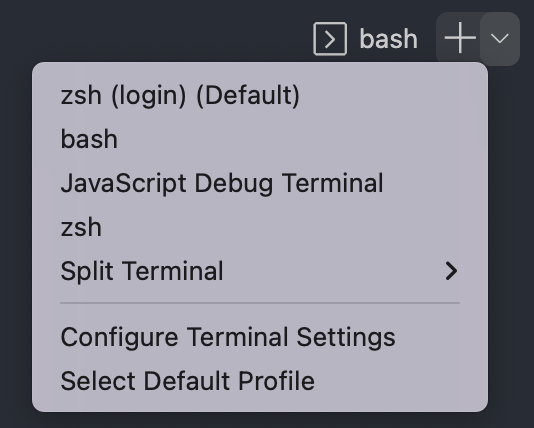
以下是我的本地设置配置(/Users/ewiener/Library/Application Support/Code/User/settings.json):
"terminal.integrated.profiles.linux": {
    "zsh (login)": {
        "path": "zsh",
        "args": [
            "-l"
        ]
    },
    "zsh": {
        "path": "/usr/local/bin/zsh",
    },
},
"terminal.integrated.defaultProfile.linux": "zsh (login)",
"terminal.integrated.defaultProfile.osx": "zsh",
"terminal.external.osxExec": "iTerm.app",
"terminal.integrated.fontFamily": "MesloLGS NF",我的远程服务器在/home/ewiener/.vscode-server/data/Machine/settings.json中没有设置终端设置。
工作区设置也没有终端设置(/home/ewiener/myrepo/.vscode/settings.json)
在连接到远程工作区时,如何确保打开ZSH?即使我手动选择ZSH作为shell,如果我关闭并重新打开工作区,它也会恢复为bash。
回答 1
Stack Overflow用户
发布于 2022-02-05 14:51:36
最新答复:
我最初的答案并不总是适用于我,所以我决定让我的.bashrc在VSCode打开一个shell时将shell更改为zsh。您可以通过将以下内容添加到.bashrc顶部来实现这一点
if [[ "$TERM_PROGRAM" == "vscode" ]]; then
  # ~/.profile is run by the login shell (this is what ssh uses)
  # ~/.bashrc is run by the interactive shell (this is what vscode uses)
  # Therefore, we only need to change the shell to zsh here since
  # vscode will run ~/.bashrc for us.
  exec zsh -l
fi
原来的答案:
我意识到正确的终端是在本地打开的,这个问题只发生在远程工作区上。这导致我修改了我的SSH配置,最终提供了解决方案。
您可以修改SSH配置,并设置要用于特定主机的终端。
Remote-SSH: Open SSH Configuration File..
- Choose
- 使用命令调色板(CMD/CTRL + SHIFT + P)打开要编辑的配置文件。
例如:
# /Users/username/.ssh/config

Host linux-server
 HostName 00.00.00.00
 User username
SetEnv TERM=/usr/local/bin/zsh # <---- this will update your terminal确保在本地计算机上(而不是在远程服务器上)编辑.ssh/config。
编辑请注意,从OpenSSH 7.8 (与sshd -V检查)开始,就支持SetEnv指令。Source
https://stackoverflow.com/questions/70824431
复制相似问题
腾讯云开发者

Copyright © 2013 - 2026 Tencent Cloud. All Rights Reserved. 腾讯云 版权所有
深圳市腾讯计算机系统有限公司 ICP备案/许可证号:粤B2-20090059  粤公网安备44030502008569号
腾讯云计算(北京)有限责任公司 京ICP证150476号 | 京ICP备11018762号