
如何本地化.net共享项目
在Visual中,可以创建共享项目。
微软是否设想过在共享项目中进行本地化的标准方法?
我很确定我能找到一种方法来处理本地化,但是在我发明我自己的方法之前,最好知道是否有一种“正式”的方法。
编辑
如果将库本地化,则应将翻译包含在库中。
如果使用.resx (或.resw)文件中的资源字符串本地化文本,则资源文件必须包含在库中,并且必须有代码从rignt资源文件加载资源。
两件事是不可能的。
- 只在使用库的组件中进行本地化。 如果用资源名称替换字符串文字,则需要更改源代码,这与使用库的整个想法背道而驰。
- 在库中使用资源名,而不提供.resx文件。 那密码就是没用。
微软论坛中也有一个类似的问题。基于该页面上的讨论,在我看来,微软并没有为共享项目的本地化提供足够的支持。
我发现了一个有趣的例子,就是项目基于CodeMaid的GitHub项目。
这是一个Visual扩展,而不是一个Xamarin项目(共享项目不限于Xamarin)。此项目包含一个资源文件(Resource.resx)和一个访问资源的代码文件(Resources.resx.cs)。基于此,我假设有可能将.resx文件包含在一个受限制的项目中。
但是,似乎不可能运行自定义工具(PublicResXFileCodeGenerator)来生成代码文件,而且在编辑.resx文件时它也不会自动运行。
我的猜测是,CodeMaid的开发人员在将资源文件移动到共享项目后,没有对资源文件进行任何更改。
回答 1
Stack Overflow用户
发布于 2022-02-11 19:23:23
我原来问题的答案似乎是“不”。关于本地化,共享项目实际上不起作用。
然而,本地化可以工作,但有两个问题。
1.自定义工具PublicResXFileCodeGenerator不运行.
在我自己的工具(这是一个visual扩展)中,我将尝试自己生成代码(Resources.designer.cs)。生成它所需的代码非常简单。
这是我的基本功能..。
public void GenerateCodeCS ( string resxFullPath, string namespaceName, ITypeResolutionService typeResolver )
{
  string BaseName = Path.GetFileNameWithoutExtension ( resxFullPath ) ;
  string BaseDir  = Path.GetDirectoryName ( resxFullPath ) ;
  string FileName = BaseName + ".designer.cs" ;
  string FullPath = Path.Combine ( BaseDir, FileName ) ;

  using ( var sw = new StreamWriter ( FullPath, false, Encoding.UTF8 ) )
  {
    sw.WriteLine ( $"namespace {namespaceName}.Properties" ) ;
    sw.WriteLine ( "{" );
    sw.WriteLine ( "  using System;" );
    sw.WriteLine ( "  using System.Resources;" );
    sw.WriteLine ( "  using System.Globalization;" );
    sw.WriteLine ( "  public class Resources" );
    sw.WriteLine ( "  {" );
    sw.WriteLine ( "    private static ResourceManager resourceMan;" );
    sw.WriteLine ( "    private static CultureInfo     resourceCulture;" );
    sw.WriteLine ();
    sw.WriteLine ( "    public static global::System.Resources.ResourceManager ResourceManager" );
    sw.WriteLine ( "    {" );
    sw.WriteLine ( "      get" );
    sw.WriteLine ( "      {" );
    sw.WriteLine ( "        if ( resourceMan == null )" );
    sw.WriteLine ( "        {" );
    sw.WriteLine ($"          resourceMan = new ResourceManager(\"{namespaceName}.Properties.Resources\", typeof(Resources).Assembly);" );
    sw.WriteLine ( "        }" );
    sw.WriteLine ( "        return resourceMan ;" );
    sw.WriteLine ( "      }" );
    sw.WriteLine ( "    }" );
    sw.WriteLine ();
    sw.WriteLine ( "    public static CultureInfo Culture { get => resourceCulture; set => resourceCulture = value; }" );
    sw.WriteLine ();

    using ( var resxReader = new ResXResourceReader ( resxFullPath, typeResolver ) )
    {
      resxReader.BasePath         = BaseDir ;
      resxReader.UseResXDataNodes = true ;

      foreach ( DictionaryEntry res in resxReader as IResourceReader )
      {
        var key      = res.Key.ToString() ;
        var resxNode = res.Value as ResXDataNode ;
        var value    = resxNode.GetValue ( typeResolver ) ;
        if ( value is string )
        {
          sw.WriteLine ( $"    public static string {key} => ResourceManager.GetString(\"{key}\", resourceCulture);" ) ;
        }
      }
    }
    sw.WriteLine ( "  }" );
    sw.WriteLine ( "}" );
  }
}
这会生成一个类似于以下内容的文件
namespace SharedProject.Properties
{
  using System;
  using System.Resources;
  using System.Globalization;
  public class Resources
  {
    private static ResourceManager resourceMan;
    private static CultureInfo     resourceCulture;

    public static global::System.Resources.ResourceManager ResourceManager
    {
      get
      {
        if ( resourceMan == null )
        {
          resourceMan = new ResourceManager("SharedProject.Properties.Resources", typeof(Resources).Assembly);
        }
        return resourceMan ;
      }
    }

    public static CultureInfo Culture { get => resourceCulture; set => resourceCulture = value; }

    public static string Bye_Bye => ResourceManager.GetString("Bye_Bye", resourceCulture);
    public static string Ciao_Ciao => ResourceManager.GetString("Ciao_Ciao", resourceCulture);
    public static string Hello_World => ResourceManager.GetString("Hello_World", resourceCulture);
  }
}
应该可以将其包含在控制台应用程序中,并在构建前的步骤中运行。typeResolver参数可能不是必需的。
2.资源的命名空间错误。
当资源被编译到目标应用程序中时,它们会被赋予应用程序的名称空间,而不是共享项目的名称空间。
由于共享项目中的代码不可能知道目标应用程序的命名空间,因此无法访问资源。
幸运的是,有一个解决这个问题的办法。您必须做的是编辑项目文件并将<LogicalName>属性添加到资源文件中。
实际上,在共享项目中,它不是项目文件(.csproj),而是文件项目项文件.csproj
在我的示例项目中,引用资源文件的方式如下
<EmbeddedResource Include="$(MSBuildThisFileDirectory)Properties\Resources.resx">
  <Generator>PublicResXFileCodeGenerator</Generator>
  <LogicalName>SharedProject.Properties.Resources.resources</LogicalName>
</EmbeddedResource>在本例中,SharedProject是共享项目的名称空间,由后面的代码引用(参见上文)。
当然,<Generator>属性是没有意义的,因为自定义工具不运行。
我不知道通过GUI或visual扩展添加属性的任何方法。
使用ILSpy,我可以看到资源现在被嵌入到我的应用程序中,其中包含了共享项目的命名空间。
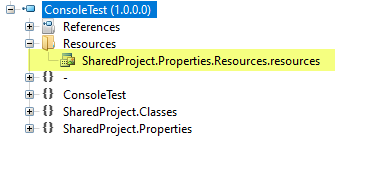
加载资源是可行的。
https://stackoverflow.com/questions/70820056
复制相似问题
腾讯云开发者

Copyright © 2013 - 2026 Tencent Cloud. All Rights Reserved. 腾讯云 版权所有
深圳市腾讯计算机系统有限公司 ICP备案/许可证号:粤B2-20090059  粤公网安备44030502008569号
腾讯云计算(北京)有限责任公司 京ICP证150476号 | 京ICP备11018762号