
在多个相同的工作表之间切换数据,而不丢失任何数据。
在多个相同的工作表之间切换数据,而不丢失任何数据。
提问于 2022-01-22 20:57:23
我有一本ecxel工作簿,它有20个标签,以床铺号码命名。每个工作表的格式相同,并包含占用床的个人的人口统计数据。数据是从用户表单中输入的。我需要一个解决方案,以改变床的分配,而不需要用户重新输入所有的数据。我想用两种方法之一来解决这一问题。我可以创建一个表单,列出那些占据床的人的名字,用户将把床#分配给每个人,然后重命名每个床单。或从每个工作表中提取所有数据,并根据床层变化将其重新插入到正确的工作表中。如果这让人困惑的话我很抱歉。我通常能找到答案,但我不知道如何问这个问题。本质上,我需要一种解决方案来在工作表之间切换数据而不丢失任何数据,或者根据用户条目重命名所有工作表。
回答 1
Stack Overflow用户
回答已采纳
发布于 2022-01-23 14:51:20
假设你有这样一个表格
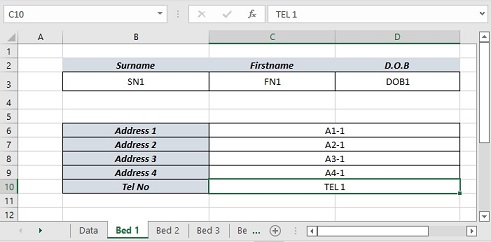
创建一个数据表,比如Load和Save按钮。
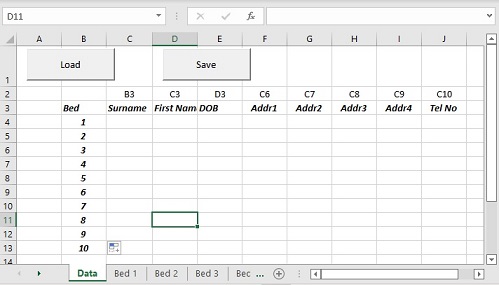
负荷将填充来自床表的数据表。重新分配B栏中的床位并保存回表格。我已经包括了基本的错误和验证检查,并在加载后备份保存,以增加安全性。
Option Explicit

Private Sub btnLoad_Click()

    Dim ws As Worksheet, wsData As Worksheet, r As Long
    Dim b As Long, c As Long, lastcol As Long, addr As String

    Set wsData = Sheets("Data")
    lastcol = wsData.Cells(2, Columns.Count).End(xlToLeft).Column
    For Each ws In Sheets
       If ws.Name Like "Bed #*" Then
            b = CLng(Mid(ws.Name, 4))
            r = b + 3
            wsData.Cells(r, "B") = b
            For c = 3 To lastcol
                addr = wsData.Cells(2, c)
                wsData.Cells(r, c) = ws.Range(addr).Value2
            Next
       End If
    Next

    ' save backup
    With Application
       .ScreenUpdating = False
       .DisplayAlerts = False
       wsData.Copy
        ActiveWorkbook.SaveAs Filename:="Data_" & Format(Now, "yyyymmdd_hhmmss") & ".xlsx", _
        FileFormat:=xlOpenXMLWorkbook, CreateBackup:=False
        ActiveWorkbook.Close False
        .DisplayAlerts = True
        .ScreenUpdating = True
    End With

End Sub

Private Sub btnSave_Click()

    Dim ws As Worksheet, wsData As Worksheet, msg As String
    Dim b As Long, c As Long, lastcol As Long, addr As String

    ' get allocations bed to data row
    Dim dict, r As Long
    Set dict = CreateObject("Scripting.Dictionary")
    For r = 4 To 13
       If Not IsNumeric(Sheets("Data").Cells(r, "B")) Then
           MsgBox "Invalid bed no" & b, vbCritical, r
           Exit Sub
       End If
       b = Sheets("Data").Cells(r, "B")
       ' sanity check
       If dict.exists(b) Then
           MsgBox "Duplicate bed " & b, vbCritical, r
           Exit Sub
        ElseIf b < 1 Or b > 20 Then
           MsgBox "Invalid bed no " & b, vbCritical, r
           Exit Sub
        Else
            dict.Add b, r
        End If
    Next

    Set wsData = Sheets("Data")
    lastcol = wsData.Cells(2, Columns.Count).End(xlToLeft).Column
    For Each ws In Sheets
       If ws.Name Like "Bed #*" Then
            b = CLng(Mid(ws.Name, 4))
            r = dict(b) ' data row from dictonary
            ' is there a change
            If r <> b + 3 Then
                For c = 3 To lastcol
                    addr = wsData.Cells(2, c)
                    ws.Range(addr).Value2 = wsData.Cells(r, c)
                Next
                msg = msg & vbLf & "Bed " & b
            End If
       End If
    Next

    If msg = "" Then
       MsgBox "No changes made", vbInformation
    Else
       MsgBox "Changes made to " & msg, vbInformation
    End If

End Sub页面原文内容由Stack Overflow提供。腾讯云小微IT领域专用引擎提供翻译支持
原文链接:
https://stackoverflow.com/questions/70817071
复制相关文章
相似问题
腾讯云开发者

Copyright © 2013 - 2026 Tencent Cloud. All Rights Reserved. 腾讯云 版权所有
深圳市腾讯计算机系统有限公司 ICP备案/许可证号:粤B2-20090059  粤公网安备44030502008569号
腾讯云计算(北京)有限责任公司 京ICP证150476号 | 京ICP备11018762号