
ENOTFOUND资产博览会
ENOTFOUND资产博览会
提问于 2022-01-22 16:38:32
我的应用程序被逐出了世博,所以每次发布时我都要做世博发布,所以每次发布时,这个方法都能完美地工作50次以上,但是当我尝试用xcode进行存档或在android中生成发布版本时,突然间,出现了以下错误
在Xcode中:
Showing All Messages
https://assets/3c851d60ad5ef3f2fe43ebd263490d78
https://assets/1a0e3525dd5df87e77057204129a5e6e
https://assets/2379ae894c2c9f63b852a9f3676c2763
https://assets/5cdf883b18a5651a29a4d1ef276d2457
https://assets/74d124a3caeac2bea111f3ca2f2dd34a
[20:37:23] Error: getaddrinfo ENOTFOUND assets
[20:37:23] Before making a release build, make sure you have run 'expo publish' at least once. Learn more. (https://expo.fyi/release-builds-with-expo-updates)在Android中:
> Task :app:bundleReleaseExpoUpdatesAssets
https://assets/3c851d60ad5ef3f2fe43ebd263490d78
https://assets/1a0e3525dd5df87e77057204129a5e6e
https://assets/2379ae894c2c9f63b852a9f3676c2763
https://assets/5cdf883b18a5651a29a4d1ef276d2457
https://assets/74d124a3caeac2bea111f3ca2f2dd34a
[21:22:20] Error: getaddrinfo ENOTFOUND assets
[21:22:20] Before making a release build, make sure you have run 'expo publish' at least once. Learn more.
即使我的世博发布已经完成,如果我试图构建存档或apk,我也会得到错误
我尝试过清除看守,删除节点模块,重新安装吊舱,清除cache.etc没有任何帮助
回答 1
Stack Overflow用户
发布于 2022-02-10 07:31:44
是否使用pdf中的说明来尝试此解决方案?,但没有为我工作。花了几天时间寻找解决方案,但对我来说没有什么效果,所以我深入研究了这个问题。
我的项目是使用世博会SDK36。
对我起作用的是下面的解决方案。
要求
- 安装expo:
npm install expo-cli --save-dev。
每当我们使用Xcode Archive或Android assembleRelease命令进行构建时,这些命令都会执行expo bundle-assets命令。我们将在下面的步骤中替换世博并使用本地expo-cli。
iOS特异溶液
- 在我们的项目中安装了expo之后,我们需要替换构建命令。
- 转到Xcode >项目名称>目标>选择您的项目>构建阶段
- 在构建阶段>去博览捆绑资产或类似的东西
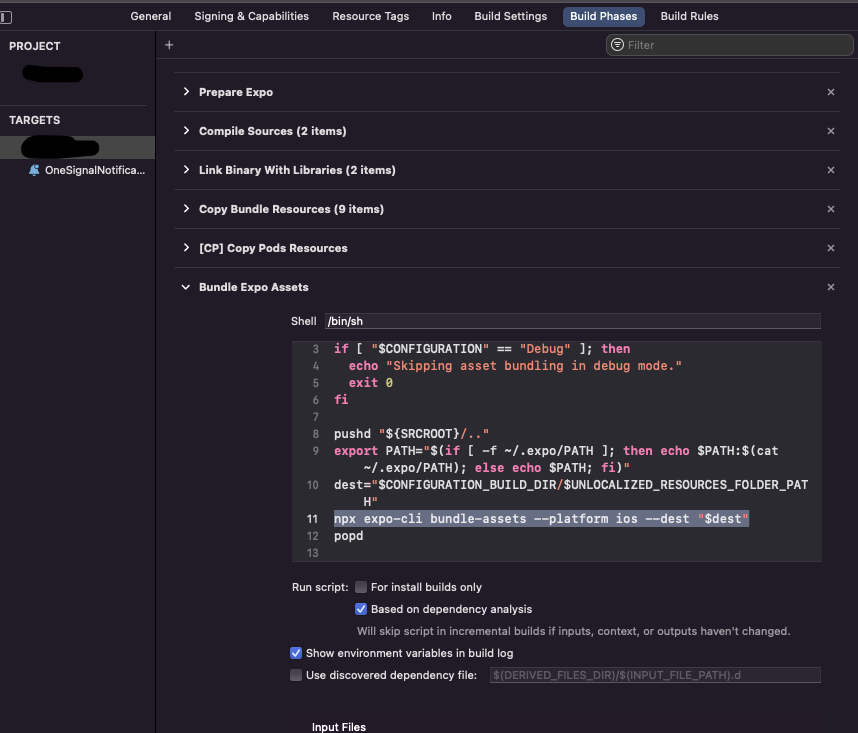
- 将
expo bundle-assets --platform ios --dest "$dest"替换为npx expo-cli bundle-assets --platform ios --dest "$dest" - 运行
npx expo-cli publish --clear - 清理项目并开始归档/建设!
Android专用解决方案(适用于MacOS/Linux)
- 在项目根文件夹中,创建一个名为
run-exp.sh的文件。 - 在
run-exp.sh中添加这些行
#!/usr/bin/env bash

value=$(cat ~/.expo/PATH)
PATH="$PATH:$value" npx expo-cli "$@"- 在项目根文件夹下,转到
android/app/expo.gradle - 替换这一行:
commandLine("./node_modules/expokit/detach-scripts/run-exp.sh", "bundle-assets", expoRoot, "--platform", "android", "--dest", assetsDir)使用
commandLine("./run-exp.sh", "bundle-assets", expoRoot, "--platform", "android", "--dest", assetsDir)- 运行
npx expo-cli publish --clear - 在Android工作室,清理项目并构建应用程序。
Android专用解决方案(适用于Windows)
- 在项目根文件夹中,创建一个名为
run-exp.bat的文件。 - 在
run-exp.bat中添加这些行
SET /P STOREDPATH=<"%USERPROFILE%\.expo\PATH"
SET PATH="\"%PATH%;%STOREDPATH%\""
npx expo-cli %*- 在项目根文件夹下,转到
android/app/expo.gradle - 替换这一行:
commandLine("cmd", "/c", ".\\node_modules\\expokit\\detach-scripts\\run-exp.bat", "bundle-assets", expoRoot, "--platform", "android", "--dest", assetsDir)使用
commandLine("cmd", "/c", ".\\run-exp.bat", "bundle-assets", expoRoot, "--platform", "android", "--dest", assetsDir)- 运行
npx expo-cli publish --clear - 在Android工作室,清理项目并构建应用程序。
页面原文内容由Stack Overflow提供。腾讯云小微IT领域专用引擎提供翻译支持
原文链接:
https://stackoverflow.com/questions/70814903
复制相关文章
相似问题
腾讯云开发者

Copyright © 2013 - 2026 Tencent Cloud. All Rights Reserved. 腾讯云 版权所有
深圳市腾讯计算机系统有限公司 ICP备案/许可证号:粤B2-20090059  粤公网安备44030502008569号
腾讯云计算(北京)有限责任公司 京ICP证150476号 | 京ICP备11018762号