
无法在我的windows server 2019上安装Postgresql 14 - post安装错误
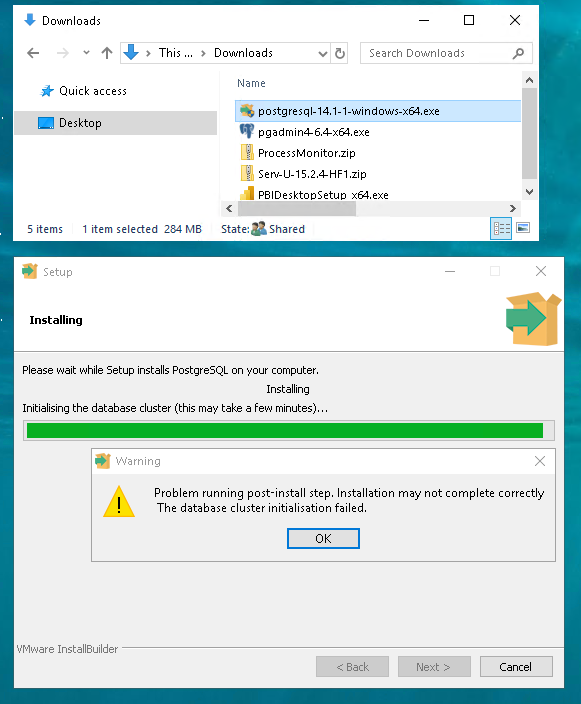
我在我的Windows2019服务器上使用PgAmin 12运行了PostgreSQL 4.6。我想安装postgreSQL 14,我尝试过使用最新的EDB .exe文件安装它几次:每次尝试都会出现一个安装错误。我试过作为管理员登录。我调整了postgresql文件夹安全特权,允许“所有应用程序包”、“所有受限制的应用程序包”、管理员组中的用户和我自己的具有完全控制权的用户帐户.我甚至尝试将postgres添加为本地管理员帐户,并通过提升的cmd提示符进行安装。无论我如何切割它-我继续得到安装后的错误。安装程序完成,但没有安装postgresql 14服务,postgreSQL 14目录中的唯一文件夹是Data。
我遗漏了什么?怎么回事?我可以使用pgAdmin创建一个新的postgresql 14服务器吗?如何初始化postgreSQL 14数据库?如果我已经安装了pdAdmin 4.6和postgreSQL 12,会有什么关系吗?我希望能得到一点帮助。非常感谢!
     Log started 01/21/2022 at 18:20:18
Preferred installation mode : qt
Trying to init installer in mode qt
Mode qt successfully initialized
Setting variable whoami from C:\WINDOWS\System32\whoami
Script exit code: 0

Script output:
 dn\USER

Script stderr:


Executing C:\WINDOWS\System32\icacls "C:\Users\USER\AppData\Local\Temp/postgresql_installer_631f935164" /inheritance:r
Script exit code: 0

Script output:
 processed file: C:\Users\USER\AppData\Local\Temp/postgresql_installer_631f935164
Successfully processed 1 files; Failed processing 0 files

Script stderr:


Executing C:\WINDOWS\System32\icacls "C:\Users\USER\AppData\Local\Temp/postgresql_installer_631f935164" /T /Q /grant "dn\USER:(OI)(CI)F"
Script exit code: 0

Script output:
 Successfully processed 1 files; Failed processing 0 files

Script stderr:


Executing C:\WINDOWS\System32\cscript //NoLogo "C:\Users\USER\AppData\Local\Temp\postgresql_installer_631f935164\prerun_checks.vbs"
Script exit code: 0

Script output:
 The scripting host appears to be functional.

Script stderr:


[18:20:30] Using branding: PostgreSQL 14
Could not find registry key HKEY_LOCAL_MACHINE\SOFTWARE\PostgreSQL\Installations\postgresql-x64-14 SB_Version. Setting variable sb_version to empty value
Could not find registry key HKEY_LOCAL_MACHINE\SOFTWARE\PostgreSQL\Installations\postgresql-x64-14 pgAdmin_Version. Setting variable pgadmin_version to empty value
Could not find registry key HKEY_LOCAL_MACHINE\SOFTWARE\PostgreSQL\Installations\postgresql-x64-14 Data Directory. Setting variable server_data_dir to empty value
Executing C:\Users\USER\AppData\Local\Temp/postgresql_installer_631f935164/temp_check_comspec.bat
Script exit code: 0

Script output:
 Active code page: 1252
Active code page: 1252
"test ok"

Script stderr:


Could not find registry key HKEY_LOCAL_MACHINE\SOFTWARE\PostgreSQL\Installations\postgresql-x64-14 Data Directory. Setting variable iDataDirectory to empty value
Could not find registry key HKEY_LOCAL_MACHINE\SOFTWARE\PostgreSQL\Installations\postgresql-x64-14 Service ID. Setting variable iServiceName to empty value
Could not find registry key HKEY_LOCAL_MACHINE\SOFTWARE\PostgreSQL\Installations\postgresql-x64-14 Service Account. Setting variable iServiceAccount to empty value
Could not find registry key HKEY_LOCAL_MACHINE\SOFTWARE\PostgreSQL\Installations\postgresql-x64-14 Super User. Setting variable iSuperuser to empty value
Could not find registry key HKEY_LOCAL_MACHINE\SOFTWARE\PostgreSQL\Installations\postgresql-x64-14 DisableStackBuilder. Setting variable iDisableStackBuilder to empty value
[18:20:31] Existing base directory: C:\Program Files\PostgreSQL\14
[18:20:31] Existing data directory:
[18:20:31] Using branding: PostgreSQL 14
[18:20:31] Using Super User: postgres and Service Account: NT AUTHORITY\NetworkService
[18:20:31] Using Service Name: postgresql-x64-14
Executing C:\Users\USER\AppData\Local\Temp\postgresql_installer_631f935164\getlocales.exe
Script exit code: 0

Script output:
EnglishxxCOMMAxxxxSPxxAustralia=English, Australia
EnglishxxCOMMAxxxxSPxxBelize=English, Belize
EnglishxxCOMMAxxxxSPxxCanada=English, Canada
EnglishxxCOMMAxxxxSPxxCaribbean=English, Caribbean
EnglishxxCOMMAxxxxSPxxHongxxSPxxKongxxSPxxSAR=English, Hong Kong SAR
EnglishxxCOMMAxxxxSPxxIndia=English, India
EnglishxxCOMMAxxxxSPxxIndonesia=English, Indonesia
EnglishxxCOMMAxxxxSPxxIreland=English, Ireland
**_TRUNCATED_**

Script stderr:
[18:21:45] Data Directory exists and is empty. Removing it
Preparing to Install
Preparing to Install
Directory already exists: C:\Program Files\PostgreSQL\14\installer
Unpacking files
Unpacking C:\Program Files\PostgreSQL\14\installer\prerun_checks.vbs
Unpacking C:\Program Files\PostgreSQL\14\installer\vcredist_x86.exe
Directory already exists: C:\Program Files\PostgreSQL\14\installer
Unpacking files
Unpacking C:\Program Files\PostgreSQL\14\installer\vcredist_x64.exe
Directory already exists: C:\Program Files\PostgreSQL\14
Directory already exists: C:\Program Files\PostgreSQL\14\..._***TRUNCATED**
Unpacking files
Unpacking C:\Program Files\PostgreSQL\14\bin\pg_regress_ecpg.exe
Unpacking C:\Program Files\PostgreSQL\14\bin\..._***TRUNCATED UNPACK A BOATLOAD OF FILES FOR INSTALLATION***_
Directory already exists: C:\Program Files\PostgreSQL\14
Directory already exists: C:\Program Files\PostgreSQL\14\bin
Directory already exists: C:\Program Files\PostgreSQL\14\lib
Directory already exists: C:\Program Files\PostgreSQL\14\installer
Directory already exists: C:\Program Files\PostgreSQL\14\installer\server
Directory already exists: C:\Program Files\PostgreSQL\14\scripts
Directory already exists: C:\Program Files\PostgreSQL\14\scripts\images
Unpacking files
Unpacking C:\Program Files\PostgreSQL\14\lib\libecpg_compat.dll
...**TRUNCATED***
Unpacking C:\Program Files\PostgreSQL\14\installer\vcredist_x64.exe
Setting variable whoami from C:\WINDOWS\System32\whoami
Script exit code: 0

Script output:
 dn\USER

Script stderr:

Executing C:\WINDOWS\System32\icacls "C:\Users\USER\AppData\Local\Temp/postgresql_installer_3f464cf94c" /inheritance:r
Script exit code: 0

Script output:
 processed file: C:\Users\USER\AppData\Local\Temp/postgresql_installer_3f464cf94c
Successfully processed 1 files; Failed processing 0 files

Script stderr:


Executing C:\WINDOWS\System32\icacls "C:\Users\USER\AppData\Local\Temp/postgresql_installer_3f464cf94c" /T /Q /grant "dn\USER:(OI)(CI)F"
Script exit code: 0

Script output:
 Successfully processed 1 files; Failed processing 0 files

Script stderr:


[18:24:34] Removing the existing ldconfig setting - set during the previous installation.
[18:24:34] Running the post-installation/upgrade actions:
[18:24:34] Write the base directory to the ini file...
[18:24:34] Write the version number to the ini file...
Initialising the database cluster (this may take a few minutes)...
Executing C:\WINDOWS\System32\cscript //NoLogo "C:\Program Files\PostgreSQL\14/installer/server/initcluster.vbs" "NT AUTHORITY\NetworkService" "postgres" "****" "C:\Users\USER\AppData\Local\Temp/postgresql_installer_3f464cf94c" "C:\Program Files\PostgreSQL\14" "D:\pgData14" 5433 "DEFAULT" 0
Script exit code: 1

Script output:
 WScript.Shell Initialized...
Scripting.FileSystemObject initialized...

Called CreateDirectory(D:\pgData14)...
Called CreateDirectory(D:\)...
Called ClearAcl (D:\pgData14)...
    Executing batch file 'radEA2DE.bat'...
    D:\pgData14 DN\USER:(I)(OI)(CI)(F)
            BUILTIN\Administrators:(I)(F)
            CREATOR OWNER:(I)(OI)(CI)(IO)(F)
            NT AUTHORITY\SYSTEM:(I)(OI)(CI)(F)
            BUILTIN\Administrators:(I)(OI)(CI)(IO)(F)
            BUILTIN\Users:(I)(CI)(S,WD)
            BUILTIN\Users:(I)(CI)(S,AD)
            BUILTIN\Users:(I)(OI)(CI)(RX)

Successfully processed 1 files; Failed processing 0 files

Removing inherited ACLs on (D:\pgData14)
    Executing batch file 'radEA2DE.bat'...
    processed file: D:\pgData14
Successfully processed 1 files; Failed processing 0 files

WScript.Network initialized...
strParentOfDataDirD:\
logged in userDN\USER
Called AclCheck(D:\pgData14)
Called IsVistaOrNewer()...
    'winmgmts' object initialized...
    Version:10.
    MajorVersion:10
Executing icacls to ensure the DN\USER account can read the path D:\pgData14
    Executing batch file 'radEA2DE.bat'...
    processed file: D:\pgData14
Successfully processed 1 files; Failed processing 0 files

Called IsVistaOrNewer()...
    'winmgmts' object initialized...
    Version:10.
    MajorVersion:10
Ensuring we can write to the data directory (using icacls) to  DN\USER:
    Executing batch file 'radEA2DE.bat'...
    processed file: D:\pgData14
Successfully processed 1 files; Failed processing 0 files

Called IsVistaOrNewer()...
    'winmgmts' object initialized...
    Version:10.
    MajorVersion:10
Granting full access to (NT AUTHORITY\NetworkService) on (D:\pgData14)
    Executing batch file 'radEA2DE.bat'...
    processed file: D:\pgData14
Successfully processed 1 files; Failed processing 0 files

Called IsVistaOrNewer()...
    'winmgmts' object initialized...
    Version:10.
    MajorVersion:10
Granting full access to CREATOR OWNER on (D:\pgData14)
    Executing batch file 'radEA2DE.bat'...
    processed file: D:\pgData14
Successfully processed 1 files; Failed processing 0 files

Called IsVistaOrNewer()...
    'winmgmts' object initialized...
    Version:10.
    MajorVersion:10
Granting full access to SYSTEM on (D:\pgData14)
    Executing batch file 'radEA2DE.bat'...
    processed file: D:\pgData14
Successfully processed 1 files; Failed processing 0 files

Called IsVistaOrNewer()...
    'winmgmts' object initialized...
    Version:10.
    MajorVersion:10
Granting full access to Administrators on (D:\pgData14)
    Executing batch file 'radEA2DE.bat'...
    processed file: D:\pgData14
Successfully processed 1 files; Failed processing 0 files

    Executing batch file 'radEA2DE.bat'...
    initdb: error: The program "postgres" was found by "C:/Program Files/PostgreSQL/14/bin/initdb.exe"
but was not the same version as initdb.
Check your installation.

Called Die(Failed to initialise the database cluster with initdb)...
Failed to initialise the database cluster with initdb

Script stderr:
 Program ended with an error exit code

Error running C:\WINDOWS\System32\cscript //NoLogo "C:\Program Files\PostgreSQL\14/installer/server/initcluster.vbs" "NT AUTHORITY\NetworkService" "postgres" "****" "C:\Users\USER\AppData\Local\Temp/postgresql_installer_3f464cf94c" "C:\Program Files\PostgreSQL\14" "D:\pgData14" 5433 "DEFAULT" 0: Program ended with an error exit code
Problem running post-install step. Installation may not complete correctly
 The database cluster initialisation failed.
Setting variable whoami from C:\WINDOWS\System32\whoami
Script exit code: 0

Script output:
 dn\USER

Script stderr:

Executing C:\WINDOWS\System32\icacls "C:\Users\USER\AppData\Local\Temp/postgresql_installer_4701618998" /inheritance:r
Script exit code: 0

Script output:
 processed file: C:\Users\USER\AppData\Local\Temp/postgresql_installer_4701618998
Successfully processed 1 files; Failed processing 0 files

Script stderr:

Executing C:\WINDOWS\System32\icacls "C:\Users\USER\AppData\Local\Temp/postgresql_installer_4701618998" /T /Q /grant "dn\USER:(OI)(CI)F"
Uninstalling C:\Program Files\PostgreSQL\14\...**__TRUNCATED UNINSTALLED THE BOATLOAD THAT WAS INSTALLED__**
Uninstalling C:/Program Files/PostgreSQL/14/bin...
Skipping C:/Program Files/PostgreSQL/14
Uninstallation completed
Exiting with code 1回答 1
Stack Overflow用户
发布于 2022-08-25 09:46:46
在作为底层用户运行和管理员运行之间似乎存在一些冲突。您必须以低特权用户的身份运行才能创建数据库集群,然后由管理员注册服务。要解决这个问题,首先在其他目录中运行initdb,而不是postgres数据目录,例如:
\apps\server\postgres\bin\initdb.exe -A md5 -Upostgres -Eutf8 -W -D"data" --no-locale然后,将创建的数据目录复制到失败安装中指定的postgres数据dir,然后手动注册服务,如下所示:
pg_ctl -N postgres -D your_postgres_data_dir 然后,您将能够正常启动/管理windows服务中的postgres服务。
https://stackoverflow.com/questions/70808603
复制相似问题
腾讯云开发者

Copyright © 2013 - 2026 Tencent Cloud. All Rights Reserved. 腾讯云 版权所有
深圳市腾讯计算机系统有限公司 ICP备案/许可证号:粤B2-20090059  粤公网安备44030502008569号
腾讯云计算(北京)有限责任公司 京ICP证150476号 | 京ICP备11018762号