
基于pickerInput的子集数据挖掘
基于pickerInput的子集数据挖掘
提问于 2022-01-20 16:34:46
我有这样的数据:
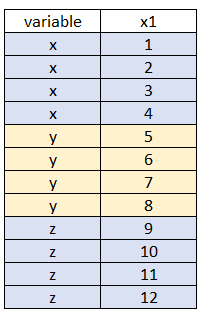
我想根据多个选择来子集数据。我使用了来自pickerInput的shinyWidgets函数,但没有得到想要的结果,忽略了一些观察:当选择x和y时,结果数据不正确,我得到如下结果:
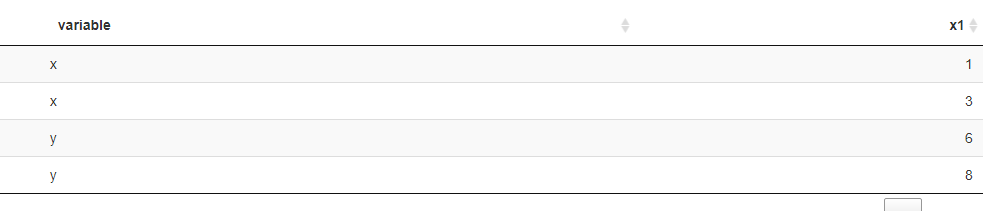
而不是这个
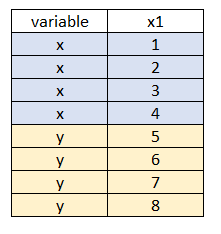
我们怎么才能修好它?我就是这样做的:
library("shiny")
library(DT)
library(shinyWidgets)

shinyApp(
  ui = fluidPage(

    sidebarLayout(

      sidebarPanel(

        pickerInput("id", "variable:",
                    choices = c( "x", "y","z"),
                    options = list(`actions-box` = TRUE),
                    selected = "z",
                    multiple = TRUE )),

      mainPanel(
        dataTableOutput("example")
      )
    )
  ),

  server = function(input, output) {

    df <- data.frame(variable = c(rep("x",4),rep("y",4),rep("z",4)),
                     x1 = 1:12)


    output$example <- renderDT({
      df2 <- df %>%
        filter(variable == input$id )
    })

  }

)
如能提供帮助,我们将不胜感激。
回答 1
Stack Overflow用户
回答已采纳
发布于 2022-01-20 16:47:04
问题是使用==而不是%in%。==是一个元素级的操作符,当rhs上只有一个元素时,它工作,因为它会循环,而长度>1且不等于lhs向量的长度时,它会回收,但是比较会得到不正确的输出。
> library(dplyr)
> df %>% mutate(new = variable == c("x", "y"))
   variable x1   new
1         x  1  TRUE
2         x  2 FALSE
3         x  3  TRUE
4         x  4 FALSE
5         y  5 FALSE
6         y  6  TRUE
7         y  7 FALSE
8         y  8  TRUE
9         z  9 FALSE
10        z 10 FALSE
11        z 11 FALSE
12        z 12 FALSE
> df %>% mutate(new = variable %in% c("x", "y"))
   variable x1   new
1         x  1  TRUE
2         x  2  TRUE
3         x  3  TRUE
4         x  4  TRUE
5         y  5  TRUE
6         y  6  TRUE
7         y  7  TRUE
8         y  8  TRUE
9         z  9 FALSE
10        z 10 FALSE
11        z 11 FALSE
12        z 12 FALSE
如果我们检查第一次比较,将“x”、“y”与前两行进行比较,然后再进行重新计算,再将'x‘、'y’等进行比较,直到到达最后一行为止(在某些情况下,当元素数不是rhs向量长度的倍数时会发现警告)。
library(DT)
library(shinyWidgets)
library(dplyr)

shinyApp(
  ui = fluidPage(

    sidebarLayout(

      sidebarPanel(

        pickerInput("id", "variable:",
                    choices = c( "x", "y","z"),
                    options = list(`actions-box` = TRUE),
                    selected = "z",
                    multiple = TRUE )),

      mainPanel(
        dataTableOutput("example")
      )
    )
  ),

  server = function(input, output) {

    df <- data.frame(variable = c(rep("x",4),rep("y",4),rep("z",4)),
                     x1 = 1:12)


    output$example <- renderDT({
      df2 <- df %>%
        filter(variable %in% input$id )
    })

  }

)
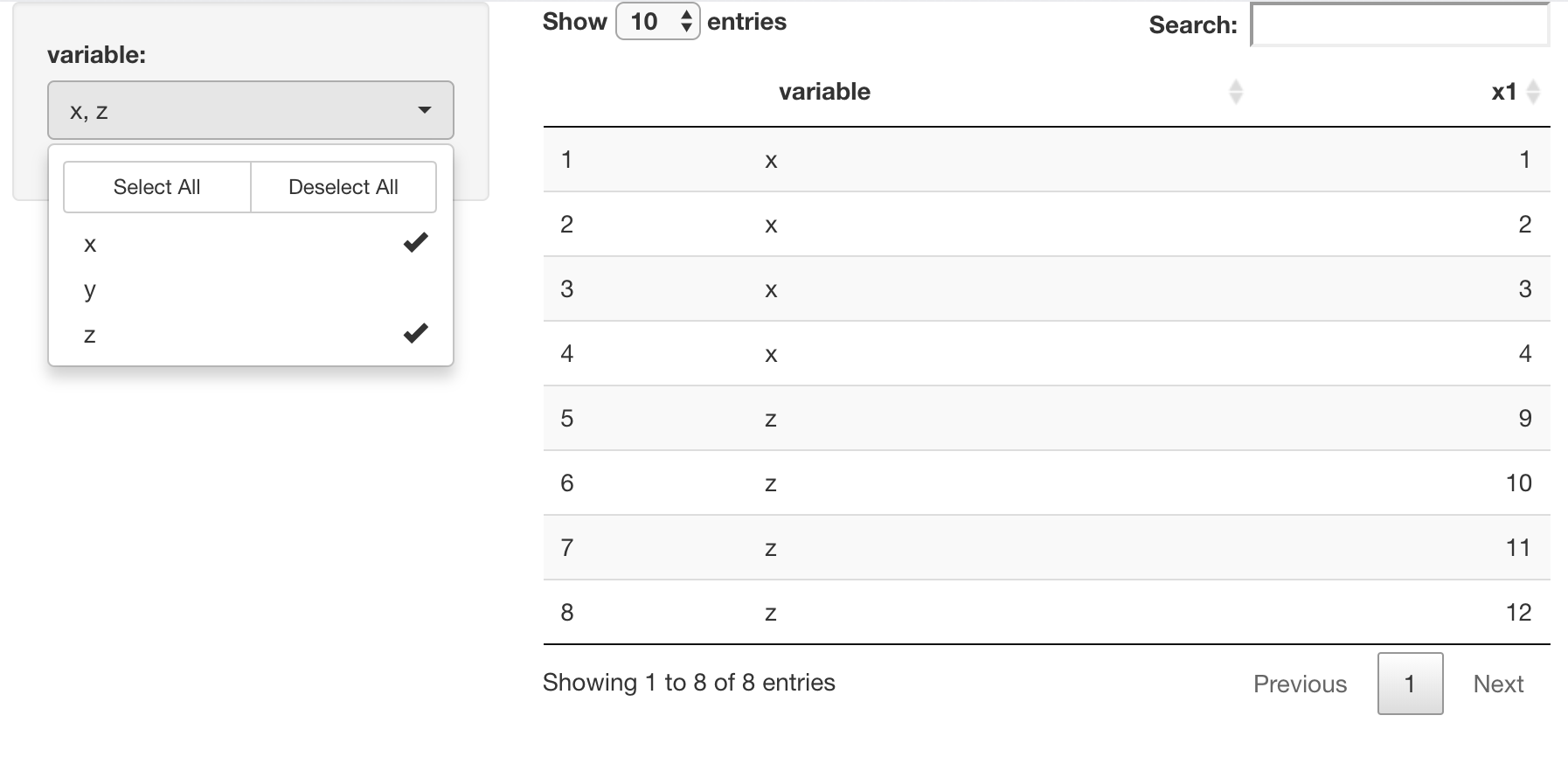
-output
页面原文内容由Stack Overflow提供。腾讯云小微IT领域专用引擎提供翻译支持
原文链接:
https://stackoverflow.com/questions/70789982
复制相关文章
相似问题
腾讯云开发者

Copyright © 2013 - 2026 Tencent Cloud. All Rights Reserved. 腾讯云 版权所有
深圳市腾讯计算机系统有限公司 ICP备案/许可证号:粤B2-20090059  粤公网安备44030502008569号
腾讯云计算(北京)有限责任公司 京ICP证150476号 | 京ICP备11018762号