
当将Editorjs自定义块作为react项目中的默认块时,在click上呈现两次
当将Editorjs自定义块作为react项目中的默认块时,在click上呈现两次
提问于 2022-01-20 09:04:38
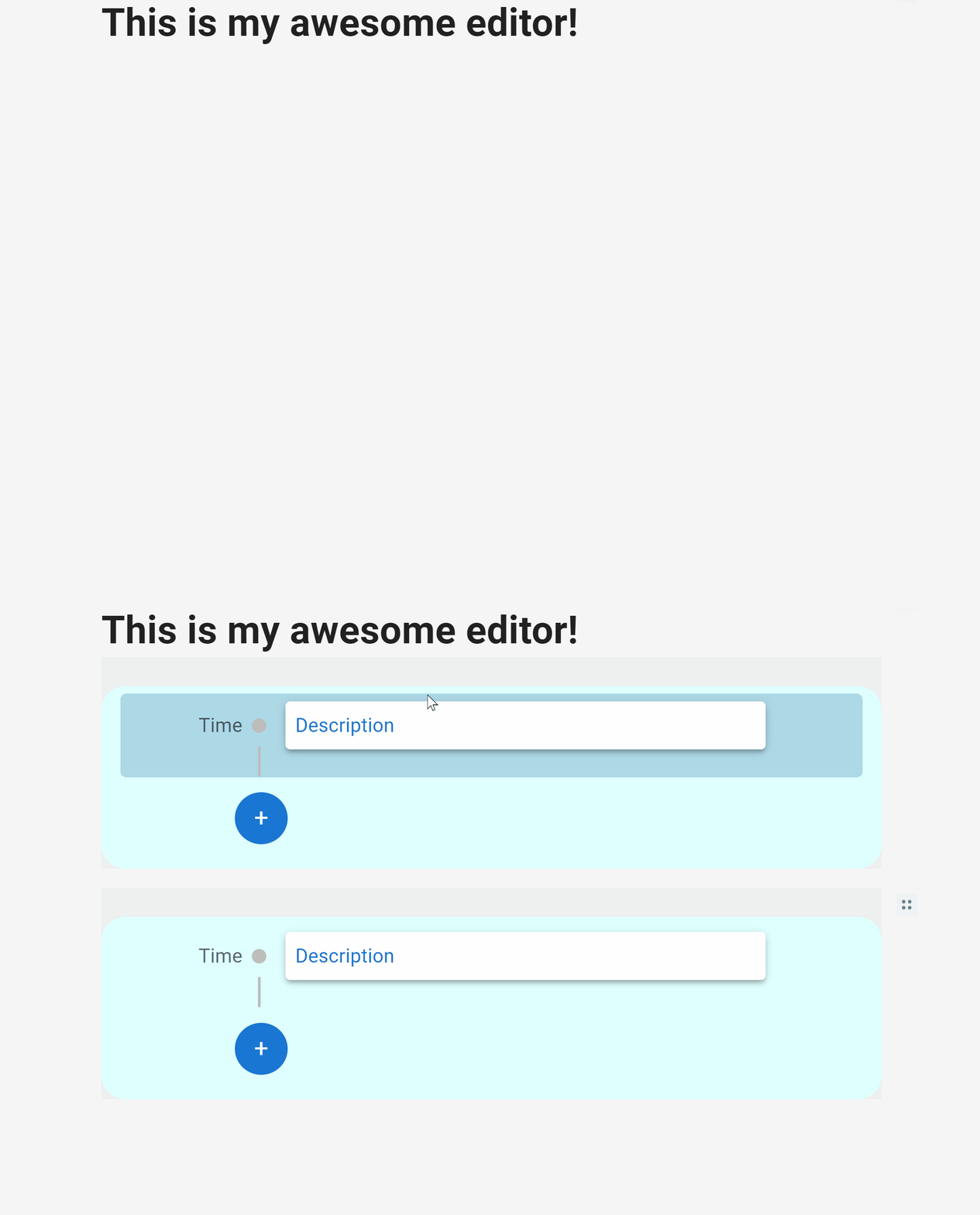
我按照这教程在react中集成了editorjs,并创建了一个定制的editorjs插件。本教程可以很好地创建自定义块,但我希望在editorjs中将自定义块作为一个editorjs。在此过程中,当我单击编辑器中的空空间时,该块会呈现两次。可能是什么问题。
这是Editor.jsx文件的代码,用于创建editorjs文本编辑器:
import { default as React, useEffect, useRef } from "react";
import EditorJS from "@editorjs/editorjs";
import { EDITOR_JS_TOOLS } from "./tools";
import { Box } from "@mui/material";

const DEFAULT_INITIAL_DATA = () => {
  return {
    time: new Date().getTime(),
    blocks: [
      {
        type: "header",
        data: {
          text: "This is my awesome editor!",
          level: 1,
        },
      },
    ],
  };
};

const EDITTOR_HOLDER_ID = "editorjs";

const Editor = (props) => {
  const ejInstance = useRef();
  const [editorData, setEditorData] = React.useState(DEFAULT_INITIAL_DATA);

  // This will run only once
  useEffect(() => {
    if (!ejInstance.current) {
      initEditor();
    }
    return () => {
      ejInstance.current.destroy();
      ejInstance.current = null;
    };
  }, []);

  const initEditor = () => {
    const editor = new EditorJS({
      holder: EDITTOR_HOLDER_ID,
      logLevel: "ERROR",
      data: editorData,
      onReady: () => {
        ejInstance.current = editor;
      },
      onChange: async () => {
        let content = await this.editorjs.saver.save();
        // Put your logic here to save this data to your DB
        setEditorData(content);
      },
      autofocus: true,
      tools: EDITOR_JS_TOOLS,
      defaultBlock: "timeline", // I have made timeline (custom block) as default block.
    });
  };

  return (
    <React.Fragment>
      <Box id={EDITTOR_HOLDER_ID} sx={{ py: 2 }}></Box>
    </React.Fragment>
  );
};

export default Editor;
回答 1
Stack Overflow用户
发布于 2022-04-23 14:45:53
我也面临着同样的问题,所以我使用了react editor-js,但是简单地呈现ReactEditor组件是不可能的,因为它会给出相同的结果(复制的块),因为父组件被呈现了两次,我不知道为什么,我保留了useEffect中呈现机制的editorjs,并通过id引用了呈现容器。
import React from "react";
import ReactDOM from "react-dom";

import { createReactEditorJS } from "react-editor-js";
import Header from "@editorjs/header";

import textBox from "./tools/textBox";

const ReactEditor = createReactEditorJS();

const Editor = () => {
  React.useEffect(() => {
    ReactDOM.render(
      <ReactEditor
        tools={{
          header: Header,
          textBox: textBox,
        }}
        defaultBlock="textBox"
      />,
      document.getElementById("react-editor-container")
    );
  }, []);

  return <div id="react-editor-container"></div>;
};
然而,我是一个菜鸟,这可能不是最好的解决办法!!
页面原文内容由Stack Overflow提供。腾讯云小微IT领域专用引擎提供翻译支持
原文链接:
https://stackoverflow.com/questions/70783390
复制相关文章
相似问题
腾讯云开发者

Copyright © 2013 - 2026 Tencent Cloud. All Rights Reserved. 腾讯云 版权所有
深圳市腾讯计算机系统有限公司 ICP备案/许可证号:粤B2-20090059  粤公网安备44030502008569号
腾讯云计算(北京)有限责任公司 京ICP证150476号 | 京ICP备11018762号