
itext 7目录
itext 7目录
提问于 2022-01-19 16:00:16
按照本例中的模式,https://kb.itextpdf.com/home/it7kb/examples/toc-as-first-page在我自己的代码中实现了目录(toc)。一切正常,但有以下例外:
- My toc有3页,可以生长
- 我可以将最后两页pdf (2页toc)移到文档的顶部,但是当我试图将toc的第一页移到顶部时,我会得到一个空异常。
int tocPageNumber = pdfDoc.GetNumberOfPages();pdfDoc.MovePage(tocPageNumber,1);// Null Exception int doc.Close();
这个代码是概念的证明。我有逻辑来确定toc中有多少页,并在一个循环中移动它们。
屏幕截图:
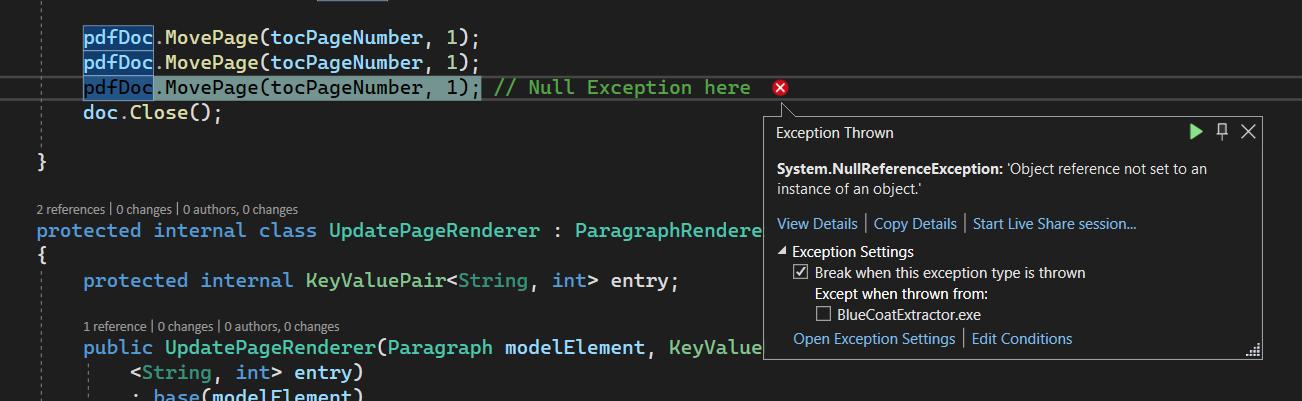
堆栈跟踪:
   at KernelExtensions.Get[TKey,TValue](IDictionary`2 col, TKey key)
   at iText.Kernel.Pdf.PdfDictionary.Put(PdfName key, PdfObject value)
   at iText.Kernel.Pdf.PdfPages.AddPage(Int32 index, PdfPage pdfPage)
   at iText.Kernel.Pdf.PdfPagesTree.AddPage(Int32 index, PdfPage pdfPage)
   at iText.Kernel.Pdf.PdfDocument.MovePage(Int32 pageNumber, Int32 insertBefore)
   at BlueCoatExtractor.PDFHelper.buildPDFNatively1(String header, String dtStamp, Dictionary`2 bcPoliciesDict, String dest) in C:\Users\xyz\source\repos\bbb\bbb\PDFHelper.cs:line 216
重新创建问题的完整示例代码:
using System;
using System.Collections;
using System.Collections.Generic;
using System.IO;

using iText.IO.Font.Constants;
using iText.Kernel.Font;
using iText.Kernel.Pdf;
using iText.Kernel.Pdf.Action;
using iText.Kernel.Pdf.Canvas.Draw;
using iText.Layout;
using iText.Layout.Element;
using iText.Layout.Hyphenation;
using iText.Layout.Layout;
using iText.Layout.Properties;
using iText.Layout.Renderer;
using iText.Kernel.Utils;

namespace BlueCoatExtractor
{
    public class C06E04_TOC_GoToNamed
    {
        public const String SRC = "Logs/jekyll_hyde.txt";

        public const String DEST = "Output/jekyll_hyde_toc2.pdf";

        internal static void initialize()
        {
            FileInfo file = new FileInfo(DEST);
            file.Directory.Create();
            //new C06E04_TOC_GoToNamed().CreatePdf(DEST);
        }

        public static void CreatePdf()
        {
            //Initialize PDF document
            PdfDocument pdf = new PdfDocument(new PdfWriter(DEST));
            // Initialize document
            Document document = new Document(pdf);
            PdfFont font = PdfFontFactory.CreateFont(StandardFonts.TIMES_ROMAN);
            PdfFont bold = PdfFontFactory.CreateFont(StandardFonts.HELVETICA_BOLD);
            document.SetTextAlignment(TextAlignment.JUSTIFIED).SetHyphenation(new HyphenationConfig("en", "uk", 3, 3))
                .SetFont(font).SetFontSize(11);
            StreamReader sr = File.OpenText(SRC);
            String name;
            String line;
            Paragraph p;
            bool title = true;
            int counter = 0;

            IList<KeyValuePair<String, KeyValuePair<String, int>>> toc = new List<KeyValuePair
                <String, KeyValuePair<String, int>>>();
            while ((line = sr.ReadLine()) != null)
            {
                p = new Paragraph(line);
                p.SetKeepTogether(true);
                if (title)
                {
                    name = String.Format("title{0:00}", counter++);
                    KeyValuePair<String, int> titlePage = new KeyValuePair<string, int>(line, pdf.GetNumberOfPages());
                    p.SetFont(bold).SetFontSize(12).SetKeepWithNext(true).SetDestination(name).SetNextRenderer(new UpdatePageRenderer(p, titlePage));
                    title = false;
                    document.Add(p);
                    toc.Add(new KeyValuePair<string, KeyValuePair<string, int>>(name, titlePage));
                }
                else
                {
                    p.SetFirstLineIndent(36);
                    if (String.IsNullOrEmpty(line))
                    {
                        p.SetMarginBottom(12);
                        title = true;
                    }
                    else
                    {
                        p.SetMarginBottom(0);
                    }
                    document.Add(p);
                }
            }
            document.Add(new AreaBreak(AreaBreakType.NEXT_PAGE));
            p = new Paragraph().SetFont(bold).Add("Table of Contents").SetDestination("toc");
            document.Add(p);
            toc.RemoveAt(0);
            IList<TabStop> tabstops = new List<TabStop>();
            tabstops.Add(new TabStop(580, TabAlignment.RIGHT, new DottedLine()));
            foreach (KeyValuePair<String, KeyValuePair<String, int>> entry in toc)
            {
                KeyValuePair<String, int> text = entry.Value;
                p = new Paragraph().AddTabStops(tabstops).Add(text.Key).Add(new Tab()).Add(text.Value.ToString()).SetAction
                    (PdfAction.CreateGoTo(entry.Key));
                document.Add(p);
            }
            //Close document

            int tocPageNumber = pdf.GetNumberOfPages();
            pdf.MovePage(tocPageNumber, 1);
            pdf.MovePage(tocPageNumber, 1);
            pdf.MovePage(tocPageNumber, 1); // null exception

            document.Close();
        }

        protected internal class UpdatePageRenderer : ParagraphRenderer
        {
            protected internal KeyValuePair<String, int> entry;

            public UpdatePageRenderer(Paragraph modelElement, KeyValuePair
                <String, int> entry)
                : base(modelElement)
            {
                this.entry = entry;
            }

            public override LayoutResult Layout(LayoutContext layoutContext)
            {
                LayoutResult result = base.Layout(layoutContext);
                int pageNumber = layoutContext.GetArea().GetPageNumber();
                entry = new KeyValuePair<string, int>(entry.Key, pageNumber);
                return result;
            }
        }
    }
}使用以下文本文件:https://github.com/itext/i7js-highlevel/blob/develop/src/main/resources/txt/jekyll_hyde.txt
回答 1
Stack Overflow用户
回答已采纳
发布于 2022-01-19 18:23:22
我创建了一个新文档,并将原始文档中的内容复制到其中。内容链接表仍按预期运行。
        fs = File.Create("Output/resultDoc.pdf");
        fs.Dispose();

        PdfDocument srcDoc = new PdfDocument(new PdfReader(dest));
        var srcTotalPages = srcDoc.GetNumberOfPages();

        PdfDocument resultDoc = new PdfDocument(new PdfWriter("Output/resultDoc.pdf"));
        resultDoc.InitializeOutlines();


        IList<int> pages = new List<int>();
        pages.Add(101);
        pages.Add(102);
        pages.Add(103);

        for (int i = 1; i <= 100; i++)
        {
            pages.Add(i);
        }

        srcDoc.CopyPagesTo(pages, resultDoc);

        resultDoc.Close();

srcDoc.Close();页面原文内容由Stack Overflow提供。腾讯云小微IT领域专用引擎提供翻译支持
原文链接:
https://stackoverflow.com/questions/70773803
复制相关文章
相似问题
腾讯云开发者

Copyright © 2013 - 2026 Tencent Cloud. All Rights Reserved. 腾讯云 版权所有
深圳市腾讯计算机系统有限公司 ICP备案/许可证号:粤B2-20090059  粤公网安备44030502008569号
腾讯云计算(北京)有限责任公司 京ICP证150476号 | 京ICP备11018762号