
闪亮:如何根据数据在表中创建操作链接,然后使用链接中的数据执行筛选?
我有两张共用钥匙的桌子。第一个表总是显示在UI中。我希望用户能够单击表中的一个链接,然后显示一个模态对话,这是根据单击的链接过滤的第二个表。
具体示例:将mtcars显示为表,并为gear列提供可单击链接。例如,当单击一个4时,就会出现一个模态对话框,显示所有带有4个齿轮的汽车。如果3被点击,你会得到所有的汽车有3个齿轮。
无论如何,似乎都没有与shiny::actionLink()传递一个参数,而这正是我想要用于表链接的内容。我意识到下面的例子没有正确地创建链接,但是不知道第二步是如何工作的(对链接进行操作),我只是在一些伪代码中留下了一个示例。
library(shiny)
library(tidyverse)


ui <- fluidPage(

    # Application title
    titlePanel("mtcars"),

        mainPanel(
           tableOutput("table")
        )
    )


server <- function(input, output) {

    output$table <- renderTable({
        mtcars %>%
            mutate(gear = actionLink("gearinput", label = gear)) #I realize this does not work, just leaving here as pseudo code.
    })

    observeEvent(input$gearinput, {
      showModal(modalDialog(
        title = "Gear filter",
        mtcars %>% filter(gear == input$gearinput)), #I can't figure out how to actually get the value based on the link clicked
      )
    })


}

# Run the application
shinyApp(ui = ui, server = server)回答 1
Stack Overflow用户
发布于 2022-01-18 23:20:55
我对dplyr不太熟悉,所以我改用了data.table。
我们可以在actionLinks中添加一个onclick事件,并通过Shiny.setInputValue将点击的设备提供给闪亮。
library(shiny)
# library(dplyr)
library(data.table)

DT <- copy(mtcars)
setDT(DT)

ui <- fluidPage(
  titlePanel("mtcars"),
  mainPanel(
    tableOutput("table")
  )
)

server <- function(input, output) {

  output$table <- renderTable({
    DT[, inputId := paste0("gear_input_", seq_len(.N))][, gear_links := as.character(actionLink(inputId = inputId, label = inputId, onclick = sprintf("Shiny.setInputValue(id = 'gear_click', value = %s);", gear))), by = inputId][, inputId := NULL]
  }, sanitize.text.function = function(x){x})

  observeEvent(input$gear_click, {
    showModal(modalDialog(
      title = "Gear filter",
      tableOutput("filtered_table"),
      size = "xl"
    ))
  })

  output$filtered_table <- renderTable({
    req(input$gear_click)
    DT[gear == input$gear_click][, c("gear_links", "vs") := NULL]
  })

}

shinyApp(ui = ui, server = server)
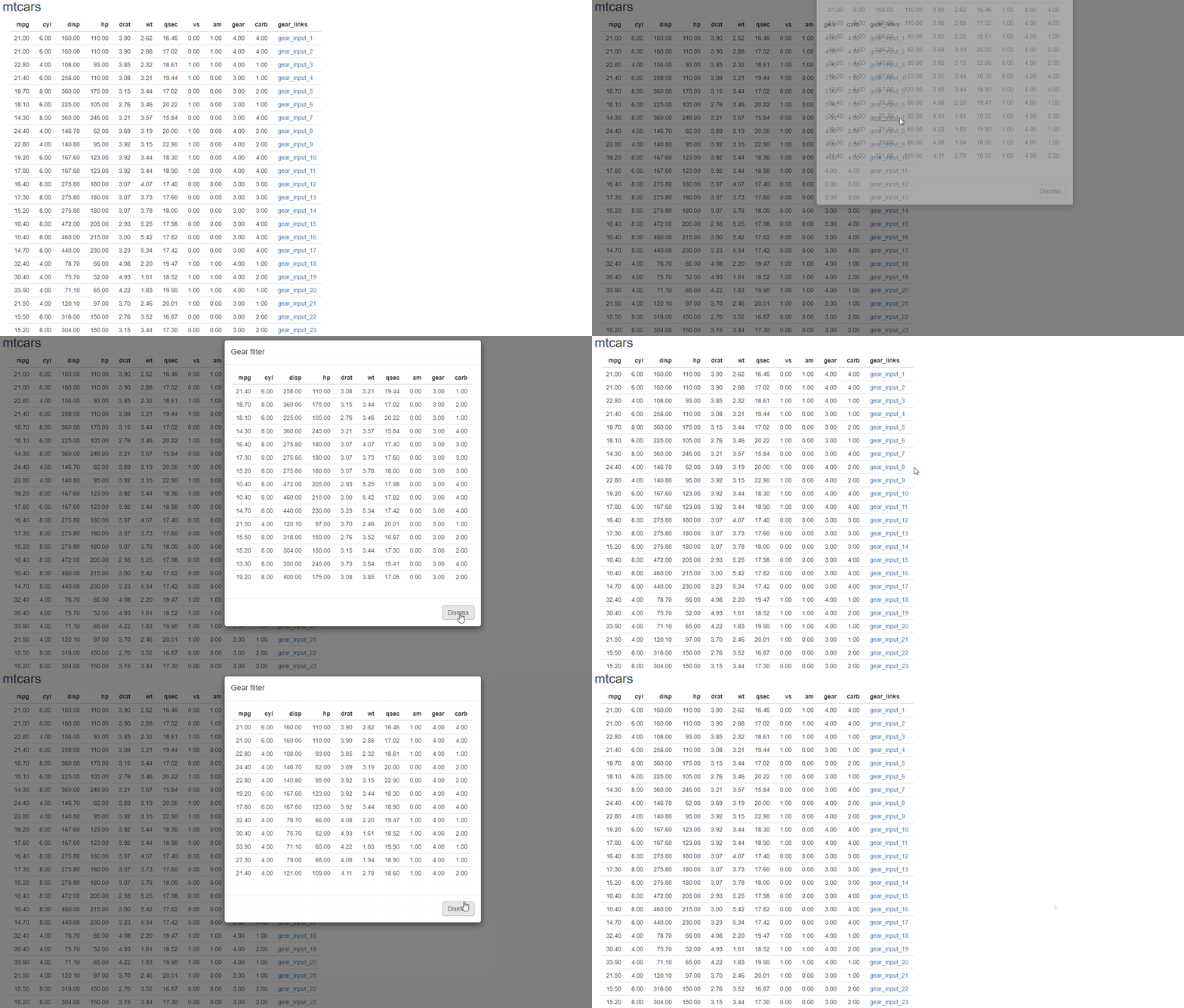
您可能想要更改链接到gear的标签--但是这样就更容易理解了。
与此有关的有用链接:
r shiny table not rendering html
https://shiny.rstudio.com/articles/communicating-with-js.html
https://stackoverflow.com/questions/70762834
复制相似问题
腾讯云开发者

Copyright © 2013 - 2026 Tencent Cloud. All Rights Reserved. 腾讯云 版权所有
深圳市腾讯计算机系统有限公司 ICP备案/许可证号:粤B2-20090059  粤公网安备44030502008569号
腾讯云计算(北京)有限责任公司 京ICP证150476号 | 京ICP备11018762号