
SwiftUI: HStack中的按钮会导致整个HStack超出界限
SwiftUI: HStack中的按钮会导致整个HStack超出界限
提问于 2022-01-18 13:12:19
我有一个SwiftUI,它在HStack中包含许多按钮。这些按钮有一个图标和一些文本,垂直排列。我遇到了按钮可能变得太宽的问题: HStack超出了视图本身的范围。例如,如果“下载所有”按钮将其文本放在两行上,这是合乎逻辑的,但它并没有这样做。
预览示例:
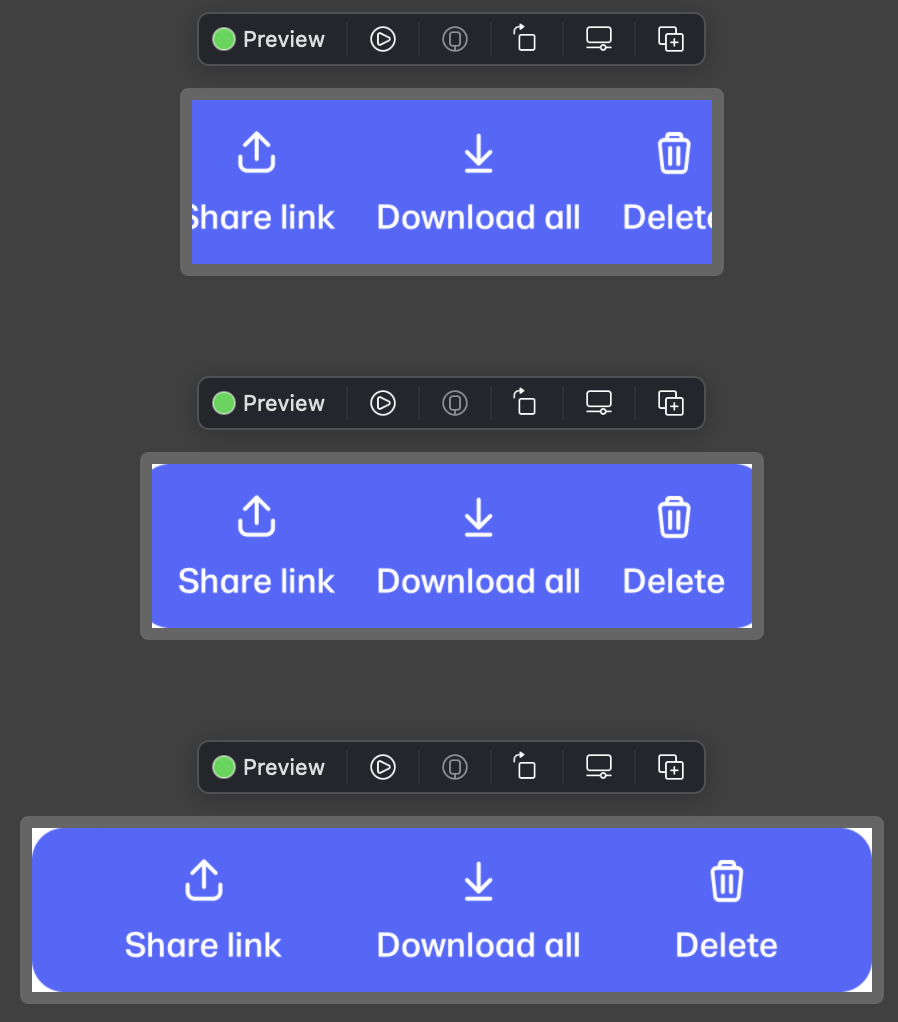
正如你所看到的,第一个版本有问题,这三个按钮不适合了。但即使在第二个例子中,圆角也没有完全显示--只有第三个例子是100%正确显示的。
代码:
import SwiftUI

struct TransferDetailsButtonsView: View {
  enum ButtonType: Hashable {
    case share
    case download
    case delete

    fileprivate var imageName: String {
      switch self {
        case .share:
          return "icon-share"
        case .download:
          return "icon-download"
        case .delete:
          return "icon-delete"
      }
    }

    fileprivate var title: String {
      switch self {
        case .share:
          return "Share"
        case .download:
          return "Download all"
        case .delete:
          return "Delete"
      }
    }
  }

  /// The button types you want to show
  var buttonTypes: [ButtonType] = [.share, .download, .delete]

  /// The action for the buttons
  var action: (ButtonType) -> Void = { _ in }

  var body: some View {
    HStack(spacing: 0) {
      Spacer(minLength: 20)
        .frame(maxWidth: .infinity)

      ForEach(buttonTypes, id: \.self) { button in
        Button {
          action(button)
        } label: {
          VStack(spacing: 8) {
            Image(button.imageName)
            Text(button.title)
              .lineLimit(nil)
          }
          .fixedSize()
        }

        Spacer(minLength: 20)
          .frame(maxWidth: .infinity)
      }
    }
    .padding(.vertical, 12)
    .foregroundColor(.white)
    .background(RoundedRectangle(cornerRadius: 16).fill(.blue))
  }
}

struct TransferDetailsButtonsView_Previews: PreviewProvider {
  static var previews: some View {
    Group {
      TransferDetailsButtonsView()
        .frame(width: 260)
        .previewLayout(.sizeThatFits)

      TransferDetailsButtonsView()
        .frame(width: 300)
        .previewLayout(.sizeThatFits)

      TransferDetailsButtonsView()
        .frame(width: 420)
        .previewLayout(.sizeThatFits)
    }
  }
}如何才能使HStack不超出整个边界,而是将多行文本用于按钮文本?
回答 1
Stack Overflow用户
回答已采纳
发布于 2022-01-18 19:33:26
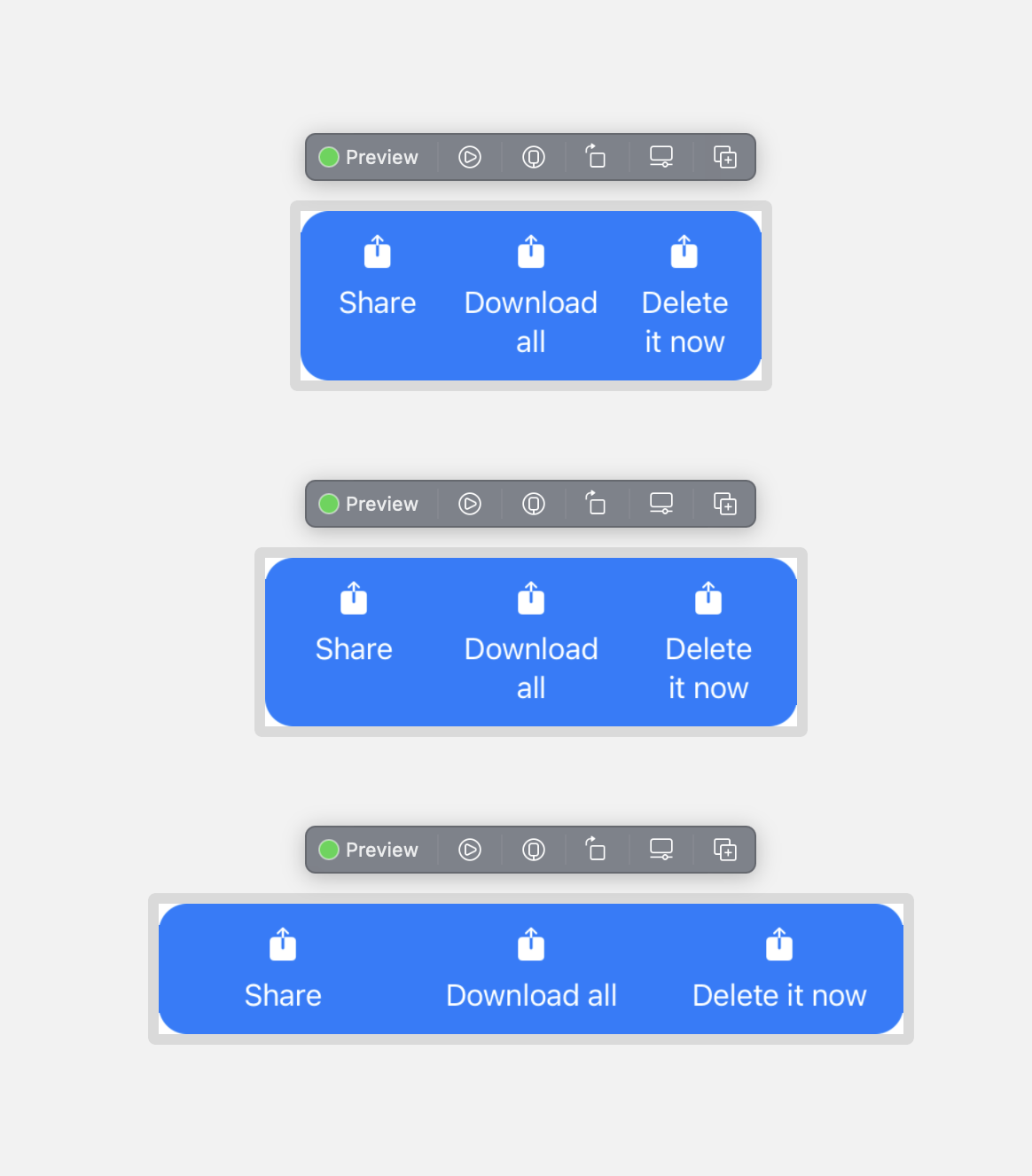
你的fixedSize()让它把HStack画在它的边界之外。您想要文本填充可用的空间,那么SwiftUI将尝试打断单词。如果容器太小,它会在字里行间破裂,所以你需要注意这一点,260是它可以与这个字体大小相匹配的最小的。
这是我想出来的,修改成可运行的SF符号。您需要在文本之间填充一些内容,否则它们就会在容器的某些尺寸上互相抵消。
struct TransferDetailsButtonsView: View {
    enum ButtonType: Hashable {
        case share
        case download
        case delete

        fileprivate var imageName: String {
            switch self {
            case .share:
                return "square.and.arrow.up.fill"
            case .download:
                return "square.and.arrow.up.fill"
            case .delete:
                return "square.and.arrow.up.fill"
            }
        }

        fileprivate var title: String {
            switch self {
            case .share:
                return "Share"
            case .download:
                return "Download all"
            case .delete:
                return "Delete it now"
            }
        }
    }

    /// The button types you want to show
    var buttonTypes: [ButtonType] = [.share, .download, .delete]

    /// The action for the buttons
    var action: (ButtonType) -> Void = { _ in }

    var body: some View {
        HStack(alignment: .top, spacing: 0) {
            ForEach(buttonTypes, id: \.self) { button in
                Button {
                    action(button)
                } label: {
                    VStack(spacing: 8) {
                        Image(systemName: button.imageName)
                        Text(button.title)
                            .frame(maxWidth: .infinity)
                    }
                }
                .padding(.horizontal, 4)
            }
        }
        .padding(.vertical, 12)
        .foregroundColor(.white)
        .background(RoundedRectangle(cornerRadius: 16).fill(.blue))
    }
}
页面原文内容由Stack Overflow提供。腾讯云小微IT领域专用引擎提供翻译支持
原文链接:
https://stackoverflow.com/questions/70756151
复制相关文章
相似问题
腾讯云开发者

Copyright © 2013 - 2026 Tencent Cloud. All Rights Reserved. 腾讯云 版权所有
深圳市腾讯计算机系统有限公司 ICP备案/许可证号:粤B2-20090059  粤公网安备44030502008569号
腾讯云计算(北京)有限责任公司 京ICP证150476号 | 京ICP备11018762号