
UICollectionViewCompositionalLayout可选部分
我看过这个类似的问题:,但答案似乎要么是在快照中忽略部分(我会这样做,但这就留下了另一个问题,我稍后会描述),或者呈现一个非常小的部分。这个解决方案似乎不是一个好的解决办法。
我有一个集合视图,使用具有不同数据源的组合布局。集合视图有四个节,但每个节都是可选的,这意味着如果该节的对应数据为空,则不应显示该节。
代码
布局定义
我有一个节提供程序,它使用sectionIndex来配置每个部分应该是什么样子。我认为这是不好的,因为如果我在快照中没有第三部分的数据,那么通常应该在第四节中的所有内容现在都会有一个indexPath,它将像第三部分那样布局。
每个区段有不同的项目大小,有些是正交滚动段。因此,如果第四节数据是使用第三节布局呈现的,那么它看起来是错误的。
NSCollectionLayoutSection * _Nullable (^sectionProvider)(NSInteger, id<NSCollectionLayoutEnvironment> _Nonnull) = ^NSCollectionLayoutSection * _Nullable (NSInteger sectionIndex, id<NSCollectionLayoutEnvironment> _Nonnull layoutEnvironment) {
    if (sectionIndex == 0) {
        //configure and return a layout for the first section
    } else if (sectionIndex == 1) {
        //configure and return a layout for the second section
    } else if (sectionIndex == 2) {
        //configure and return a layout for the third section
    } else if (sectionIndex == 3) {
        //configure and return a layout for the fourth section
    }
    return nil;
};


UICollectionViewCompositionalLayoutConfiguration *configuration = [[UICollectionViewCompositionalLayoutConfiguration alloc] init];
configuration.interSectionSpacing = 10;
configuration.scrollDirection = UICollectionViewScrollDirectionVertical;


self->_collectionViewLayout = [[UICollectionViewCompositionalLayout alloc] initWithSectionProvider:sectionProvider configuration:configuration];
数据源定义
这是定义数据源的地方。每个部分使用不同的数据模型类,因此我根据数据模型类的类型而不是索引路径来决定使用哪种单元格类型。
self->_dataSource = [[UICollectionViewDiffableDataSource alloc] initWithCollectionView:self.collectionView cellProvider:^UICollectionViewCell * _Nullable(UICollectionView * _Nonnull collectionView, NSIndexPath * _Nonnull indexPath, id  _Nonnull item) {
    if ([item isKindOfClass:[MyFirstSectionModel class]]) {
        return [collectionView dequeueConfiguredReusableCellWithRegistration:firstSectionCellRegistration forIndexPath:indexPath item:item];
    } else if ([item isKindOfClass:[MySecondSectionModel class]]) {
        return [collectionView dequeueConfiguredReusableCellWithRegistration:secondSectionCellRegistration forIndexPath:indexPath item:item];
    } else if ([item isKindOfClass:[MyThirdSectionModel class]]) {
        return [collectionView dequeueConfiguredReusableCellWithRegistration:thirdSectionCellRegistration forIndexPath:indexPath item:item];
    } else if ([item isKindOfClass:[MyFourthSectionModel class]]) {
        return [collectionView dequeueConfiguredReusableCellWithRegistration:fourthSectionCellRegistration forIndexPath:indexPath item:item];
    }
    return nil;
}];
快照构造
在这里,每个部分要么包含(如果有数据),要么被排除(如果区段是空的)。但是将一个节排除在外(例如,如果第三节没有任何数据,那么它将被排除在外,但这将使第四节的数据具有索引路径,索引为2,而索引路径将不适用于节提供程序。
如果我在快照中插入一个空部分,这仍然不能工作,因为其中一些部分有标题,所以如果它是一个具有标头的部分,那么标题仍然会被显示。但是,即使没有一个节有标头,我认为它仍然会为该节提供一些额外的空空间(但这可能是不正确的)。
- (void)reloadDataSourceAnimated:(BOOL)animated {
    NSDiffableDataSourceSnapshot<CICustomerReviewsSectionIdentifierType, CICustomerReviewsItemIdentifierType> *snapshot = [[NSDiffableDataSourceSnapshot alloc] init];


    if (self.firstSectionItems.count) {
        [snapshot appendSectionsWithIdentifiers:@[MyFirstSectionIdentifier]];
        [snapshot appendItemsWithIdentifiers:@[self.firstSectionItems] intoSectionWithIdentifier:MyFirstSectionIdentifier];
    }

    if (self.secondSectionItems.count) {
        [snapshot appendSectionsWithIdentifiers:@[MySecondSectionIdentifier]];
        [snapshot appendItemsWithIdentifiers:@[self.secondSectionItems] intoSectionWithIdentifier:MySecondSectionIdentifier];
    }

    if (self.thirdSectionItems.count) {
        [snapshot appendSectionsWithIdentifiers:@[MyThirdSectionIdentifier]];
        [snapshot appendItemsWithIdentifiers:@[self.thirdSectionItems] intoSectionWithIdentifier:MyThirdSectionIdentifier];
    }

    if (self.fourthSectionItems.count) {
        [snapshot appendSectionsWithIdentifiers:@[MyFourthSectionIdentifier]];
        [snapshot appendItemsWithIdentifiers:self.fourthSectionItems intoSectionWithIdentifier:MyFourthSectionIdentifier];
    }


    [self.dataSource applySnapshot:snapshot animatingDifferences:animated];
}
摘要
因此,问题是,如果我的一个或多个节没有数据,那么当它们被排除在快照之外时,就会导致将后续节的数据呈现在错误的部分中(因为节提供程序根据索引配置节,并且在空节不再是原始indexPath之后配置每个节的indexPath)。
问题
- 是否有一种方法可以使节是可选的,并且不为“空”部分呈现任何常规视图和补充视图?
回答 1
Stack Overflow用户
发布于 2022-07-15 14:05:18
在应用数据源快照之前,我通过将集合视图数据分配给局部变量来解决这个问题。UICollectionViewCompositionalLayoutSectionProvider闭包可以访问该变量,以确定给定索引需要返回哪些布局。
示例
让我们以这个数据模型为例:
struct ViewControllerData {
    let texts: [String]
    let colors: [UIColor]
    let numbers: [Int]
}
集合视图数据源定义:
enum Section: Hashable {
    case first
    case second
    case third
}

enum SectionData: Hashable {
    case text(String)
    case color(UIColor)
    case number(Int)
}

lazy var datasource: UICollectionViewDiffableDataSource<Section, SectionData> = {

    let dataSource = UICollectionViewDiffableDataSource<Section, SectionData>(collectionView: self.collectionView) { [weak self] (collectionView, indexPath, data) -> UICollectionViewCell? in

        switch data {
        case .text(let text):
            let cell = collectionView.dequeueReusableCell(withReuseIdentifier: TextCollectionViewCell.reuseIdentifier, for: indexPath) as? TextCollectionViewCell
            cell?.textLabel.text = text
            return cell

        case .color(let color):
            let cell = collectionView.dequeueReusableCell(withReuseIdentifier: ColorCollectionViewCell.reuseIdentifier, for: indexPath) as? ColorCollectionViewCell
            cell?.colorView.backgroundColor = color
            return cell

        case .number(let number):
            let cell = collectionView.dequeueReusableCell(withReuseIdentifier: NumberCollectionViewCell.reuseIdentifier, for: indexPath) as? NumberCollectionViewCell
            cell?.numberLabel.text = "\(number)"
            return cell
        }
    }

    dataSource.supplementaryViewProvider = ...

    return dataSource
}()
配置不包含数据的可区分快照,并将模型数据分配给局部变量:
private var currentData: ViewControllerData?

public func showData(_ data: ViewControllerData) {

    self.currentData = data

    var snapshot = NSDiffableDataSourceSnapshot<Section, SectionData>()

    if !data.texts.isEmpty {
        snapshot.appendSections([.first])
        snapshot.appendItems(data.texts.map { SectionData.text($0 )}, toSection: .first)
    }

    if !data.colors.isEmpty {
        snapshot.appendSections([.second])
        snapshot.appendItems(data.colors.map { SectionData.color($0) }, toSection: .second)
    }

    if !data.numbers.isEmpty {
        snapshot.appendSections([.third])
        snapshot.appendItems(data.numbers.map { SectionData.number($0) }, toSection: .third)
    }

    datasource.apply(snapshot, animatingDifferences: true)
}
使用此变量提供正确的节布局:
lazy var collectionViewLayout: UICollectionViewLayout = {

    let layout = UICollectionViewCompositionalLayout { [weak self] (sectionIndex, layoutEnvironment) -> NSCollectionLayoutSection? in

        guard let section = self?.currentData?.visibleSection(at: sectionIndex) else { return nil }

        switch section {
        case .first:
            let section = ...
            return section

        case .second:
            let header = ...
            let section = ...
            section.boundarySupplementaryItems = [header]
            return section

        case .third:
            let section = ...
            return section
        }
    }

    return layout
}()为了方便起见,visibleSection(at index:)是ViewControllerData的扩展:
extension ViewControllerData {

    var visibleSections: [ViewController.Section] {

        var sections: [ViewController.Section] = []
        if !texts.isEmpty { sections.append(.first) }
        if !colors.isEmpty { sections.append(.second) }
        if !numbers.isEmpty { sections.append(.third) }

        return sections
    }

    func visibleSection(at index: Int) -> ViewController.Section? {
        guard visibleSections.indices.contains(index) else { return nil }
        return visibleSections[index]
    }
}
此变量还可用于收集视图数据源,以提供补充视图:
dataSource.supplementaryViewProvider = { [weak self] (collectionView, kind, indexPath) in

    guard let section = self?.currentData?.visibleSection(at: indexPath.section) else { return nil }

    switch section {
    case .second:
        let header = collectionView.dequeueReusableSupplementaryView(ofKind: UICollectionView.elementKindSectionHeader, withReuseIdentifier: HeaderView.reuseIdentifier, for: indexPath) as? HeaderView
        header?.textLabel.text = "Colors section header"
        return header

    default: return nil
    }
}
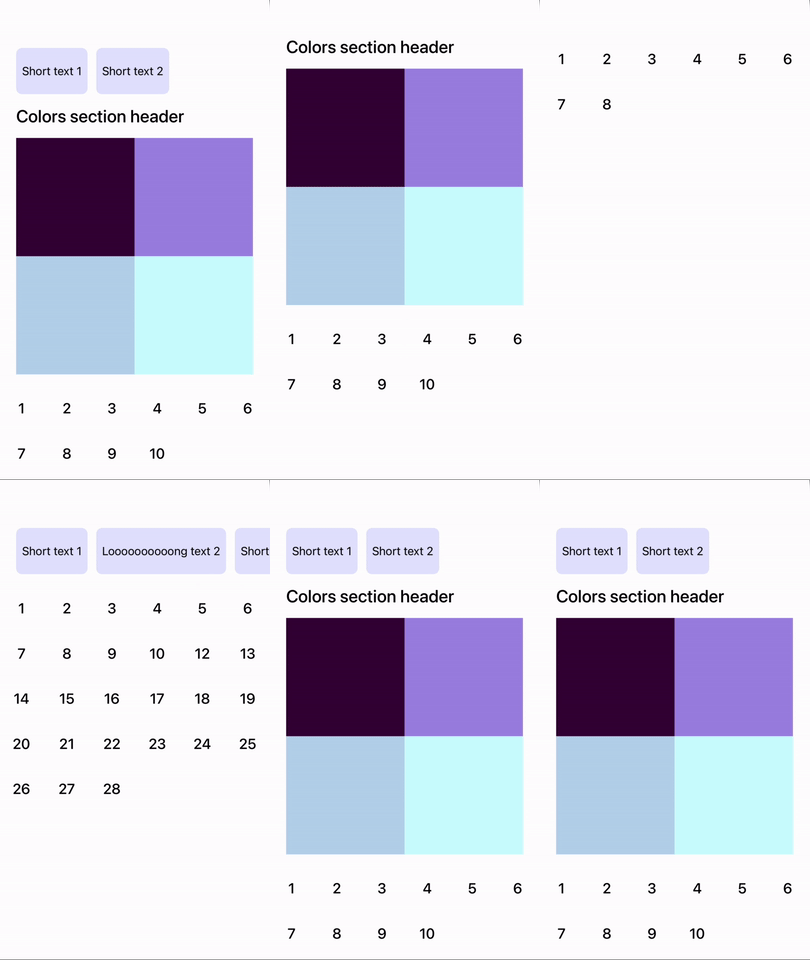
结果:
https://stackoverflow.com/questions/70746178
复制相似问题
腾讯云开发者

Copyright © 2013 - 2026 Tencent Cloud. All Rights Reserved. 腾讯云 版权所有
深圳市腾讯计算机系统有限公司 ICP备案/许可证号:粤B2-20090059  粤公网安备44030502008569号
腾讯云计算(北京)有限责任公司 京ICP证150476号 | 京ICP备11018762号