
如何使用selenium在网页中搜索,尽管使用了正确的搜索id
我正在尝试使用selenium搜索网页。下面是搜索页面的HTML代码片段。
<div class="cmp-globalsite-search ac_box">
     <input id="searchString" type="text" class="form-control searchString
          ac_input" placeholder="Search" aria-label="Search" required="" autocomplete="off">
     <input type="hidden" id="searchTargetUrl" value="/en/search">
     <a class="searchHead btn" href="#">
     <span class="nav-icon gcom-icon-search"></span>
     </a>
</div>上面这个是从https://www.gartner.com上拿来的。
我正在使用下面的python代码来使用搜索页面。
url = 'https://www.gartner.com/'
driver = webdriver.Chrome(executable_path='path to chrome web driver')
driver.get(url)
elem = driver.find_element_by_id("SearchString")
elem.send_keys("Risk Management Solution")
elem.send_keys(keys.RETURN)
奇怪的是,我得到了以下错误:
NoSuchElementException: no such element: Unable to locate element: {"method":"css
selector","selector":"[id="SearchString"]"}
(Session info: chrome=97.0.4692.71)
我也尝试了以下几点:
elem = driver.find_element_by_xpath("""//input[@id="searchTargetUrl"]/input[@value = "Risk Management Solution""")得到类似的错误:
InvalidSelectorException: invalid selector: Unable to locate an element with the xpath
expression //input[@id="searchTargetUrl"]/input[@value = "Risk Management Solution because
of the following error:
SyntaxError: Failed to execute 'evaluate' on 'Document': The string
'//input[@id="searchTargetUrl"]/input[@value = "Risk Management Solution' is not a valid
XPath expression.
(Session info: chrome=97.0.4692.71)
我是硒的新手,因此需要任何线索。
更新
我已经从上面的网站复制了搜索页面的full xpath。
//*[@id="gartnerinternalpage-9ac4556e05"]/div[2]/div/div/div/div/div/div/section/div/div/div[1]/div[2]/div/div[1]/input因此,我在python代码中替换了上面的xpath字符串,并添加了//input[@value={0}]。
还是没运气!!
回答 1
Stack Overflow用户
发布于 2022-01-15 16:49:01
默认情况下,搜索字段不可见,若要向搜索字段发送字符序列,需要先在搜索图标上click()用于element_to_be_clickable()的WebDriverWait,您可以使用以下任何一个Locator Strategies
使用
- 的CSS_SELECTOR:
20).until(EC.element_to_be_clickable((By.CSS_SELECTOR,"button#onetrust-accept-btn-handler"))).click() WebDriverWait(driver,driver,20).until(EC.element_to_be_clickable((By.CSS_SELECTOR,“span.nav-icon.gcom-图标搜索”)).click()WebDriverWait(驱动程序,20).until(EC.element_to_be_clickable((By.CSS_SELECTOR,(“input#searchString”)).send_keys(“风险管理解决方案”+ Keys.RETURN)
使用XPATH的
- :
20).until(EC.element_to_be_clickable((By.XPATH,"//button@id='onetrust-accept-btn-handler'"))).click() WebDriverWait(driver,20).until(EC.element_to_be_clickable((By.XPATH,“//span@class=‘nav-图标gcom-WebDriverWait’)).click()WebDriverWait(驱动程序,20).until(EC.element_to_be_clickable((By.XPATH,)"//input@id='searchString'"))).send_keys("Risk管理解决方案“+ Keys.RETURN)
- Note:您必须添加以下导入:
从selenium.webdriver.support.ui导入WebDriverWait从selenium.webdriver.common.by导入从selenium.webdriver.support导入expected_conditions作为EC
- 浏览器快照:
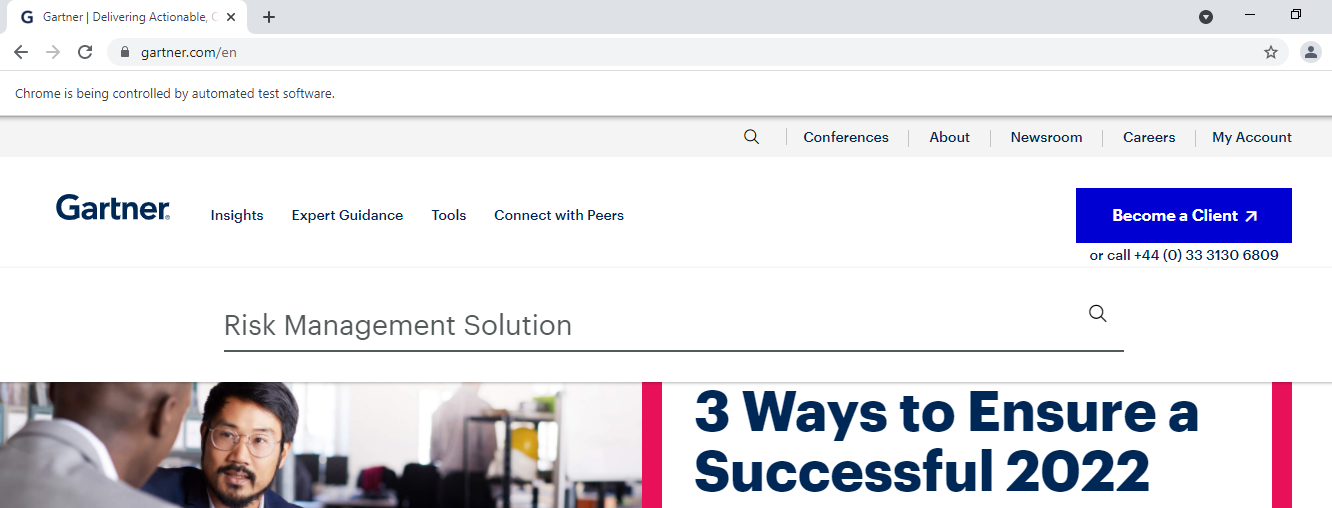
https://stackoverflow.com/questions/70719550
复制相似问题
腾讯云开发者

Copyright © 2013 - 2026 Tencent Cloud. All Rights Reserved. 腾讯云 版权所有
深圳市腾讯计算机系统有限公司 ICP备案/许可证号:粤B2-20090059  粤公网安备44030502008569号
腾讯云计算(北京)有限责任公司 京ICP证150476号 | 京ICP备11018762号