
改变反应树的宽度和高度-下拉树-选择组件
改变反应树的宽度和高度-下拉树-选择组件
提问于 2022-01-14 19:53:01
这里是努布·韦德夫。我正在使用一个基于树的drop文档:链接 Live示例:这里
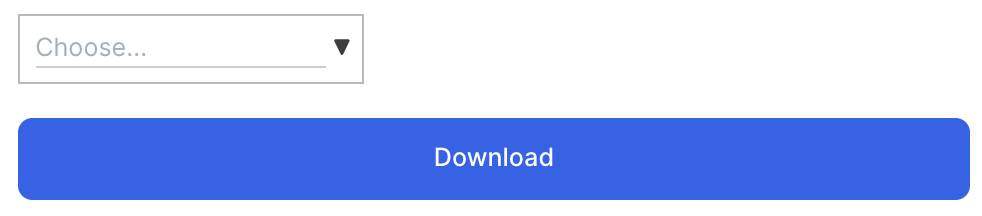
我想在这张图片中更改"Search/DropDown bar"的高度和宽度
To be displayed like this:
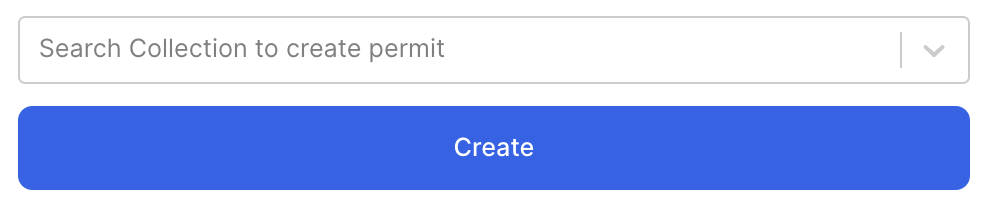
但是有一些问题,即使是在线css也不起作用。
主要组件是DropdownTreeSelect
见下面的代码:
DropDown.js
   import React, { Component } from "react";
    import DropdownTreeSelect from "react-dropdown-tree-select";
    import isEqual from "lodash/isEqual";
    import "./DownloadNFT.css";

export default class Container extends Component {
  constructor(props) {
    super(props);
    this.state = { data: props.data };
  }

  componentWillReceiveProps = (nextProps) => {
    if (!isEqual(nextProps.data, this.state.data)) {
      this.setState({ data: nextProps.data });
    }
  };

  shouldComponentUpdate = (nextProps) => {
    return !isEqual(nextProps.data, this.state.data);
  };

  render() {
    const { data, ...rest } = this.props;
    return (
      <DropdownTreeSelect
        className="mdl-demo"
        data={this.state.data}
        {...rest}
      />
    );
  }
}许多更改都是在内联和css中进行的,但是searchbox/dropdown的样式并没有改变。
DropDown.css
/* fallback, until https://github.com/CompuIves/codesandbox-client/issues/174 is resolved */
@font-face {
  font-family: "Material Icons";
  font-style: normal;
  font-weight: 400;
  src: url(https://fonts.gstatic.com/s/materialicons/v36/flUhRq6tzZclQEJ-Vdg-IuiaDsNc.woff2)
    format("woff2");
}

.material-icons {
  font-family: "Material Icons";
  font-weight: normal;
  font-style: normal;
  font-size: 54px;
  line-height: 1;
  letter-spacing: normal;
  text-transform: none;
  display: inline-block;
  white-space: nowrap;
  word-wrap: normal;
  direction: ltr;
  -webkit-font-feature-settings: "liga";
  -webkit-font-smoothing: antialiased;
}

/* mdl-demo is a custom classname to increases the specificity of our styles. It can be anything.
 * The idea is that it is easy to extend/override builtin styles with very little effort.
 */

.mdl-demo .dropdown-trigger > span:after {
  font-size: 32px;
  color: rgb(208, 255, 0);
}

.mdl-demo .toggle {
  font: normal normal normal 18px/1 "Material Icons";
  color: #555;
  white-space: pre;
  margin-right: 4px;
}回答 1
Stack Overflow用户
发布于 2022-01-14 22:04:47
document.getElementsByClassName("search")[0].placeholder="Search collection";将其放在演示示例中的render(<App />, document.getElementById("root")); in (index.js)之后
页面原文内容由Stack Overflow提供。腾讯云小微IT领域专用引擎提供翻译支持
原文链接:
https://stackoverflow.com/questions/70715875
复制相关文章
相似问题
腾讯云开发者

Copyright © 2013 - 2026 Tencent Cloud. All Rights Reserved. 腾讯云 版权所有
深圳市腾讯计算机系统有限公司 ICP备案/许可证号:粤B2-20090059  粤公网安备44030502008569号
腾讯云计算(北京)有限责任公司 京ICP证150476号 | 京ICP备11018762号