
SAPCore3.1-无法加载'System.ServiceModel.Activation.VirtualPathExtension‘类型
我有一个托管REST服务的.NET Core 3.1应用程序,我正在为一些端点合并some实用程序。我在Windows 10上。
在通过执行RfcConfigParameters建立新RfcConfigParameters parameters = new RfcConfigParameters()时,我通过其中一个端点遇到了一个错误
错误跟踪如下:
2022-01-14 12:49:41.982 -05:00 [ERR] LookupRfcAttributes Error: System.TypeLoadException: Could not load type 'System.ServiceModel.Activation.VirtualPathExtension' from assembly 'System.ServiceModel, Version=4.0.0.0, Culture=neutral, PublicKeyToken=b77a5c561934e089'.
   at SAP.Middleware.Connector.RfcConfigParameters.LoadConfiguration()
   at SAP.Middleware.Connector.RfcConfigParameters..cctor()
2022-01-14 12:49:42.781 -05:00 [ERR] An unhandled exception has occurred, The type initializer for 'SAP.Middleware.Connector.RfcConfigParameters' threw an exception.
System.Exception: The type initializer for 'SAP.Middleware.Connector.RfcConfigParameters' threw an exception.
   at SAPConnector.API.Services.SAPService.LookupRfcAttributes(AttributeLookupRequest attributeRequest) in C:\Users\nbaki.DOMARI\Projects\SAPConnector\SAPConnector.API\Services\SAPService.cs:line 55
   at SAPConnector.API.Controllers.SAPController.AttributeLookup(LookupRequest lookupRequest) in C:\Users\nbaki.DOMARI\Projects\SAPConnector\SAPConnector.API\Controllers\SAPController.cs:line 221
   at lambda_method(Closure , Object )
   at Microsoft.Extensions.Internal.ObjectMethodExecutorAwaitable.Awaiter.GetResult()
   at Microsoft.AspNetCore.Mvc.Infrastructure.ActionMethodExecutor.AwaitableObjectResultExecutor.Execute(IActionResultTypeMapper mapper, ObjectMethodExecutor executor, Object controller, Object[] arguments)
   at Microsoft.AspNetCore.Mvc.Infrastructure.ControllerActionInvoker.<InvokeActionMethodAsync>g__Awaited|12_0(ControllerActionInvoker invoker, ValueTask`1 actionResultValueTask)
   at Microsoft.AspNetCore.Mvc.Infrastructure.ControllerActionInvoker.<InvokeNextActionFilterAsync>g__Awaited|10_0(ControllerActionInvoker invoker, Task lastTask, State next, Scope scope, Object state, Boolean isCompleted)
   at Microsoft.AspNetCore.Mvc.Infrastructure.ControllerActionInvoker.Rethrow(ActionExecutedContextSealed context)
   at Microsoft.AspNetCore.Mvc.Infrastructure.ControllerActionInvoker.Next(State& next, Scope& scope, Object& state, Boolean& isCompleted)
   at Microsoft.AspNetCore.Mvc.Infrastructure.ControllerActionInvoker.InvokeInnerFilterAsync()
--- End of stack trace from previous location where exception was thrown ---
   at Microsoft.AspNetCore.Mvc.Infrastructure.ResourceInvoker.<InvokeFilterPipelineAsync>g__Awaited|19_0(ResourceInvoker invoker, Task lastTask, State next, Scope scope, Object state, Boolean isCompleted)
   at Microsoft.AspNetCore.Mvc.Infrastructure.ResourceInvoker.<InvokeAsync>g__Awaited|17_0(ResourceInvoker invoker, Task task, IDisposable scope)
   at Microsoft.AspNetCore.Routing.EndpointMiddleware.<Invoke>g__AwaitRequestTask|6_0(Endpoint endpoint, Task requestTask, ILogger logger)
   at Microsoft.AspNetCore.Authorization.AuthorizationMiddleware.Invoke(HttpContext context)
   at Microsoft.AspNetCore.Authentication.AuthenticationMiddleware.Invoke(HttpContext context)
   at NSwag.AspNetCore.Middlewares.SwaggerUiIndexMiddleware.Invoke(HttpContext context)
   at NSwag.AspNetCore.Middlewares.RedirectToIndexMiddleware.Invoke(HttpContext context)
   at NSwag.AspNetCore.Middlewares.OpenApiDocumentMiddleware.Invoke(HttpContext context)
   at CorrelationId.CorrelationIdMiddleware.Invoke(HttpContext context, ICorrelationContextFactory correlationContextFactory)
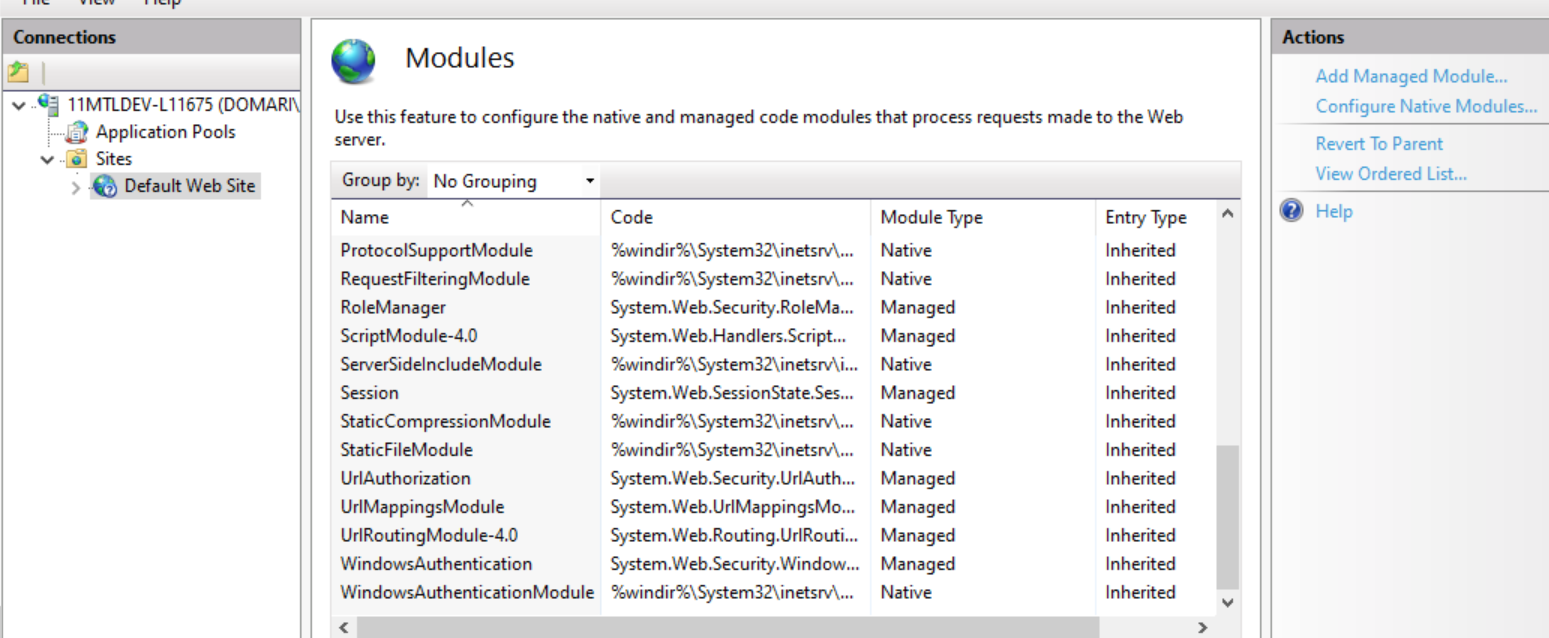
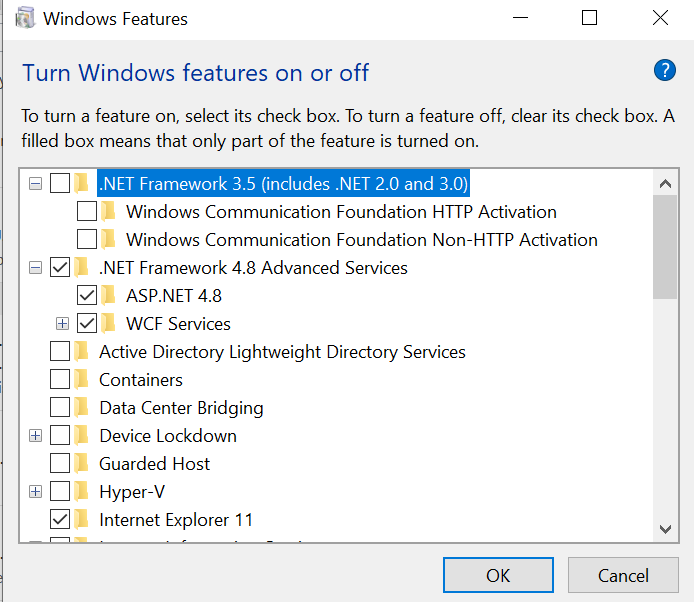
at SAPConnector.API.Middleware.ApiExceptionHandlingMiddleware.Invoke(HttpContext context) in C:\Users\nbaki.DOMARI\Projects\SAPConnector\SAPConnector.API\Middleware\ApiExceptionHandlingMiddleware.cs:line 32我跟随了这么多关于解决类似问题的文章和指南,但一直未能解决。我已经启用/禁用了所有Windows功能。我已经从IIS中删除了ServiceModel。我甚至完全禁用了.NET 3.5,感觉好像有冲突。我尝试过通过.NET v4注册aspnet_regiis.exe -iru,但它告诉我通过"Windows“或”done“来管理它,我已经这样做了。
下面是一些可以帮助我回答问题的截图:

C:\Windows\Microsoft.NET\Framework64\v4.0.30319>dism /online /get-features

Deployment Image Servicing and Management tool
Version: 10.0.19041.844

Image Version: 10.0.19042.1415

Features listing for package : Microsoft-Windows-Foundation-Package~31bf3856ad364e35~amd64~~10.0.19041.1

Feature Name : Printing-PrintToPDFServices-Features
State : Enabled

Feature Name : Printing-XPSServices-Features
State : Enabled

Feature Name : TelnetClient
State : Disabled

Feature Name : TFTP
State : Disabled

Feature Name : LegacyComponents
State : Disabled

Feature Name : DirectPlay
State : Disabled

Feature Name : SimpleTCP
State : Disabled

Feature Name : Windows-Identity-Foundation
State : Disabled

Feature Name : NetFx3
State : Disabled with Payload Removed

Feature Name : WCF-HTTP-Activation
State : Disabled

Feature Name : WCF-NonHTTP-Activation
State : Disabled

Feature Name : IIS-WebServerRole
State : Enabled

Feature Name : IIS-WebServer
State : Enabled

Feature Name : IIS-CommonHttpFeatures
State : Enabled

Feature Name : IIS-HttpErrors
State : Enabled

Feature Name : IIS-HttpRedirect
State : Enabled

Feature Name : IIS-ApplicationDevelopment
State : Enabled

Feature Name : IIS-Security
State : Enabled

Feature Name : IIS-RequestFiltering
State : Enabled

Feature Name : IIS-NetFxExtensibility
State : Disabled

Feature Name : IIS-NetFxExtensibility45
State : Enabled

Feature Name : IIS-HealthAndDiagnostics
State : Enabled

Feature Name : IIS-HttpLogging
State : Enabled

Feature Name : IIS-LoggingLibraries
State : Disabled

Feature Name : IIS-RequestMonitor
State : Enabled

Feature Name : IIS-HttpTracing
State : Disabled

Feature Name : IIS-URLAuthorization
State : Disabled

Feature Name : IIS-IPSecurity
State : Disabled

Feature Name : IIS-Performance
State : Enabled

Feature Name : IIS-HttpCompressionDynamic
State : Enabled

Feature Name : IIS-WebServerManagementTools
State : Enabled

Feature Name : IIS-ManagementScriptingTools
State : Enabled

Feature Name : IIS-IIS6ManagementCompatibility
State : Enabled

Feature Name : IIS-Metabase
State : Enabled

Feature Name : WAS-WindowsActivationService
State : Enabled

Feature Name : WAS-ProcessModel
State : Enabled

Feature Name : WAS-NetFxEnvironment
State : Disabled

Feature Name : WAS-ConfigurationAPI
State : Enabled

Feature Name : IIS-HostableWebCore
State : Disabled

Feature Name : WCF-Services45
State : Enabled

Feature Name : WCF-HTTP-Activation45
State : Enabled

Feature Name : WCF-TCP-Activation45
State : Enabled

Feature Name : WCF-Pipe-Activation45
State : Enabled

Feature Name : WCF-MSMQ-Activation45
State : Enabled

Feature Name : WCF-TCP-PortSharing45
State : Enabled

Feature Name : IIS-StaticContent
State : Enabled

Feature Name : IIS-DefaultDocument
State : Enabled

Feature Name : IIS-DirectoryBrowsing
State : Enabled

Feature Name : IIS-WebDAV
State : Disabled

Feature Name : IIS-WebSockets
State : Disabled

Feature Name : IIS-ApplicationInit
State : Disabled

Feature Name : IIS-ASPNET
State : Disabled

Feature Name : IIS-ASPNET45
State : Enabled

Feature Name : IIS-ASP
State : Enabled

Feature Name : IIS-CGI
State : Disabled

Feature Name : IIS-ISAPIExtensions
State : Enabled

Feature Name : IIS-ISAPIFilter
State : Enabled

Feature Name : IIS-ServerSideIncludes
State : Enabled

Feature Name : IIS-CustomLogging
State : Disabled

Feature Name : IIS-BasicAuthentication
State : Enabled

Feature Name : IIS-HttpCompressionStatic
State : Enabled

Feature Name : IIS-ManagementConsole
State : Enabled

Feature Name : IIS-ManagementService
State : Enabled

Feature Name : IIS-WMICompatibility
State : Disabled

Feature Name : IIS-LegacyScripts
State : Disabled

Feature Name : IIS-LegacySnapIn
State : Disabled

Feature Name : IIS-FTPServer
State : Disabled

Feature Name : IIS-FTPSvc
State : Disabled

Feature Name : IIS-FTPExtensibility
State : Disabled

Feature Name : MSMQ-Container
State : Enabled

Feature Name : MSMQ-DCOMProxy
State : Disabled

Feature Name : MSMQ-Server
State : Enabled

Feature Name : MSMQ-ADIntegration
State : Disabled

Feature Name : MSMQ-HTTP
State : Disabled

Feature Name : MSMQ-Multicast
State : Disabled

Feature Name : MSMQ-Triggers
State : Disabled

Feature Name : IIS-CertProvider
State : Disabled

Feature Name : IIS-WindowsAuthentication
State : Enabled

Feature Name : IIS-DigestAuthentication
State : Disabled

Feature Name : IIS-ClientCertificateMappingAuthentication
State : Disabled

Feature Name : IIS-IISCertificateMappingAuthentication
State : Disabled

Feature Name : IIS-ODBCLogging
State : Disabled

Feature Name : MediaPlayback
State : Enabled

Feature Name : WindowsMediaPlayer
State : Enabled

Feature Name : DataCenterBridging
State : Disabled

Feature Name : SmbDirect
State : Enabled

Feature Name : HostGuardian
State : Disabled

Feature Name : SearchEngine-Client-Package
State : Enabled

Feature Name : MSRDC-Infrastructure
State : Enabled

Feature Name : TIFFIFilter
State : Disabled

Feature Name : MicrosoftWindowsPowerShellV2Root
State : Enabled

Feature Name : MicrosoftWindowsPowerShellV2
State : Enabled

Feature Name : NetFx4-AdvSrvs
State : Enabled

Feature Name : NetFx4Extended-ASPNET45
State : Enabled

Feature Name : SMB1Protocol-Deprecation
State : Enabled

Feature Name : MultiPoint-Connector
State : Disabled

Feature Name : MultiPoint-Connector-Services
State : Disabled

Feature Name : MultiPoint-Tools
State : Disabled

Feature Name : AppServerClient
State : Disabled

Feature Name : Windows-Defender-Default-Definitions
State : Enabled

Feature Name : WorkFolders-Client
State : Enabled

Feature Name : Client-ProjFS
State : Disabled

Feature Name : SMB1Protocol
State : Enabled

Feature Name : SMB1Protocol-Client
State : Enabled

Feature Name : SMB1Protocol-Server
State : Enabled

Feature Name : Internet-Explorer-Optional-amd64
State : Enabled

Feature Name : Printing-Foundation-Features
State : Enabled

Feature Name : Printing-Foundation-InternetPrinting-Client
State : Enabled

Feature Name : Printing-Foundation-LPDPrintService
State : Disabled

Feature Name : Printing-Foundation-LPRPortMonitor
State : Disabled

Feature Name : Client-DeviceLockdown
State : Disabled

Feature Name : Client-EmbeddedShellLauncher
State : Disabled

Feature Name : Client-EmbeddedBootExp
State : Disabled

Feature Name : Client-EmbeddedLogon
State : Disabled

Feature Name : Client-KeyboardFilter
State : Disabled

Feature Name : Client-UnifiedWriteFilter
State : Disabled

Feature Name : ServicesForNFS-ClientOnly
State : Disabled

Feature Name : ClientForNFS-Infrastructure
State : Disabled

Feature Name : NFS-Administration
State : Disabled

Feature Name : Microsoft-Windows-Subsystem-Linux
State : Disabled

Feature Name : HypervisorPlatform
State : Disabled

Feature Name : VirtualMachinePlatform
State : Disabled

Feature Name : Containers-DisposableClientVM
State : Disabled

Feature Name : Microsoft-Hyper-V-All
State : Disabled

Feature Name : Microsoft-Hyper-V
State : Disabled

Feature Name : Microsoft-Hyper-V-Tools-All
State : Disabled

Feature Name : Microsoft-Hyper-V-Management-PowerShell
State : Disabled

Feature Name : Microsoft-Hyper-V-Hypervisor
State : Disabled

Feature Name : Microsoft-Hyper-V-Services
State : Disabled

Feature Name : Microsoft-Hyper-V-Management-Clients
State : Disabled

Feature Name : DirectoryServices-ADAM-Client
State : Disabled

Feature Name : Windows-Defender-ApplicationGuard
State : Disabled

Feature Name : Containers
State : Disabled

The operation completed successfully.
请帮帮我!谢谢。
回答 1
Stack Overflow用户
发布于 2022-01-17 16:40:28
我想,这不是您想要听到的,但是请检查NCo 3.0的发布和支持策略。上面写着:
支持的.NET Frameworks2.0、3.0、3.5、4.0、4.5、4.6、4.7和4.8。
这意味着.NET Core完全不受NCo支持。.NET核心与经典的.NET框架不一样。如果您的应用程序必须是.NET核心应用程序,那么我怀疑您是否能够使用当前的NCo。
不幸的是,SAP还没有为NCo核心环境发布任何.NET版本。
https://stackoverflow.com/questions/70715180
复制相似问题
腾讯云开发者

Copyright © 2013 - 2026 Tencent Cloud. All Rights Reserved. 腾讯云 版权所有
深圳市腾讯计算机系统有限公司 ICP备案/许可证号:粤B2-20090059  粤公网安备44030502008569号
腾讯云计算(北京)有限责任公司 京ICP证150476号 | 京ICP备11018762号