
在SVG中绘制3条线编织的编织物
在SVG中绘制3条线编织的编织物
提问于 2022-01-11 23:40:22
我试图存档一个类似于这个的结果:
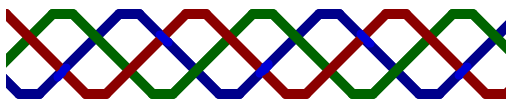
那里的红线在蓝色的后面经过,但仍然在绿色之上。到目前为止,我已经成功地创造了这些线条。什么顺序的绘图将创造正确的堆叠?
片段:https://observablehq.com/d/91f99a7dfdaeb71f
const svg = d3.create("svg").attr("width", 500).attr("height", 100);
const segment = 80;
const ratio = 0.2;
const flat = segment * ratio;
const slope = segment - flat;
const width = 15;
const top = 10;
const btm = 90;
const offset = -200;

for (let i = 0; i < 10; i++) {
  const isUp = !(i % 2);
  for (let j = 0; j < 3; j++) {
    const color = ["darkred", "darkgreen", "darkblue"][j % 3];
    const spacings = [0, (segment / 3) * 2, (segment / 3) * 4].map(
      (x) => x + offset
    );
    const spacing = spacings[j % 3];
    svg
      .append("line")
      .attr("x1", segment * i + spacing)
      .attr("x2", segment * i + slope + spacing)
      .attr("y1", isUp ? top : btm)
      .attr("y2", isUp ? btm : top)
      .attr("stroke", color)
      .attr("stroke-width", width)
      .attr("stroke-linecap", "round");

    svg
      .append("line")
      .attr("x1", segment * i + slope + spacing)
      .attr("x2", segment * i + slope + flat + spacing)
      .attr("y1", isUp ? btm : top)
      .attr("y2", isUp ? btm : top)
      .attr("stroke", color)
      .attr("stroke-width", width)
      .attr("stroke-linecap", "round");
  }
}
return svg.node();回答 1
Stack Overflow用户
发布于 2022-01-15 21:27:43
通过巧妙地使用defs和掩蔽与CSS变量混合,这是可能的:
<svg width="520" height="60" viewBox="0 0 137.583 15.875" xmlns="http://www.w3.org/2000/svg">
  <defs>
    <path id="red"
      style="fill:none;stroke:var(--stroke, transparent);stroke-width:4.23333333;stroke-linecap:butt;stroke-linejoin:round;"
      d="M-3.237 2.646h14.111l14.111 10.583h7.056L46.15 2.646h7.056L67.32 13.229h7.055L88.485 2.646h7.056l14.11 10.583h7.056L130.82 2.646h7.055l3.314-.054" />
    <path id="green"
      style="fill:none;stroke:var(--stroke, transparent);stroke-width:4.23333333;stroke-linecap:butt;stroke-linejoin:round;"
      d="M-3.656 7.941H3.4l7.474 5.288h7.056L32.04 2.646h7.056l14.111 10.583h7.056L74.374 2.646h7.056l14.11 10.583h7.056l14.111-10.583h7.056l8.453 5.292h7.056l1.733-.052" />
    <path id="blue"
      style="fill:none;stroke:var(--stroke, transparent);stroke-width:4.23333333;stroke-linecap:butt;stroke-linejoin:round;"
      d="M-3.237 13.23h7.056l14.11-10.584h7.056l14.111 10.583h7.056L60.263 2.646h7.056l14.11 10.583h7.056l14.111-10.583h7.056l14.111 10.583h14.111l3.058-.158" />
    <rect id="bg" x="0" y="0" width="137.583" height="15.875" fill="white" />
    <filter id="shadow">
      <feGaussianBlur in="SourceGraphic" stdDeviation="1" />
    </filter>
    <mask id="redmask">
      <use href="#bg" />
      <use href="#red" x="0" y="0" style="--stroke:#000000" />
      <use href="#red" x="0" y="0" style="--stroke:#000000" filter="url(#shadow)" />
    </mask>
    <mask id="greenmask">
      <use href="#bg" />
      <use href="#green" x="0" y="0" style="--stroke:#000000" />
      <use href="#green" x="0" y="0" style="--stroke:#000000" filter="url(#shadow)" />
    </mask>
    <mask id="bluemask">
      <use href="#bg" />
      <use href="#blue" x="0" y="0" style="--stroke:#000000" />
      <use href="#blue" x="0" y="0" style="--stroke:#000000" filter="url(#shadow)" />
    </mask>
  </defs>
  <use href="#red" x="0" y="0" />
  <use href="#red" x="0" y="0" mask="url(#bluemask)" style="--stroke:#660000" />
  <use href="#green" x="0" y="0" mask="url(#redmask)" style="--stroke:#006600" />
  <use href="#blue" x="0" y="0" mask="url(#greenmask)" style="--stroke:#000066" />
</svg>
页面原文内容由Stack Overflow提供。腾讯云小微IT领域专用引擎提供翻译支持
原文链接:
https://stackoverflow.com/questions/70674707
复制相关文章
相似问题
腾讯云开发者

Copyright © 2013 - 2026 Tencent Cloud. All Rights Reserved. 腾讯云 版权所有
深圳市腾讯计算机系统有限公司 ICP备案/许可证号:粤B2-20090059  粤公网安备44030502008569号
腾讯云计算(北京)有限责任公司 京ICP证150476号 | 京ICP备11018762号