
结果列表内容上的GooglePlacesAutocomplete样式-本机
结果列表内容上的GooglePlacesAutocomplete样式-本机
提问于 2022-01-10 08:57:15
我很难为GooglePlacesAutocomplete的列表结果区域设置样式。谁能帮我把结果行的样式与结果容器的底色和边框半径结合起来呢?
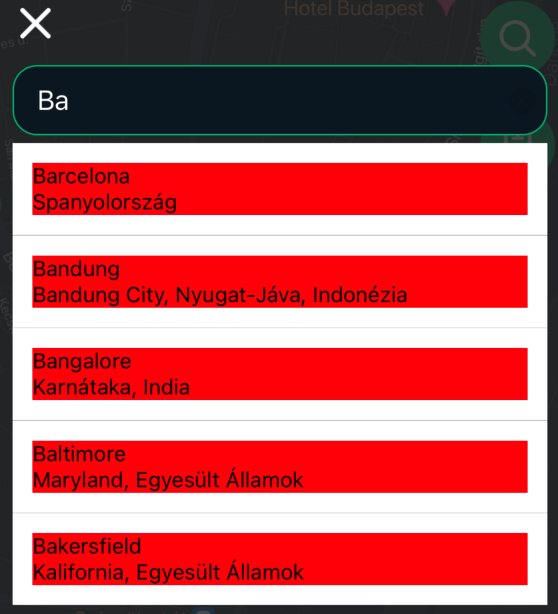
我想要没有这个边框的背景色的行。
这是我的代码:
<GooglePlacesAutocomplete
            placeholder={'MY PLACEHOLDER'}
            onPress={(data, details = null) => {
              myOnPressCode
            }}
            query={{
              myQuery
            }}
            textInputProps={{
              placeholderTextColor: colors.searchModalPlaceHolderColor,
            }}
            fetchDetails={true}
            enablePoweredByContainer={false}
            styles={{
              container: {
                alignSelf: 'stretch',
                borderRadius: 16,
              },
              textInput: {
                height: 46,
                color: colors.text,
                borderRadius: 16,
                borderWidth: 1,
                borderColor: colors.primary,
                backgroundColor: colors.searchModalInputBackground,
                fontSize: 18,
                paddingHorizontal: 15,
              },
            }}
            renderRow={(rowData) => {
              const title = rowData.structured_formatting.main_text;
              const address = rowData.structured_formatting.secondary_text;
              return (
                <View
                  style={{
                    backgroundColor: 'red',
                    flex: 1,
                    height: '100%',
                  }}>
                  <Text style={{fontSize: 14}}>{title}</Text>
                  <Text style={{fontSize: 14}}>{address}</Text>
                </View>
              );
            }}
/>回答 1
Stack Overflow用户
发布于 2022-01-12 12:12:41
行背景颜色:
row: {
      backgroundColor: 'transparent',
      paddingVertical: 0,
      paddingHorizontal: 0,
    },

containerResultRow: {
      flex: 1,
      height: 55,
      justifyContent: 'center',
      paddingHorizontal: 15,
      backgroundColor:
        rowIndex && (rowIndex + 1) % 2 === 0
          ? 'blue'
          : 'gray',
    },
对于listView borderRadius:
https://github.com/FaridSafi/react-native-google-places-autocomplete/issues/792
页面原文内容由Stack Overflow提供。腾讯云小微IT领域专用引擎提供翻译支持
原文链接:
https://stackoverflow.com/questions/70649883
复制相关文章
相似问题
腾讯云开发者

Copyright © 2013 - 2026 Tencent Cloud. All Rights Reserved. 腾讯云 版权所有
深圳市腾讯计算机系统有限公司 ICP备案/许可证号:粤B2-20090059  粤公网安备44030502008569号
腾讯云计算(北京)有限责任公司 京ICP证150476号 | 京ICP备11018762号