
我需要在单元格中设置get URL的值
我需要在单元格中设置get URL的值
提问于 2022-01-10 07:37:03
我现在需要转换谷歌表格页为PDF,电子邮件给用户,并保存PDF格式,直接到谷歌驱动器。
我需要谷歌驱动器链接后,保存到谷歌驱动器。
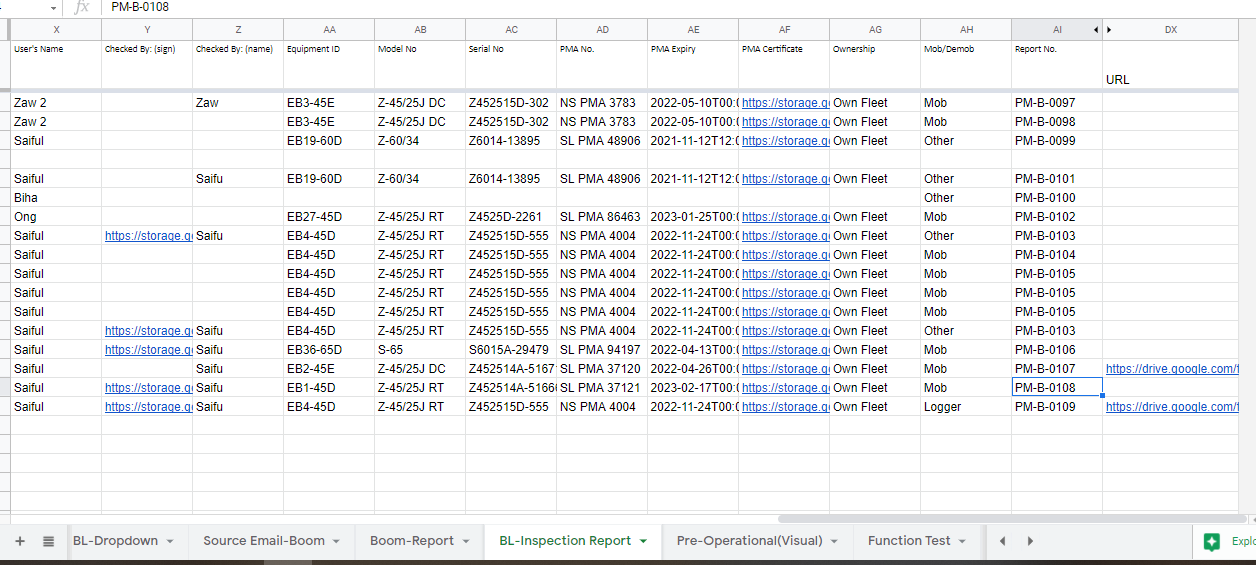
从Google转换为PDF的步骤,我已经完成了,但我坚持要将URL粘贴到特定的单元格上。
我知道如何使用这段代码Logger.log(fileUrl)获取URL,但是如何粘贴到单元格上呢?
var changedFlag = false;
var TEMPLATESHEET='Boom-Report';

function emailSpreadsheetAsPDF() {
  //Utilities.sleep(300000); //to pause for 60 seconds . Make sure photo completely upload to google sheet
  DocumentApp.getActiveDocument();
  DriveApp.getFiles();

  // This is the link to my spreadsheet with the Form responses and the Invoice Template sheets
  // Add the link to your spreadsheet here
  // or you can just replace the text in the link between "d/" and "/edit"
  // In my case is the text: 17I8-QDce0Nug7amrZeYTB3IYbGCGxvUj-XMt8uUUyvI
  const ss = SpreadsheetApp.openByUrl("https://docs.google.com/spreadsheets/d/1NVJOdFLBAgNFqSHhnHJYybjUlSqhv4hKI_HXJyhJ88E/edit");

  // We are going to get the email address from the cell "B7" from the "Invoice" sheet
  // Change the reference of the cell or the name of the sheet if it is different
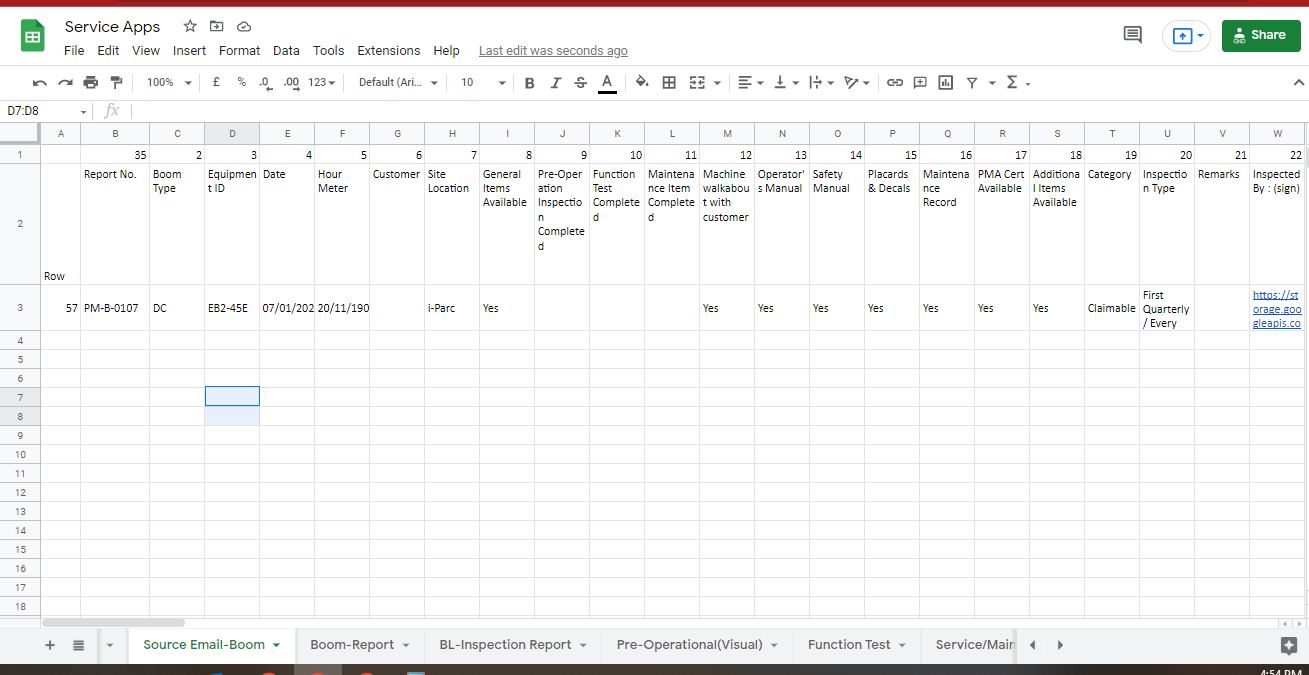
  const value = ss.getSheetByName("Source Email-Boom").getRange("X3").getValue();
  const email = value.toString();

  // Subject of the email message
  const subject = ss.getSheetByName("Source Email-Boom").getRange("B3").getValue();

    // Email Text. You can add HTML code here - see ctrlq.org/html-mail
  const body = "Boom Lifts Inspection Report - Sent via Auto Generate PDI Report from Glideapps";

  // Again, the URL to your spreadsheet but now with "/export" at the end
  // Change it to the link of your spreadsheet, but leave the "/export"
  const url = 'https://docs.google.com/spreadsheets/d/1NVJOdFLBAgNFqSHhnHJYybjUlSqhv4hKI_HXJyhJ88E/export?';

  const exportOptions =
    'exportFormat=pdf&format=pdf' + // export as pdf
    '&size=A4' + // paper size letter / You can use A4 or legal
    '&portrait=true' + // orientation portal, use false for landscape
    '&fitw=true' + // fit to page width false, to get the actual size
    '&sheetnames=false&printtitle=false' + // hide optional headers and footers
    '&pagenumbers=false&gridlines=false' + // hide page numbers and gridlines
    '&fzr=false' + // do not repeat row headers (frozen rows) on each page
    '&gid=1832955909'; // the sheet's Id. Change it to your sheet ID.
    // You can find the sheet ID in the link bar.
  // Select the sheet that you want to print and check the link,
  // the gid number of the sheet is on the end of your link.

  var params = {method:"GET",headers:{"authorization":"Bearer "+ ScriptApp.getOAuthToken()}};

  // Generate the PDF file
  var response = UrlFetchApp.fetch(url+exportOptions, params).getBlob();

  // Send the PDF file as an attachement
    GmailApp.sendEmail("biha@equip-inc.com", subject, body, {
      htmlBody: body,
      attachments: [{
            fileName: ss.getSheetByName("Source Email-Boom").getRange("B3").getValue().toString() +".pdf",
            content: response.getBytes(),
            mimeType: "application/pdf"
        }]
    });

  // Save the PDF to Drive. (in the folder) The name of the PDF is going to be the name of the Company (cell B5)
  const nameFile = ss.getSheetByName("Source Email-Boom").getRange("B3").getValue().toString() +".pdf"
  const folderID = "1ZKWq9jWmeEQlxncuTPHssCFXC3Fidmxn";
  DriveApp.getFolderById(folderID).createFile(response).setName(nameFile);


// create file URL

  var SpreadsheetID = "1NVJOdFLBAgNFqSHhnHJYybjUlSqhv4hKI_HXJyhJ88E";
  var ss2 = SpreadsheetApp.openById(SpreadsheetID);
  var Sheetname2= "BL-Inspection Report";
  var sheet2 = ss2.getSheetByName(Sheetname2);
  // Get the last row based on the data range of a single column.
  var lastRow2 = sheet2.getLastRow();
  var lastColumn2 = sheet2.getLastColumn();

  //EXAMPLE: Get the data range based on our selected columns range.
  var dataRange2 = sheet2.getRange(1,1, lastRow2, lastColumn2);
  var dataValues2 = dataRange2.getValues();
  var dataMatch=[];
  //***** */
  // Loop through array and if condition met, add relevant
  // background color.
  var p=34 ; //Column No. for Name column AI:AI (Report No)


   var filename = encodeURI(nameFile);
   var files = DriveApp.getFilesByName(nameFile);
   while (files.hasNext()) {
      var file = files.next();
      if (file) {
         var fileUrl = file.getUrl();

      };
   };
////////////////HELP THIS PART////////////////////////////////
for ( j = 0 ; j < lastRow2 ; j++){
    var zz=j;
    var yy=dataValues2[j][34];

    if(dataValues2[j][34] == subject){
      var doclink = Logger.log(fileUrl);
       var range = sheet2.getRange(j+1, 128);
      range.setValue(doclink);

    };
  };

}
如果第一个源中的单元格B3值在Google中找到,那么将该URL粘贴在DX列中,其中AI与第一个源相同。
回答 1
Stack Overflow用户
回答已采纳
发布于 2022-01-11 09:40:11
我相信你的目标如下。
- 您希望搜索从Google中从"Source Boom“工作表的单元格"B3”检索的文件,当从“BL检查报告”页的列"AI“中找到
subject的值时,您希望将该文件的URL放到"AJ”列中。 - 对于我的
For example, you want to put the URL of the just created file?问题,从您答复的Yes中,我了解到您希望将刚刚创建的文件的URL放在这个脚本中。
在这种情况下,下面的修改如何?我认为在本例中,刚刚创建的文件的URL可以直接从DriveApp.getFolderById(folderID).createFile(response).setName(nameFile)检索。那么,下面的修改如何?
发自:
DriveApp.getFolderById(folderID).createFile(response).setName(nameFile);至:
var fileUrl = DriveApp.getFolderById(folderID).createFile(response).setName(nameFile).getUrl();此外,请修改如下。
发自:
var filename = encodeURI(nameFile);
var files = DriveApp.getFilesByName(nameFile);
while (files.hasNext()) {
   var file = files.next();
   if (file) {
      var fileUrl = file.getUrl();

   };
};
////////////////HELP THIS PART////////////////////////////////
for (j = 0; j < lastRow2; j++) {
  if (dataValues2[j][34] == subject) {
    var doclink = Logger.log(fileUrl);
    var range = sheet2.getRange(j + 1, 128);
    range.setValue(doclink);
  };
};
至:
var range = sheet2.getRange("AI2:AI" + sheet2.getLastRow()).createTextFinder(subject).findNext();
if (range) {
  range.offset(0, 1).setValue(fileUrl);
}- 在此修改中,使用TextFinder搜索单元格。
参考资料:
页面原文内容由Stack Overflow提供。腾讯云小微IT领域专用引擎提供翻译支持
原文链接:
https://stackoverflow.com/questions/70649118
复制相关文章
相似问题
腾讯云开发者

Copyright © 2013 - 2026 Tencent Cloud. All Rights Reserved. 腾讯云 版权所有
深圳市腾讯计算机系统有限公司 ICP备案/许可证号:粤B2-20090059  粤公网安备44030502008569号
腾讯云计算(北京)有限责任公司 京ICP证150476号 | 京ICP备11018762号