
移除HStack的左缘
移除HStack的左缘
提问于 2022-01-07 08:26:07
我想删除HStack上的左边距,它用作下面列表视图的标题列。
目前,我的UI如下所示:
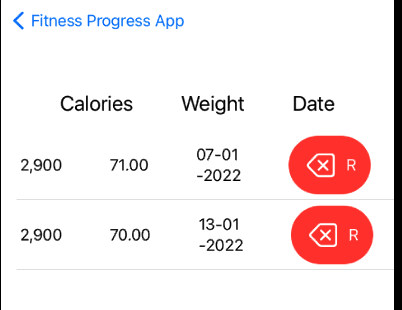
我希望卡路里文本与它下面的数字对齐,我不知道如何实现这一点,因为设置padding(.leading, 0)没有实现它。我已经为下面的视图附上了代码。
    var body: some View {
        HStack(spacing: 50) {
            Text("Calories").font(.title2).padding(.leading, 0)
            Text("Weight").font(.title2)
            Text("Date").font(.title2)
        }

        List (weightEntriesViewModel.weightEntries) { item in

            let weight: String = String(format: "%.2f", item.weight)
            let date: String = self.convertDate(item: item)
            HStack(spacing: 50) {
                Text("\(item.calories)")
                Text(weight)
                Text(date)
                Button(action: {
                    self.weightEntriesViewModel.removeEntry(weightEntry: item)
                    self.weightEntriesViewModel.getData()
                }, label: {
                    HStack {
                        Image(systemName: "delete.left")
                            .font(/*@START_MENU_TOKEN@*/.title/*@END_MENU_TOKEN@*/)
                        Text("Remove")
                            .frame(width: 10, height: 10, alignment: .trailing)

                    }.padding()
                    .foregroundColor(.white)
                    .background(Color.red)
                    .cornerRadius(40)
                })
}回答 1
Stack Overflow用户
发布于 2022-01-07 09:16:06
在Spacer()后添加Hstack中的Text("Date").font(.title2)
只需在.padding()之后添加Hstack
HStack(spacing: 50) {
    Text("Calories").font(.title2)
    Text("Weight").font(.title2)
    Text("Date").font(.title2)

    Spacer()
}.padding()
告诉我..。对你有用吗?

页面原文内容由Stack Overflow提供。腾讯云小微IT领域专用引擎提供翻译支持
原文链接:
https://stackoverflow.com/questions/70618467
复制相关文章
相似问题
腾讯云开发者

Copyright © 2013 - 2026 Tencent Cloud. All Rights Reserved. 腾讯云 版权所有
深圳市腾讯计算机系统有限公司 ICP备案/许可证号:粤B2-20090059  粤公网安备44030502008569号
腾讯云计算(北京)有限责任公司 京ICP证150476号 | 京ICP备11018762号