
D3 TopoJSON美国地图按角度调整大小
我有一个有角度的应用程序,其中一个HTML页面包含一个div > row > col和一个D3 TopoJSON映射。
在常规的JS框架中,我已经看到了调整父容器映射大小的各种解决方案,但这些解决方案似乎并不能顺利地转换为角。理想情况下,我还想在nation周围添加一个下拉阴影,并且这方面的例子似乎也没有角度(我认为主要问题是我在与来自TypeScript的DOM交互方面的无能)。
我有一个页面设置如下:
<div class="container-fluid">
  <div class="row">
    <div id="map-col" class="col g-0 col-xxl-8 col-xl-8 col-lg-8 col-md-8 col-sm-12 col-12">
      <div class="map"></div>
    </div>
    <div class="col-4"></div>
</div>
CSS
.container-fluid {
  height: 70%;
  width: 100%;
  padding: 1%;
}
.row {
  width: 100%;
  height: 100%;
  padding: 0 0 0 0;
  margin: 0 0 0 0;
}
.map {
  height: 100%;
}
TypeScript
import { Component, OnInit } from '@angular/core';
import { HttpClient } from '@angular/common/http';
import * as d3 from 'd3';

import * as topojson from 'topojson-client';
import { GeometryCollection } from 'topojson-specification';

@Component({
  selector: 'app-root',
  templateUrl: './app.component.html',
  styleUrls: ['./app.component.css']
})
export class AppComponent implements OnInit {
  constructor(private http: HttpClient) { }

  // mapInit
  path: any = d3.geoPath()
  topography: any = Object
  svg: any = null
  g: any = null
  nation: any = null
  states: any = null
  counties: any = null

  async ngOnInit(): Promise<void> {
    await this.mapInit()
  }

  async mapInit() {
    this.topography = await this.http.get(`https://cdn.jsdelivr.net/npm/us-atlas@3/counties-albers-10m.json`).toPromise()

    this.svg = d3.select(".map").append("svg")
      .attr("preserveAspectRatio", "xMidYMid meet")
      .attr("height", "100%")
      .attr("width", "100%")

    this.g = this.svg.append("g")

    this.nation = this.g.append('g')
        .attr("class", "nation")
        .attr("fill", "none")
        .selectAll('path')
        .data(topojson.feature(this.topography, this.topography["objects"]["nation"]  as GeometryCollection)["features"])
        .join("path")
        .attr('d', this.path)

      this.counties = this.g.append("g")
        .attr("class", "county")
        .attr("fill", "#E7E7E8")
        .attr("stroke", "#ffffff")
        .attr("stroke-linejoin", "round")
        .attr("stroke-width", "0.25")
        .selectAll('path')
        .data(topojson.feature(this.topography, this.topography["objects"]["counties"] as GeometryCollection)["features"])
        .join("path")
        .attr("id", function(d:any) {return d["id"]})
        .attr('d', this.path)

      this.states = this.g.append('g')
        .attr("class", "state")
        .attr("fill", "none")
        .attr("stroke", "#ffffff")
        .attr("stroke-linejoin", "round")
        .attr("stroke-width", "0.5")
        .selectAll("path.state")
        .data(topojson.feature(this.topography, this.topography["objects"]["states"]  as GeometryCollection)["features"])
        .join("path")
        .attr("id", function(d:any) {return d["id"]})
        .attr("d", this.path)

  }
但是这会导致它的父映射溢出(见屏幕截图)。
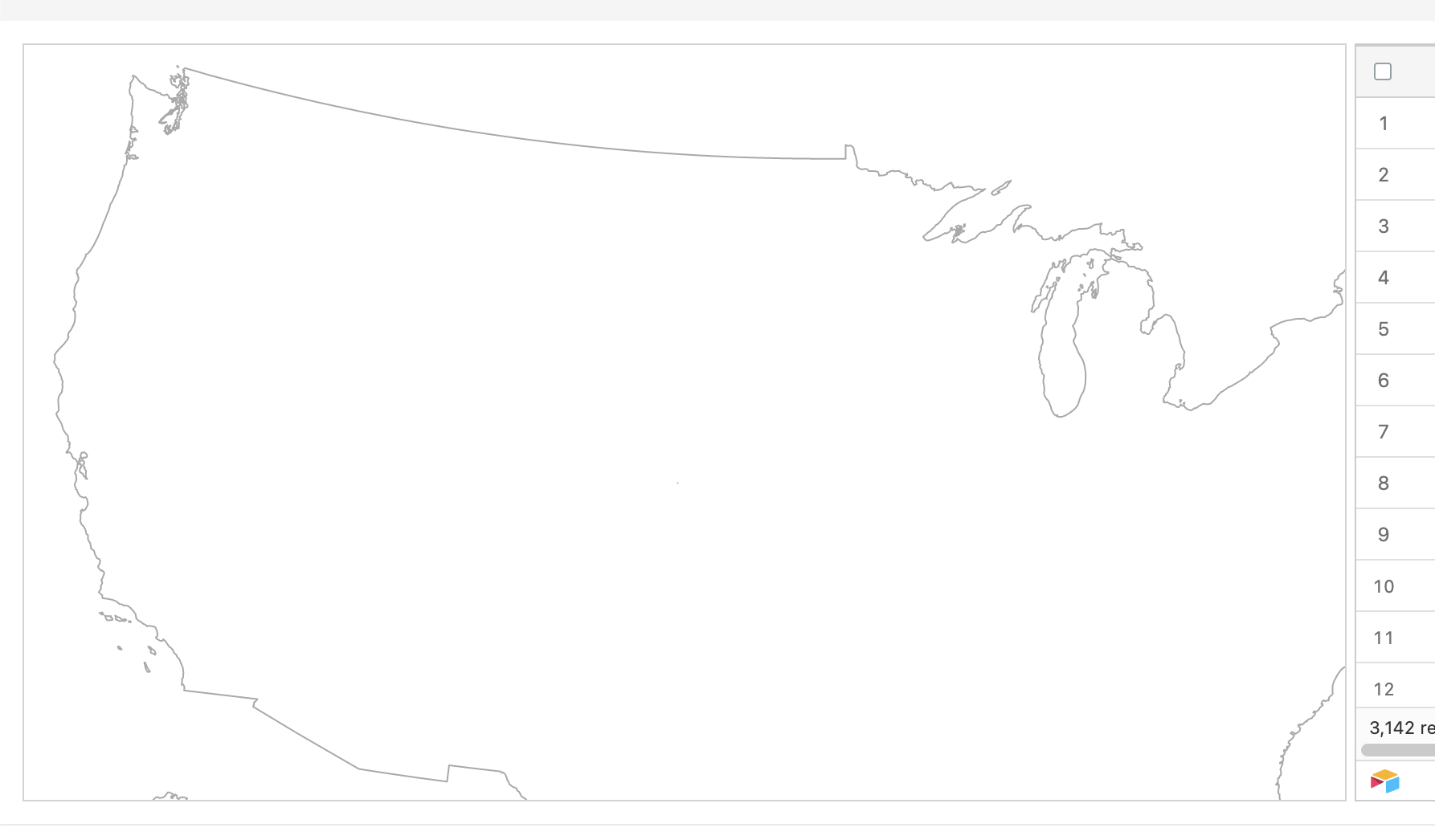
是否有一种方法可以使地图不断地识别其父母的尺寸,调整其自身以保持其纵横比,但适合于内部,并调整大小?如果您知道有一种方法可以清晰地翻译这个隐藏脚本:https://codepen.io/TiannanZ/pen/rrEKoB!
回答 1
Stack Overflow用户
发布于 2022-01-07 11:13:06
下面是一个完整的解决方案,可以根据窗口大小调整映射大小。奖金实现与参考(https://codepen.io/TiannanZ/pen/rrEKoB)。我希望你觉得这有帮助。
app.component.html
<div class="container-fluid">
  <div class="row">
    <div class="col g-0 col-xxl-8 col-xl-8 col-lg-8 col-md-8 col-sm-12 col-12">
      <div id="map">
        <svg
          width="100%"
          height="100%"
          stroke-linejoin="round"
          stroke-linecap="round"
        >
          <defs>
            <filter id="blur">
              <feGaussianBlur stdDeviation="5"></feGaussianBlur>
            </filter>
          </defs>
        </svg>
      </div>
    </div>
    <div class="col-4">
      Lorem ipsum dolor sit amet consectetur adipisicing elit. Mollitia, magnam
      at dolore iure laborum minima doloribus voluptate sed harum impedit sit,
      quos in architecto adipisci minus quo ipsa debitis magni.
    </div>
  </div>
</div>
app.component.scss
#map {
  max-width: 1000px;
  margin: 2%;
  padding: 20px;
}
app.component.ts
import { Component, ElementRef, OnInit } from '@angular/core';

import * as d3 from 'd3';
import * as topojson from 'topojson-client';
import { GeometryCollection } from 'topojson-specification';

import { TopographyService } from './topography.service';

@Component({
  selector: 'app-root',
  templateUrl: './app.component.html',
  styleUrls: ['./app.component.scss'],
})
export class AppComponent implements OnInit {
  svg: any;
  projection: any;
  topoFeatureStates: any;
  path: any;

  constructor(
    private topographyService: TopographyService,
    private el: ElementRef
  ) {}

  ngOnInit(): void {
    this.initialMap();
  }

  initialMap(): void {
    this.topographyService.getTopographyData().subscribe((topography: any) => {
      this.draw(topography);
    });
  }

  draw(topography): void {
    const { width, height } = this.getMapContainerWidthAndHeight();

    this.topoFeatureStates = topojson.feature(
      topography,
      topography.objects.states
    );
    this.projection = d3
      .geoIdentity()
      .fitSize([width, height], this.topoFeatureStates);

    this.path = d3.geoPath(this.projection);

    // render svg
    this.svg = d3
      .select('svg')
      .attr('width', width + 50)
      .attr('height', height);

    this.renderNationFeaturesWithShadow(topography);
    this.renderCountiesFeatures(topography);
    this.renderStateFeaures(topography);

    // resize event
    d3.select(window).on('resize', this.resizeMap);
  }

  renderNationFeaturesWithShadow(topography: any): void {
    const defs = this.svg.select('defs');
    defs
      .append('path')
      .datum(topojson.feature(topography, topography.objects.nation))
      .attr('id', 'nation')
      .attr('d', this.path);

    this.svg
      .append('use')
      .attr('xlink:href', '#nation')
      .attr('fill-opacity', 0.2)
      .attr('filter', 'url(#blur)');

    this.svg.append('use').attr('xlink:href', '#nation').attr('fill', '#fff');

    // extra touch (counties in grid)
    this.svg
      .append('path')
      .attr('fill', 'none')
      .attr('stroke', '#777')
      .attr('stroke-width', 0.35)
      .attr(
        'd',
        this.path(
          topojson.mesh(
            topography,
            topography.objects.counties,
            (a: any, b: any) => {
              // tslint:disable-next-line:no-bitwise
              return ((a.id / 1000) | 0) === ((b.id / 1000) | 0);
            }
          )
        )
      );
    // end extra touch
  }

  renderCountiesFeatures(topography: any): void {
    this.svg
      .append('g')
      .attr('class', 'county')
      .attr('fill', '#fff')
      .selectAll('path')
      .data(
        topojson.feature(
          topography,
          topography.objects.counties as GeometryCollection
        ).features
      )
      .join('path')
      .attr('id', (d: any) => {
        return d.id;
      })
      .attr('d', this.path);
  }

  renderStateFeaures(topography: any): void {
    this.svg
      .append('g')
      .attr('class', 'state')
      .attr('fill', 'none')
      .attr('stroke', '#BDBDBD')
      .attr('stroke-width', '0.7')
      .selectAll('path.state')
      .data(
        topojson.feature(
          topography,
          topography.objects.states as GeometryCollection
        ).features
      )
      .join('path')
      .attr('id', (d: any) => {
        return d.id;
      })
      .attr('d', this.path);
  }

  resizeMap = () => {
    const { width, height } = this.getMapContainerWidthAndHeight();

    this.svg.attr('width', width + 50).attr('height', height);

    // update projection
    this.projection.fitSize([width, height], this.topoFeatureStates);

    this.svg.selectAll('path').attr('d', this.path);
  };

  getMapContainerWidthAndHeight = (): { width: number; height: number } => {
    const mapContainerEl = this.el.nativeElement.querySelector(
      '#map'
    ) as HTMLDivElement;
    const width = mapContainerEl.clientWidth - 50;
    const height = (width / 960) * 600;

    return { width, height };
  };
}
topography.service.ts
import { HttpClient } from '@angular/common/http';
import { Injectable } from '@angular/core';
import { Observable } from 'rxjs';

@Injectable({
  providedIn: 'root',
})
export class TopographyService {
  constructor(private http: HttpClient) {}

  getTopographyData(): Observable<any> {
    const topoDataURL =
      'https://cdn.jsdelivr.net/npm/us-atlas@3/counties-albers-10m.json';

    return this.http.get(topoDataURL);
  }
}https://stackoverflow.com/questions/70615612
复制相似问题
腾讯云开发者

Copyright © 2013 - 2026 Tencent Cloud. All Rights Reserved. 腾讯云 版权所有
深圳市腾讯计算机系统有限公司 ICP备案/许可证号:粤B2-20090059  粤公网安备44030502008569号
腾讯云计算(北京)有限责任公司 京ICP证150476号 | 京ICP备11018762号