
二维土砖到三维土砖
场景
我正在使用来自开放街道地图的2d块构建一个交互式的。我有一个阴影把瓷砖包裹在球体上,但是瓷砖在两极附近显得太高,在赤道附近太短。
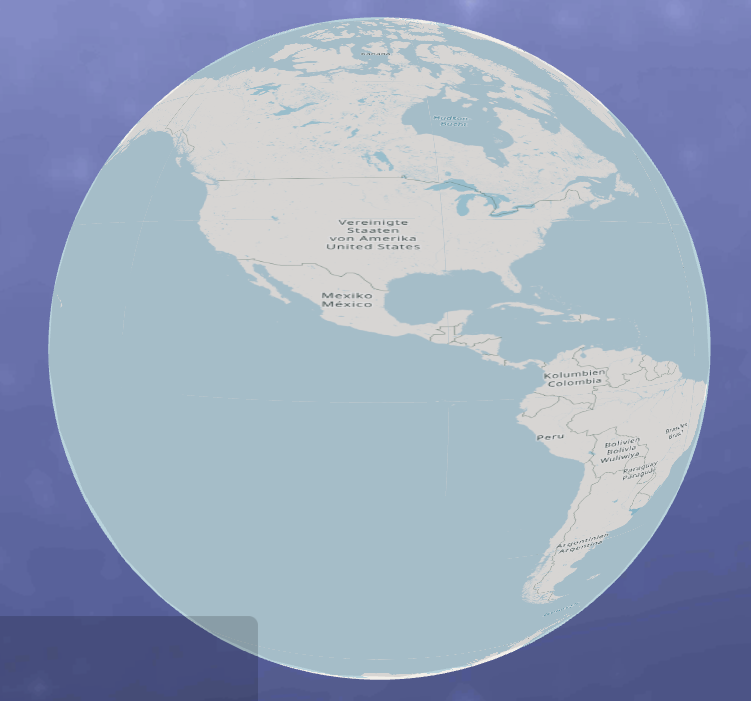
赤道附近的瓷砖太短,使内容看上去水平拉伸。
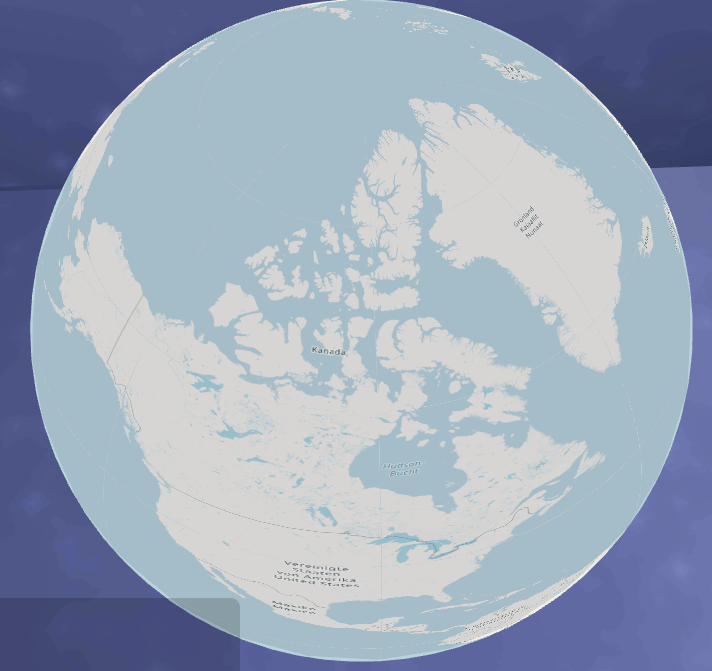
靠近北极的瓷砖太高,使内容看起来垂直延伸。
我最初的想法是使用Mathf.Sin缩短极地附近的瓷砖(sin0),而在赤道附近(sin1)扩展瓷砖。从理论上讲,这个想法似乎是合理的,但在实践中却不太顺利。
问题
如何使我的着色器调整为必要的2d到3D垂直瓷砖调整?我一直在寻找一些精简的着色代码,负责它的v2f功能的一切,但我没有太多的运气。
一些代码
BaseTile->GetThetaPhiFromXY ( GetThetaPhiFromKey使用的核心)
public static Vector2
GetThetaPhiFromXY(float x, float y, int zoomLevel, bool stretch = false)
{
    Vector2 tilesXY = TileGroup.GetTilesXY(zoomLevel);

    float theta = (x + 0.5f) / tilesXY.x * Mathf.PI * 2 - Mathf.PI / 2;
    float phi = (y + 0.5f) / tilesXY.y * Mathf.PI;

    // // stretch tiles vertically (poles are shorter, equator is taller) @jkr
    // if (stretch == true)
    // {
    //     float PI2 = Mathf.PI / 2;
    //     float sin = Mathf.Sin(phi);
    //     float phiSin = phi * sin;
    //     if (
    //         y > tilesXY.y / 2 - 1 // tiles north of equator @jkr
    //     )
    //     {
    //         // phi range 0-PI:bot2top
    //         // sin range 0-1:bot2mid, 1-0:mid2top
    //         float neuePhi = phi - PI2;
    //         phiSin = neuePhi * sin;

    //         // phiSin += PI2;
    //         phiSin = Mathf.PI;
    //     }
    //     Debug.Log($"{y} {phi} {sin}");
    //     phi = phiSin;
    // }

    return new Vector2(theta, phi);
}
TileBender.cs
using System.Collections;
using System.Collections.Generic;
using UnityEngine;

/**
 * this class helps with prepping the tiles for the TileBender shader
 * @jkr
 */

public class TileBender : MonoBehaviour
{
    void Start()
    {
        // SetUpTileLatLons(GetComponent<MeshFilter>().mesh, new TileKey(0, 0, 0));
    }

    private Vector2 GetThetaPhiOfVertex(TileKey tileKey, Vector2 uv)
    {
        // if (tileKey.x != 0) return Vector2.zero;

        TileKey tileKey2 = tileKey;
        tileKey2.x += 1;
        tileKey2.y += 1;

        Vector3 startPos = BaseTile.GetThetaPhiFromKey(tileKey, true);
        Vector3 endPos = BaseTile.GetThetaPhiFromKey(tileKey2, true);

        // todo: this can be done faster, but how ? @jkr
        Vector3 diff2 = (endPos - startPos) / 2;
        startPos -= diff2;
        endPos -= diff2;

        float theta = Mathf.Lerp(startPos.x, endPos.x, uv.x);
        float phi = Mathf.Lerp(startPos.y, endPos.y, uv.y);

        // Debug.Log($"{startPos.x}, {endPos.x}");
        // Debug.Log($"{startPos.x} -- {endPos.x} -- {uv.x} -- {theta}");

        return new Vector2(theta, phi);
    }

    public void SetUpTilePairs(Mesh mesh, TileKey tileKey)
    {
        Vector2[] uvs = mesh.uv;
        Vector2[] thetaPhiPairs = new Vector2[uvs.Length];

        for (int i = 0; i < thetaPhiPairs.Length; ++i)
        {
            thetaPhiPairs[i] = GetThetaPhiOfVertex(tileKey, uvs[i]);
        }

        mesh.uv2 = thetaPhiPairs;
    }
}
TileBender.shader
Shader "Custom/TileBender" {

    Properties{
        _MainTex("Tex", 2D) = "" {}
        _SphereCenter("SphereCenter", Vector) = (0, 0, 0, 1)
        _EarthRadius("EarthRadius", Float) = 5
        _ColorAlpha("TextureAlpha", Float) = 0.5
    }

    SubShader{
        // Cull off // for doublesized texture @jkr todo: disable for prod
        Tags {"Queue"="Transparent" "IgnoreProjector"="True" "RenderType"="Transparent"}
        ZWrite Off
        // ZTest Off
        Blend SrcAlpha OneMinusSrcAlpha
        // Cull front
        // LOD 100

        Pass {
            HLSLPROGRAM

            #pragma vertex vert
            #pragma fragment frag

            #include "UnityCG.cginc"

            struct appdata {
                float2 uv     : TEXCOORD0;
                float2 thetaPhi : TEXCOORD1;

            };
            struct v2f
            {
                float4 pos  : SV_POSITION;
                float3 norm : NORMAL;
                float2 uv   : TEXCOORD0;
            };

            uniform float _EarthRadius;
            float4 _SphereCenter;

            v2f vert(appdata v)
            {
                v2f o;
                float theta = v.thetaPhi.x;
                float phi = v.thetaPhi.y;

                float4 posOffsetWorld = float4(
                _EarthRadius*sin(phi)*cos(theta),
                _EarthRadius*-cos(phi),
                _EarthRadius*sin(phi)*sin(theta),
                0);

                float4 posObj = mul(unity_WorldToObject,
                posOffsetWorld + _SphereCenter);

                o.pos = UnityObjectToClipPos(posObj);
                o.uv = v.uv;
                o.norm = mul(unity_WorldToObject, posOffsetWorld);
                return o;
            }

            uniform fixed _TextureAlpha = 0.5;
            sampler2D _MainTex;

            float4 frag(v2f IN) : COLOR
            {
                fixed4 col = tex2D(_MainTex, IN.uv);
                col[3] = _TextureAlpha; // transparency
                return col;
            }
            ENDHLSL
        }
    }
    FallBack "VertexLit"
}
** 编辑 **
基于@derHugo的评论,我开始从维基百科的Web Mercator投影页面中分解出一个公式。我刚刚开始将其转换为c#,这是目前正在进行的工作。随着编辑的进行,我将修改它。
private void PointConversions() {

    Vector3 pos = this.Camera.transform.position;
    Vector3 rot = this.Camera.transform.rotation.eulerAngles;
    // Debug.Log($"{rot.x} -- {rot.y}");

    float lambda = rot.y; // longitude
    if(pos.x > 0) lambda = (0 - (lambda - 360)) * -1;
    lambda = lambda / 360 * PI;
    float phi = rot.x; // latitude
    if(pos.y < 0) phi = (0 - (phi - 360) * -1);
    phi = phi / 360 * PI;
    // Debug.Log($"{lambda} -- {phi}");

    Vector2 lonLat = new Vector2(lambda, phi);
    Vector2 pt3d = Point2DFromLonLat(lonLat);
    Debug.Log(pt3d);

}

private Vector2 Point2DFromLonLat(Vector2 lonLat) {

    float lon = lonLat.x;
    float lat = lonLat.y;

    float x = size / PI2;
    x *= Mathf.Pow(zoomLevel, 2);
    x *= lon + PI;

    float y = size / PI2;
    y *= Mathf.Pow(zoomLevel, 2);
    float subY = Mathf.Tan((PI/4) + (lat/2));
    y *= PI - Mathf.Log(subY);

    // Debug.Log($"{x} -- {y}");

    Vector2 point = Vector3.zero;
    point.x = x;
    point.y = y;
    // point.z = earthRadius;

    return point;
}

private Vector2 Point3dTo2D(Vector3 xyz) {
    return Vector2.zero;
}
**最新解决办法**
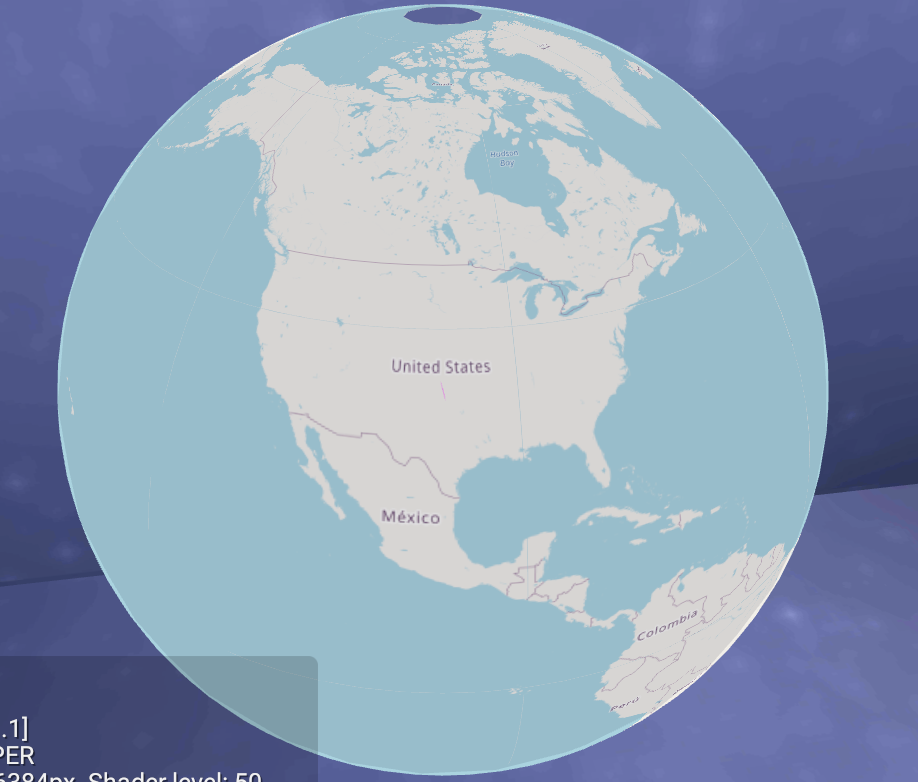
我很肯定我已经考虑过整个项目了。尽管如此,我已经把事情做得很简单,找到了一个主要的痛点,那就是找到一种合适的方法,在飞行中将墨卡托瓷砖转换成四边形的瓷砖。
“魔术”公式是最接近于古德曼尼亚逆的公式
float phi = (float)Math.Atan(Math.Sinh(latRad *2));这并不完美,因为原来找到的公式不需要*2,所以我的应用程序中的其他东西一定是错的
回答 1
Stack Overflow用户
发布于 2022-09-06 16:36:41
已经有一段时间了,我不记得到底是什么“解决了”了这个问题。前面提到的古德曼逆是一个关键的部分,但是下面是我的BaseTile类和相关的着色器包括:
BaseTile.cs
using System;
using System.Collections;
using System.Collections.Generic;
using System.Threading;
using System.Threading.Tasks;
using Unity.Collections;
using UnityEngine;
using UnityEngine.Networking;
using UnityEngine.UI;

public class BaseTile : MonoBehaviour
{
    protected TileKey _tileKey;
    public static readonly IWebClient WebClient = new WebClient();

    public static Vector3 scaleFactor = Vector3.one / 10;

    //public static BaseTile PrefabFactory(GameObject prefab, Transform parent)
    //{
    //    GameObject tileGameObject =
    //        UnityEngine.Object.Instantiate<GameObject>(prefab, parent);

    //    BaseTile baseTile = tileGameObject.GetComponent<BaseTile>();

    //    // baseTile.InitWithKey (tileKey);
    //    return baseTile;
    //}

    protected virtual void Awake() {}
    protected virtual void Start() {}
    protected virtual void OnDisable() {}
    protected virtual void OnEnable() {}
    protected virtual void Update() {}

    private Renderer _renderer;

    public virtual void InitWithKey(TileKey tileKey) // z is zoom level @jkr
    {
        if (this == null || this.gameObject == null) return;

        this.TileKey = tileKey;
        Vector2 tilesXY = TileGroup.GetTilesXY();

        if (WeatherTracker.instance.renderMode == WeatherTracker.RenderMode.MODE_3D)
        {
            float earthRadiusAdjusted = WeatherTracker.instance.EarthRadius / 5;
            float pi2 = Mathf.PI / 2;
            scaleFactor.x = pi2 / tilesXY.x * earthRadiusAdjusted * 2f;
            scaleFactor.y = pi2 / tilesXY.y * earthRadiusAdjusted;
            scaleFactor.z = pi2 / tilesXY.x * earthRadiusAdjusted * 2f;
        }

        //this.transform.position = this.GetPosition();
        //this.transform.localScale = this.GetScale();
        //this.transform.rotation = this.GetRotation();

        TileBender tileBender = this.GetComponent<TileBender>();
        if (tileBender != null) tileBender.PrepShader(this);
    }

    public virtual void ReturnToPool()
    {
        try {
            // Material mat = this.RendMat();
            // // if(mat && mat.HasProperty("_MainTex"))
            //     Destroy(mat.mainTexture);
            // Resources.UnloadAsset(mat);
        } catch (UnityException) {}

        this.gameObject.SetActive(false);
    }

    /**
     *  theta phi is lonRad latRad AFTER mercator > equirectangular conversion @jkr
     */
    public static Vector2 GetThetaPhiFromXY(float x, float y, int zoomLevel)
    {
        Vector2 tilesXY = TileGroup.GetTilesXY(zoomLevel);

        float latLen = 90; //84; // virtual latitude "radius" as merc > equi conversion eventually results to lat infiniti beyond a certain point @jkr
        float adj = 0.5f; // offset tile position by half otherwise columns are off vertically @jkr

        // adj = 0.0f; // todo: since theta phi refactor the half tile adjust hasn't worked @jkr
        float lon = (x + adj) / tilesXY.x * 360 - 90; // could just go straight to lonRad @jkr
        float lat = (y + adj) / tilesXY.y * (latLen * 2) - latLen;

        return BaseTile.GetThetaPhiFromLatLon(lon, lat);
    }

    /**
     * lat lon come in as angles
     * @jkr
     */
    public static Vector2 GetThetaPhiFromLatLon(float lon, float lat) {
        float lonRad = lon * Mathf.Deg2Rad;
        float latRad = lat * Mathf.Deg2Rad;

        float theta = lonRad;
        float phi = BaseTile.GudermannianInverse(latRad * 2); // todo: *2 should not be in there, it must be compensating for an error somewhere else @jkr

        return new Vector2(theta, phi);
    }

    private static float GudermannianInverse(float latRad)
    {
        return (float) Math.Atan(Math.Sinh(latRad));
    }

    public static Vector3 GetPositionByKey(TileKey tileKey)
    {
        // if (key == null) key = this.TileKey;
        if (
            WeatherTracker.instance.renderMode ==
            WeatherTracker.RenderMode.MODE_2D
        )
        {
            Vector3 sf = BaseTile.scaleFactor;
            Vector3 ret = Vector3.zero;
            ret.x = tileKey.x * sf.x;
            ret.y = tileKey.y * sf.y;
            ret.z = 0;
            return ret * 10;
            // return new Vector3(this.TileKey.x, this.TileKey.y, 0) *
            // BaseTile.scaleFactor *
            // 10; // because tiles are 10x bigger than spheres @jkr
        }

        // Vector2 tilesXY = TileGroup.GetTilesXY(tileKey.z);
        Vector3 pos = GetPositionByXY(tileKey.x, tileKey.y, tileKey.z);
        return pos;
    }

    public static Vector3
    GetPositionByXY(float tileX, float tileY, int zoomLevel, float plusRadius = 0)
    {
        var thetaPhi = BaseTile.GetThetaPhiFromXY(tileX, tileY, zoomLevel);
        var pos = BaseTile.GetPositionByThetaPhi(thetaPhi, plusRadius);
        return pos;
    }

    /**
     * plusRadius is essentially additional distance from the earth @jkr
     */
    public static Vector3 GetPositionByLatLon(Vector2 latLon, float plusRadius = 0) {
        return BaseTile.GetPositionByLatLon(latLon.x, latLon.y, plusRadius);
    }

    public static Vector3 GetPositionByLatLon(float lat, float lon, float plusRadius = 0) {
        lat *= Mathf.Deg2Rad;
        lon *= Mathf.Deg2Rad;
        lon += Mathf.PI/2; // additional quarter turn @jkr

        var pos = BaseTile.GetPositionByThetaPhi(new Vector2(lon, lat), plusRadius);
        return pos;
    }

    public static Vector3 GetPositionByThetaPhi(Vector2 thetaPhi, float plusRadius = 0) {
        float theta = thetaPhi.x;
        float phi = thetaPhi.y;
        float r = WeatherTracker.instance.EarthRadius + plusRadius;

        // https://en.wikipedia.org/wiki/Spherical_coordinate_system#
        float x = r * Mathf.Cos(phi) * Mathf.Cos(theta);
        float y = r * Mathf.Sin(phi);
        float z = r * Mathf.Cos(phi) * Mathf.Sin(theta);

        Vector3 pos = new Vector3(x, y, z);

        return pos;
    }

    // position for 3d tiles; adding .5 to keys so the polar caps look correct @jkr
    protected Vector3 GetPosition()
    {
        return BaseTile.GetPositionByKey(this.TileKey);
    }

    /**
     * rotation for tiles. Does not effect the shader!
     * @jkr
     */
    protected Quaternion GetRotation()
    {
        if (
            WeatherTracker.instance.renderMode ==
            WeatherTracker.RenderMode.MODE_2D
        )
        {
            return Quaternion.LookRotation(Vector3.up);
        }

        Vector3 pp = this.transform.position;
        Vector3 pu = Vector3.up; // plane up

        // if (WeatherTracker.instance.useOSMTiles == true) pu = Vector3.down;
        Vector3 pr = Vector3.Cross(pp, pu); // plane right
        Vector3 pf = Vector3.Cross(pr, pp); // plane forward - sometimes zero
        Quaternion rotQuat = this.transform.rotation;

        if (pf == Vector3.zero) return rotQuat;
        return Quaternion.LookRotation(pf, pp);
    }

    // scaling for tiles @jkr
    protected Vector3 GetScale()
    {
        if (
            WeatherTracker.instance.renderMode ==
            WeatherTracker.RenderMode.MODE_2D
        )
        {
            return BaseTile.scaleFactor;
        }

        Vector2Int tilesXY = TileGroup.GetTilesXY(this.TileKey.z);

        float keyY = this.TileKey.y + 0.5f;

        float latRad = keyY / (tilesXY.y) * (Mathf.PI * 2) - Mathf.PI;

        // Debug.Log($"{latRad} {keyY}");
        float scaleX =
            Mathf.Sin(keyY / tilesXY.y * Mathf.PI) * BaseTile.scaleFactor.x;
        float scaleY = 1 * BaseTile.scaleFactor.y;
        float scaleZ = 1 * BaseTile.scaleFactor.z;
        scaleZ =
            Mathf.Sin(keyY / tilesXY.y * Mathf.PI) * BaseTile.scaleFactor.z;

        // BaseTile.GudermannianInverse(latRad) * BaseTile.scaleFactor.z;
        // Debug.Log($"{scaleX},{scaleY},{scaleZ}");
        return new Vector3(scaleX, scaleY, scaleZ);
    }

    public Material RendMat(GameObject go = null)
    {
        if(_renderer != null)
        {
            return _renderer.material;
        }
        else if(this == null || this.gameObject == null)
        {
            return null;
        }
        else
        {
            if(go == null)
            {
                go = this.gameObject;
            }

            //cache the renderer so we're not wasting time finding it
            _renderer = go.GetComponent<Renderer>();
            if(!_renderer) return null;

            return _renderer.material;
        }
    }

    public TileKey TileKey
    {
        get
        {
            return this._tileKey;
        }
        set
        {
            this.name = value.ToString();
            this._tileKey = value;
        }
    }

    public virtual void OnDestroy()
    {
        // // this.RendMat()mainTexture = null;
        if (this && this.gameObject)
            UnityEngine.Object.Destroy(this.gameObject);
        if (this) UnityEngine.Object.Destroy(this);
    }

    /**
    * sets texture alpha, to be used with fade-in fade-out of material textures @jkr
    * @return returns the original alpha
    * @author jkr
    */
    //public float SetTextureAlpha(float alpha, bool fade = true)
    //{
    //    Color origColor = Color.clear;
    //    Material rendMat = this.RendMat();
    //    if (rendMat == null) return origColor.a;
    //    if (RendMat().HasProperty("_Color")) origColor = this.RendMat().color;
    //    Color neueColor = origColor;

    //    if (fade == false)
    //    {
    //        neueColor.a = alpha;
    //        this.RendMat().color = neueColor;
    //        this.RendMat().SetFloat("_TextureAlpha", alpha);

    //        // yield return null;
    //    }

    //    return origColor.a;
    //    // yield return new WaitForSecondsRealtime(0.1f);
    //}

    public static async Task<Texture2D> DownloadTexture(string uri)
    {
        return await WebClient.HttpGET<Texture2D>(uri) ?? Texture2D.whiteTexture;
    }
}
Shader .cginc
/**
// Upgrade NOTE: excluded shader from DX11; has structs without semantics (struct v2f members worldPos)
#pragma exclude_renderers d3d11
 * this cginc helps bend shaders to a sphere
 */

#define PI2 1.5707963267948966192313216916398f
#define PI 3.1415926535897932384626433832795f
#define PIPI 6.283185307179586476925286766559f
#define QUARTER_PI 0.7853981634

struct appdata {
    float4 pos: POSITION;
    float2 uv     : TEXCOORD0;
    float4 normal : NORMAL;
};

struct appdata_tan_ {
    float4 position: POSITION;
    float2 uv    : TEXCOORD1;
    float4 normal : NORMAL;
    float4 tangent : TANGENT;
};


struct v2f {
    float4 pos : SV_POSITION;
    float3 norm : NORMAL;
    half2 uv : TEXCOORD0;
    float3 worldPos : COLOR0;
    // UNITY_FOG_COORDS(1)
};

float _EarthRadius;

// v2f vert(appdata v)
v2f vertBender(appdata v, float _EdgeUVEpsilon)
{
    v2f o;

    o.pos = UnityObjectToClipPos(v.pos);
    o.uv = clamp(v.uv, _EdgeUVEpsilon, 1-_EdgeUVEpsilon);
    o.norm = v.normal;
    o.worldPos = mul(unity_ObjectToWorld, v.pos);

    return o;
}

v2f vertBender(appdata_tan_ v, float _EdgeUVEpsilon)
{
    v2f o;

    o.pos = UnityObjectToClipPos(v.position);
    o.uv = clamp(v.uv, _EdgeUVEpsilon, 1-_EdgeUVEpsilon);
    o.norm = v.normal;
    o.worldPos = mul(unity_ObjectToWorld, v.position);

    return o;
}https://stackoverflow.com/questions/70614531
复制相似问题
腾讯云开发者

Copyright © 2013 - 2026 Tencent Cloud. All Rights Reserved. 腾讯云 版权所有
深圳市腾讯计算机系统有限公司 ICP备案/许可证号:粤B2-20090059  粤公网安备44030502008569号
腾讯云计算(北京)有限责任公司 京ICP证150476号 | 京ICP备11018762号