
没有缓存版本的org.jetbrains.kotlin:kotlin-gradle-plugin:1.5.21可用于脱机模式错误
没有缓存版本的org.jetbrains.kotlin:kotlin-gradle-plugin:1.5.21可用于脱机模式错误
提问于 2022-01-04 18:33:29
我还没有找到解决这个问题的办法。这将是有用的人后,我做了。如果你能说出原因,你会很有帮助的。谢谢
FAILURE: Build failed with an exception.

* What went wrong:
A problem occurred configuring root project 'App Name'.
> Could not resolve all artifacts for configuration ':classpath'.
   > Could not resolve org.jetbrains.kotlin:kotlin-gradle-plugin:1.5.21.
     Required by:
         project :
      > No cached version of org.jetbrains.kotlin:kotlin-gradle-plugin:1.5.21 available for offline mode.
      > No cached version of org.jetbrains.kotlin:kotlin-gradle-plugin:1.5.21 available for offline mode.
      > No cached version of org.jetbrains.kotlin:kotlin-gradle-plugin:1.5.21 available for offline mode.

* Try:
Run with --info or --debug option to get more log output. Run with --scan to get full insights.

* Exception is:
org.gradle.api.ProjectConfigurationException: A problem occurred configuring root project 'Story Maker'.
Caused by: org.gradle.api.internal.artifacts.ivyservice.DefaultLenientConfiguration$ArtifactResolveException: Could not resolve all artifacts for configuration ':classpath'.

Caused by: org.gradle.internal.resolve.ModuleVersionResolveException: Could not resolve org.jetbrains.kotlin:kotlin-gradle-plugin:1.5.21.
Required by:
    project :
Cause 1: org.gradle.internal.resolve.ModuleVersionResolveException: No cached version of org.jetbrains.kotlin:kotlin-gradle-plugin:1.5.21 available for offline mode.
Cause 2: org.gradle.internal.resolve.ModuleVersionResolveException: No cached version of org.jetbrains.kotlin:kotlin-gradle-plugin:1.5.21 available for offline mode.
Cause 3: org.gradle.internal.resolve.ModuleVersionResolveException: No cached version of org.jetbrains.kotlin:kotlin-gradle-plugin:1.5.21 available for offline mode.


* Get more help at https://help.gradle.org

BU�LD FAILED in 5s回答 1
Stack Overflow用户
回答已采纳
发布于 2022-01-04 19:51:35
看起来,Gradle处于离线模式,这意味着它不会尝试检查对依赖项等的更新(使构建更快),但它也无法下载缓存中没有的任何内容。
您可以在设置中启用/禁用它,这是最简单的方法(或者您是如何意外地(?)首先打开它)是在弹出Gradle面板中使用这个按钮:
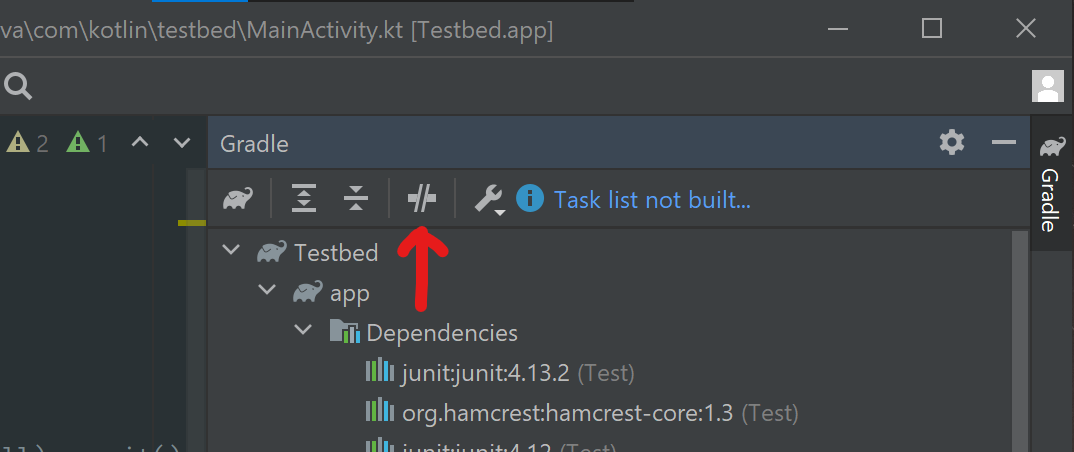
只需确保这是,没有启用,并尝试构建。确保你也有一个互联网连接!
页面原文内容由Stack Overflow提供。腾讯云小微IT领域专用引擎提供翻译支持
原文链接:
https://stackoverflow.com/questions/70583514
复制相关文章
相似问题
腾讯云开发者

Copyright © 2013 - 2026 Tencent Cloud. All Rights Reserved. 腾讯云 版权所有
深圳市腾讯计算机系统有限公司 ICP备案/许可证号:粤B2-20090059  粤公网安备44030502008569号
腾讯云计算(北京)有限责任公司 京ICP证150476号 | 京ICP备11018762号