
用Aforge捕捉桌面
用Aforge捕捉桌面
提问于 2022-01-01 17:37:52
我已经看过各种教程,如this,关于如何从摄像头制作视频,显示和记录它。我现在想要的是能够对桌面进行同样的操作,这样我就可以将计算机活动与外部世界交叉引用。所以我想要的是能够录制一段在计算机上发生的事情的视频,可能是usig AForge。我没有发现这方面的任何参考资料,因此不可能与阿弗特有关吗?
-加
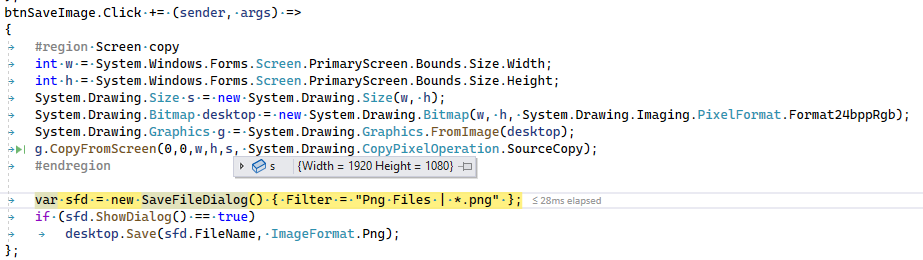
我建议的解决办法如下:
谢谢
但是当我看到png的时候,都是黑色的。保存程序是正确的,因为当我保存网络摄像头框架,它是好的。你能从你的代码中告诉我我的改编有什么问题吗?
谢谢
回答 1
Stack Overflow用户
回答已采纳
发布于 2022-01-01 18:55:56
它可能不是专业的解决方案,也不是实时的解决方案,但它适用于像您这样的简单场景。它是一个用NetFramework4.7.2构建的控制台应用程序。我使用它的源代码重新构建了程序集Aforge.Video.FFMPEG,以便它可以与.NET Framework一起使用。
using AForge.Video.FFMPEG;
using System;
using System.Diagnostics;
using System.Drawing;
using System.Threading;
using System.Windows.Forms;

class Program
    {
        static VideoFileWriter VideoFileWriter;
        static Stopwatch stopwatch = new Stopwatch();
        static void Main(string[] args)
        {
            VideoFileWriter = new VideoFileWriter();

            Size screenSize = Screen.PrimaryScreen.Bounds.Size;
            VideoFileWriter.Open("test.mp4", screenSize.Width, screenSize.Height, 30, VideoCodec.MPEG4, 19200000);
            Bitmap bitmap = new Bitmap(screenSize.Width, screenSize.Height, System.Drawing.Imaging.PixelFormat.Format24bppRgb);
            Graphics g = Graphics.FromImage(bitmap);
            stopwatch.Start();
            while (stopwatch.Elapsed < TimeSpan.FromSeconds(10)) // Record for ten seconds.
            {
                g.CopyFromScreen(0, 0, 0, 0, screenSize, CopyPixelOperation.SourceCopy);
                VideoFileWriter.WriteVideoFrame(bitmap, stopwatch.Elapsed);
                Thread.Sleep(29);
            }
            VideoFileWriter.Close();
            g.Dispose();
        }
}页面原文内容由Stack Overflow提供。腾讯云小微IT领域专用引擎提供翻译支持
原文链接:
https://stackoverflow.com/questions/70550640
复制相关文章
相似问题
腾讯云开发者

Copyright © 2013 - 2026 Tencent Cloud. All Rights Reserved. 腾讯云 版权所有
深圳市腾讯计算机系统有限公司 ICP备案/许可证号:粤B2-20090059  粤公网安备44030502008569号
腾讯云计算(北京)有限责任公司 京ICP证150476号 | 京ICP备11018762号