
用于UICollectionViewCompositionalLayout的可重用头
用于UICollectionViewCompositionalLayout的可重用头
提问于 2021-12-31 07:34:49
我正试图为我的UICollectionViewCompositionalLayout中的每个部分创建描述性标题。就像这样:
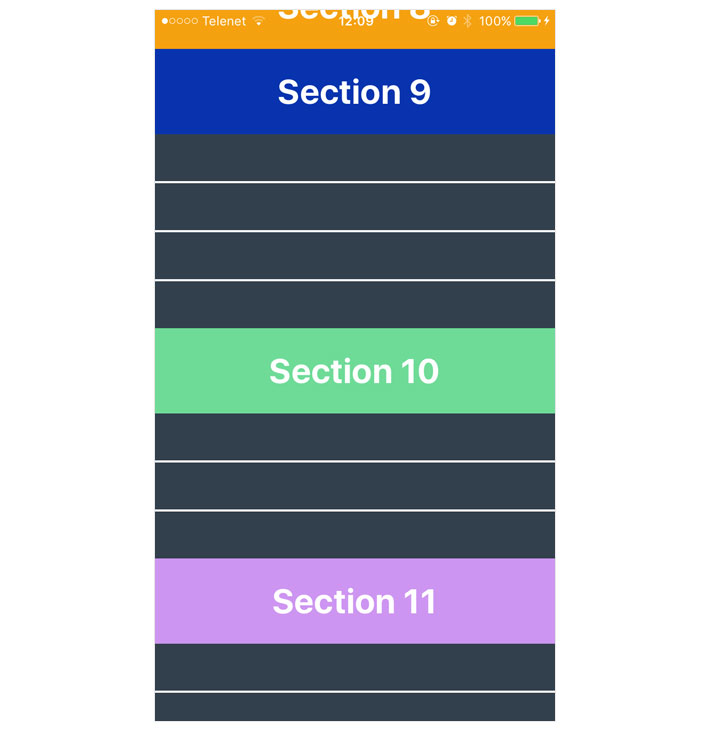
这是我的标题:
class CafeHeaderView: UICollectionReusableView {

    static let reuseId = "HeaderView"
    let categoryLabel = UILabel()

    override init(frame: CGRect) {
        super.init(frame: frame)
        setupContent()
    }

    func setupContent() {
        categoryLabel.frame = CGRect(x: 16, y: 15, width: 200, height: 17)
        categoryLabel.font = UIFont(name: "Montserratarm-Medium", size: 22)
        categoryLabel.text = "Section ?? "
        addSubview(categoryLabel)
    }

    required init?(coder: NSCoder) {
        fatalError("init(coder:) has not been implemented")
    }
}
我注册了我的手机
mainCollectionView.register(CafeHeaderView.self, forSupplementaryViewOfKind: UICollectionView.elementKindSectionHeader, withReuseIdentifier: CafeHeaderView.reuseId)而不是创建boundarySupplementaryItem
section.boundarySupplementaryItems = [.init(layoutSize: .init(widthDimension: .fractionalWidth(1), heightDimension: .estimated(60)), elementKind: UICollectionView.elementKindSectionHeader, alignment: .top)]最后
   func collectionView(_ collectionView: UICollectionView, viewForSupplementaryElementOfKind kind: String, at indexPath: IndexPath) -> UICollectionReusableView {
         let header = collectionView.dequeueReusableSupplementaryView(ofKind: kind, withReuseIdentifier: CafeHeaderView.reuseId, for: indexPath)

    }
那么,是否有一种方法来确定当前部分并相应地设置我的标签文本?
回答 1
Stack Overflow用户
回答已采纳
发布于 2021-12-31 10:26:01
试试这个:
var anyArray = ["cat", "dog", "mouse", "elephant"]
func collectionView(_ collectionView: UICollectionView, viewForSupplementaryElementOfKind kind: String, at indexPath: IndexPath) -> UICollectionReusableView {

let header = collectionView.dequeueReusableSupplementaryView(ofKind: kind, withReuseIdentifier: CafeHeaderView.reuseId, for: indexPath)

header.yourLabel.text = anyArray[indexPath.section]
return header
}若要将数据存储在每个单元格的区段中,请使用indexPath.section.
页面原文内容由Stack Overflow提供。腾讯云小微IT领域专用引擎提供翻译支持
原文链接:
https://stackoverflow.com/questions/70540035
复制相关文章
相似问题
腾讯云开发者

Copyright © 2013 - 2026 Tencent Cloud. All Rights Reserved. 腾讯云 版权所有
深圳市腾讯计算机系统有限公司 ICP备案/许可证号:粤B2-20090059  粤公网安备44030502008569号
腾讯云计算(北京)有限责任公司 京ICP证150476号 | 京ICP备11018762号