
使用LCD1602连接Waveshare RGB和Raspberry
使用LCD1602连接Waveshare RGB和Raspberry
提问于 2021-12-30 20:58:34
我试图连接LCD1602 RBG波形与覆盆子使用C#。我将其连接到Raspberry并设置权限,现在试图传递一些数据。下面的代码运行所有行,但LCD没有反应。如果有人能给我建议。
using System;
using System.Device.Gpio;
using System.Threading.Tasks;
using System.Device.I2c;
using Iot.Device.CharacterLcd;
using Iot.Device.Pcx857x;
using System.Threading;

namespace pi_project
{
    public class Program
    {
        static void Main(string[] args)
        {
            Console.WriteLine("Test1");

            using I2cDevice i2c = I2cDevice.Create(new I2cConnectionSettings(1, 0x3e));
            //BCM2835
            using var driver = new Pcf8574(i2c);
            using var lcd = new Lcd1602(registerSelectPin: 0,
                                    enablePin: 2,
                                    dataPins: new int[] { 4, 5, 6, 7 },
                                    backlightPin: 3,
                                    backlightBrightness: 0.3f,
                                    readWritePin: 1,
                                    controller: new GpioController(PinNumberingScheme.Logical, driver));
            int counter = 0;

            while (counter <= 4)
            {
                lcd.Clear();

                lcd.SetCursorPosition(0, 0);
                lcd.Write("TestText1");

                lcd.SetCursorPosition(0, 1);
                lcd.Write("TestText2");

                Thread.Sleep(2000);
                counter++;
            }
        }
    }
} 0 1 2 3 4 5 6 7 8 9 a b c d e f
00: -- -- -- -- -- -- -- --
10: -- -- -- -- -- -- -- -- -- -- -- -- -- -- -- --
20: 20 -- -- -- -- -- -- -- -- -- -- -- -- -- -- --
30: -- -- -- -- -- -- -- -- -- -- -- -- 3c -- 3e --
40: -- -- -- -- -- -- -- -- -- -- -- -- -- -- -- --
50: -- -- -- -- -- -- -- -- -- -- -- -- -- -- -- --
60: 60 -- -- -- -- -- -- -- -- -- -- -- -- -- -- --
70: 70 -- -- -- -- -- -- --
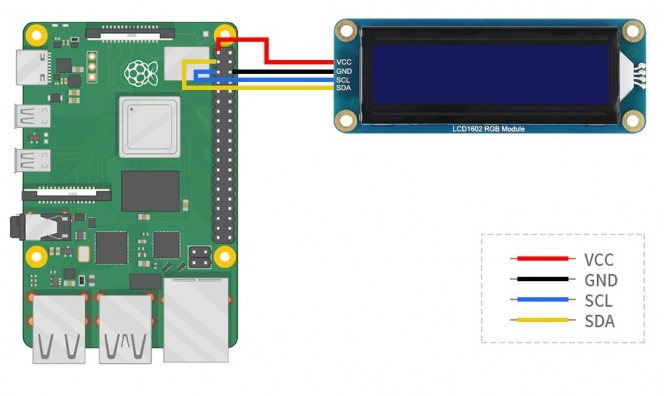
回答 1
Stack Overflow用户
回答已采纳
发布于 2022-01-01 18:49:10
这些显示器的控制器通常是HD44780或兼容的。如果python示例运行良好,那么应该这样做:
var i2cLcdDevice = I2cDevice.Create(new I2cConnectionSettings(busId: 1, deviceAddress: 0x3E));
var i2cRgbDevice = I2cDevice.Create(new I2cConnectionSettings(busId: 1, deviceAddress: 0x60));
using LcdRgb lcd = new LcdRgb(new Size(16, 2), i2cLcdDevice, i2cRgbDevice);
{
    lcd.Write("Hello World!");
    lcd.SetBacklightColor(Color.Azure);
}(出于我以外的原因,python示例将地址定义为0x7c >> 1和0xc0 >> 1,它们是0x3E和0x60,它们与设备扫描保持一致)
页面原文内容由Stack Overflow提供。腾讯云小微IT领域专用引擎提供翻译支持
原文链接:
https://stackoverflow.com/questions/70536639
复制相关文章
相似问题
腾讯云开发者

Copyright © 2013 - 2026 Tencent Cloud. All Rights Reserved. 腾讯云 版权所有
深圳市腾讯计算机系统有限公司 ICP备案/许可证号:粤B2-20090059  粤公网安备44030502008569号
腾讯云计算(北京)有限责任公司 京ICP证150476号 | 京ICP备11018762号