
为什么我在jQuery中得到了一个CORS错误,而在XMLHttpRequest中却没有得到?
在从UI代码库进行跨域API调用时,我们面临着一个奇怪的问题,其中一种方法Ajax请求(vanilla )可以工作,而另一种方法则不行(jQuery)。任何指针都会有帮助。
跨域成功调用
let url = 'https://somedomain.com/test-api/links';
var xhr = new XMLHttpRequest();
xhr.open("GET", url, true);
xhr.responseType = 'application/json';
xhr.onload = function () {
  // Successful request
  if (xhr.status == 200) {
    console.log('success')
  }
};
xhr.onerror = function () {
  // Crossdomain request denied
  if (xhr.status === 0) {
    console.log(xhr.response)
  }
};

xhr.crossDomain = true;
xhr.withCredentials = true;
xhr.send();
然而,使用下面的代码库(jQuery),我们得到了声明-的错误消息:
CORS策略阻止从“XMLHttpRequest”从“https://sourcedomain.com/test-api/links”访问“https://callerDomain.com”:对飞行前请求的响应不通过访问控制检查:响应中的“访问控制-允许-凭据”标题的值为“”,当请求的凭据模式为“包括”时,该值必须为“true”。由XMLHttpRequest发起的请求的凭据模式由withCredentials属性控制。
.ajax({
      url: "https://somedomain.com/test-api/links",
      method: 'GET',
      contentType: 'application/json',
      dataType: "json",
      crossDomain : true,
      xhrFields: {
        withCredentials: true
      }
    }).then((resp) => {
      console.log(resp)
    }).catch((err) => {
      console.log(err)
    });
基于 sourcedomain.com的Apache协议
Header always set Access-Control-Allow-Methods "POST, GET, OPTIONS, DELETE, PUT"
Header set Access-Control-Allow-Credentials true
Header always set Access-Control-Allow-Origin "https://callerDomain.com"
Header always set Access-Control-Allow-Headers "*"更新:,因为下面的组合是无效的--我将apacahe配置更新为
 Header always set Access-Control-Allow-Headers "*"
Header set Access-Control-Allow-Credentials trueApache在sourcedomain.com上更新确认
Header always set Access-Control-Allow-Methods "POST, GET, OPTIONS, DELETE, PUT"
Header set Access-Control-Allow-Credentials true
Header always set Access-Control-Allow-Origin "https://callerDomain.com"
//for testing only
Header set   Access-Control-Allow-Headers       "Accept, Accept-CH, Accept-Charset, Accept-Datetime, Accept-Encoding, Accept-Ext, Accept-Features, Accept-Language, Accept-Params, Accept-Ranges, Access-Control-Allow-Credentials, Access-Control-Allow-Headers, Access-Control-Allow-Methods, Access-Control-Allow-Origin, Access-Control-Expose-Headers, Access-Control-Max-Age, Access-Control-Request-Headers, Access-Control-Request-Method, Age, Allow, Alternates, Authentication-Info, Authorization, C-Ext, C-Man, C-Opt, C-PEP, C-PEP-Info, CONNECT, Cache-Control, Compliance, Connection, Content-Base, Content-Disposition, Content-Encoding, Content-ID, Content-Language, Content-Length, Content-Location, Content-MD5, Content-Range, Content-Script-Type, Content-Security-Policy, Content-Style-Type, Content-Transfer-Encoding, Content-Type, Content-Version, Cookie, Cost, DAV, DELETE, DNT, DPR, Date, Default-Style, Delta-Base, Depth, Derived-From, Destination, Differential-ID, Digest, ETag, Expect, Expires, Ext, From, GET, GetProfile, HEAD, HTTP-date, Host, IM, If, If-Match, If-Modified-Since, If-None-Match, If-Range, If-Unmodified-Since, Keep-Alive, Label, Last-Event-ID, Last-Modified, Link, Location, Lock-Token, MIME-Version, Man, Max-Forwards, Media-Range, Message-ID, Meter, Negotiate, Non-Compliance, OPTION, OPTIONS, OWS, Opt, Optional, Ordering-Type, Origin, Overwrite, P3P, PEP, PICS-Label, POST, PUT, Pep-Info, Permanent, Position, Pragma, ProfileObject, Protocol, Protocol-Query, Protocol-Request, Proxy-Authenticate, Proxy-Authentication-Info, Proxy-Authorization, Proxy-Features, Proxy-Instruction, Public, RWS, Range, Referer, Refresh, Resolution-Hint, Resolver-Location, Retry-After, Safe, Sec-Websocket-Extensions, Sec-Websocket-Key, Sec-Websocket-Origin, Sec-Websocket-Protocol, Sec-Websocket-Version, Security-Scheme, Server, Set-Cookie, Set-Cookie2, SetProfile, SoapAction, Status, Status-URI, Strict-Transport-Security, SubOK, Subst, Surrogate-Capability, Surrogate-Control, TCN, TE, TRACE, Timeout, Title, Trailer, Transfer-Encoding, UA-Color, UA-Media, UA-Pixels, UA-Resolution, UA-Windowpixels, URI, Upgrade, User-Agent, Variant-Vary, Vary, Version, Via, Viewport-Width, WWW-Authenticate, Want-Digest, Warning, Width, X-Content-Duration, X-Content-Security-Policy, X-Content-Type-Options, X-CustomHeader, X-DNSPrefetch-Control, X-Forwarded-For, X-Forwarded-Port, X-Forwarded-Proto, X-Frame-Options, X-Modified, X-OTHER, X-PING, X-PINGOTHER, X-Powered-By, X-Requested-With"
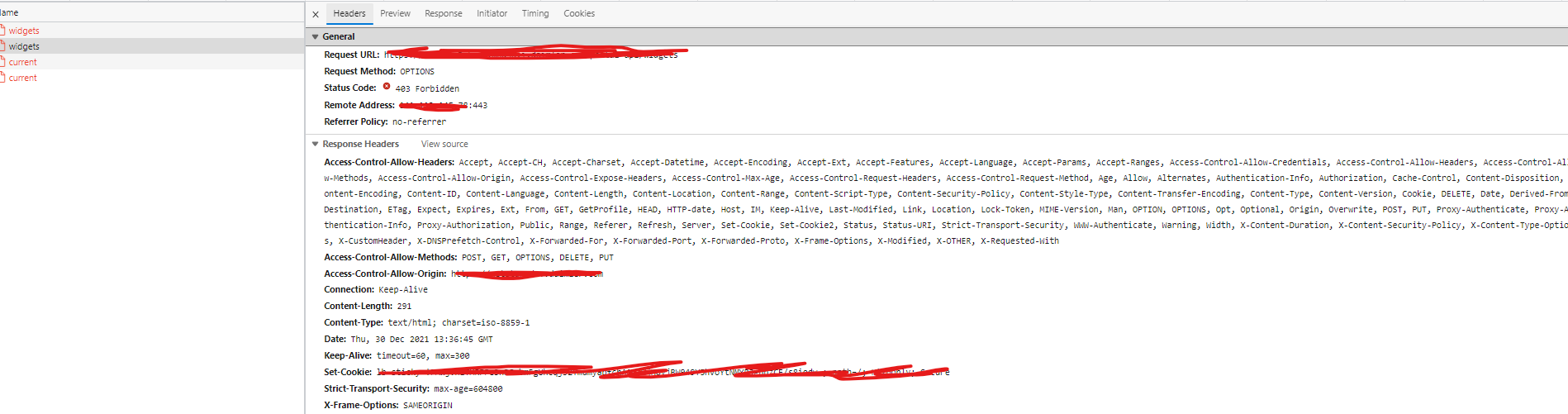
对飞行前请求的响应

回答 1
Stack Overflow用户
发布于 2021-12-30 12:13:46
问题(S)
这两项请求并不相等。
对于通过XHR发送的邮件,您只需要设置类的内容类型
xhr.open("GET", url, true);
// ...
xhr.responseType = 'application/json';但是,对于通过jQuery发送的请求,您要将本身设置为application/json
.ajax({
  // ...
  method: 'GET',
  contentType: 'application/json',
  // ...
});
结合有证书的请求使用通配符
请求的内容类型的application/json值使其为https://developer.mozilla.org/en-US/docs/Web/HTTP/CORS#simple_requests;因此,浏览器会触发预运行请求。但是,您对此飞行前请求的响应是
Access-Control-Allow-Headers: *
Access-Control-Allow-Credentials: true这是一个不相容组合。因此,CORS预飞失败,正如浏览器的错误消息所解释的那样。
总是响应具有403状态的飞行前请求
最近的编辑显示,对飞行前请求的响应状态是403。但是,要使CORS预飞行成功,状态必须在2xx范围内;请参阅我最近的另一个回答。
解决方案
- 要么不指定请求的内容类型来保持https://developer.mozilla.org/en-US/docs/Web/HTTP/CORS#simple_requests,要么(最好)显式地允许
Access-Control-Allow-Headers头中的Content-Type头,而不是使用通配符。 - 确保您以
2xx状态响应成功的飞行前请求。请注意,因为飞行前请求从不携带凭据,因此您应该在任何授权中间件面前处理此类请求。
https://stackoverflow.com/questions/70531105
复制相似问题
腾讯云开发者

Copyright © 2013 - 2026 Tencent Cloud. All Rights Reserved. 腾讯云 版权所有
深圳市腾讯计算机系统有限公司 ICP备案/许可证号:粤B2-20090059  粤公网安备44030502008569号
腾讯云计算(北京)有限责任公司 京ICP证150476号 | 京ICP备11018762号