
从本地npm包导入React组件返回空对象
我正在构建我的反应组件的第一个npm包。
在我用webpack成功地构建了它之后,我尝试用npm link来测试它。
它连接了,但是组件没有加载。它给了我一堆像这样的错误
Uncaught : Element type无效:预期为字符串(用于内置组件)或类/函数(用于组合组件),但got: object。您可能忘记从定义在其中的文件中导出组件,或者您可能混淆了默认导入和命名导入。检查
App的呈现方法。
因此,我尝试console.log()组件。它返回一个空的Object。
我为这事挣扎了两天,不知道出了什么问题。
以下是一些配置
webpack.config.js
var path = require("path");
const isDevelopment = process.env.NODE_ENV === 'development'
const MiniCssExtractPlugin = require('mini-css-extract-plugin')

module.exports = {
    mode: "production",
    entry: {
        index: path.join(__dirname, 'src', 'index.tsx')
    },
    plugins: [
        new MiniCssExtractPlugin({
            filename: isDevelopment ? '[name].css' : '[name].[hash].css',
            chunkFilename: isDevelopment ? '[id].css' : '[id].[hash].css'
        })
    ],
    module: {
        rules: [
            {
                test: /\.tsx?$/,
                loader: 'ts-loader',
                exclude: /node_modules/,
                options: { allowTsInNodeModules: true }
            },
            {
                test: /\.css$/i,
                use: ["style-loader", "css-loader"],
            },
            {
                test: /\.module\.s[ac]ss$/,
                use: [
                    isDevelopment ? 'style-loader': MiniCssExtractPlugin.loader,
                    {
                        loader: 'css-loader',
                        options: {
                            modules: true,
                            sourceMap: isDevelopment
                        }
                    },
                    {
                        loader: 'sass-loader',
                        options: {
                            sourceMap: isDevelopment
                        }
                    }
                ]
            },
            {
                test: /\.s[ac]ss$/i,
                exclude: /\.module.(s[ac]ss)$/,
                use: [
                    // Creates `style` nodes from JS strings
                    isDevelopment ? 'style-loader': MiniCssExtractPlugin.loader,
                    // to generate a .d.ts module
                    "css-modules-typescript-loader",
                    // Translates CSS into CommonJS
                    {loader: "css-loader", options: {modules: true}},
                    // Compiles Sass to CSS
                    {loader: "sass-loader", options: {sourceMap: isDevelopment}},
                ],
            },
        ]
    },
    resolve: {
        extensions: [".ts", ".tsx", ".js", ".css", ".scss"]
    },
    output: {
        filename: '[name].js',
        path: path.resolve(__dirname, 'dist'),
    },
}
tsconfig.json
{
  "compilerOptions": {
    "outDir": "./dist/",
    "target": "es5",
    "lib": [
      "dom",
      "dom.iterable",
      "esnext"
    ],
    "allowJs": true,
    "declaration": true,
    "declarationMap": true,
    "skipLibCheck": true,
    "esModuleInterop": true,
    "allowSyntheticDefaultImports": true,
    "strict": true,
    "forceConsistentCasingInFileNames": true,
    "noFallthroughCasesInSwitch": true,
    "module": "esnext",
    "moduleResolution": "node",
    "resolveJsonModule": true,
    "isolatedModules": true,
    "removeComments": true,
    "noImplicitAny": true,
    "noEmit": false,
    "jsx": "react-jsx",
    "sourceMap": true,
    "plugins": [{"name": "typescript-plugin-css-modules"}]
  },
  "include": [
    "src"
  ]
}
package.json
{
  "name": "react-dissolve",
  "version": "1.0.0",
  "description": "A color and image animated dissolve effect.",
  "main": "./dist/index.js",
  "types": "./dist/index.d.ts",
  "files": [
    "dist",
    "src"
  ],
  "scripts": {
    "build": "webpack"
  },
  "author": "jack szeto",
  "license": "MIT",
  "devDependencies": {
    "@babel/core": "^7.16.5",
    "@babel/preset-env": "^7.16.5",
    "@babel/preset-react": "^7.16.5",
    "@testing-library/jest-dom": "^5.16.1",
    "@testing-library/react": "^12.1.2",
    "@testing-library/user-event": "^13.5.0",
    "@types/color-string": "^1.5.2",
    "@types/jest": "^27.0.3",
    "@types/node": "^16.11.15",
    "@types/node-sass": "^4.11.2",
    "@types/react": "^17.0.37",
    "@types/react-dom": "^17.0.11",
    "color-string": "^1.9.0",
    "css-loader": "^6.5.1",
    "css-modules-typescript-loader": "^4.0.1",
    "mini-css-extract-plugin": "^2.4.5",
    "node-sass": "^7.0.1",
    "rc-slider": "^9.7.5",
    "react": "^17.0.2",
    "react-dom": "^17.0.2",
    "react-p5": "^1.3.24",
    "react-scripts": "5.0.0",
    "sass": "^1.45.1",
    "sass-loader": "^12.4.0",
    "simplex-noise": "^3.0.0",
    "style-loader": "^3.3.1",
    "ts-loader": "^9.2.6",
    "typescript": "^4.5.4",
    "web-vitals": "^2.1.2",
    "webpack": "^5.65.0",
    "webpack-cli": "^4.9.1"
  },
  "peerDependencies": {
    "react": "^17.0.2",
    "react-p5": "^1.3.24",
    "simplex-noise": "^3.0.0",
    "color-string": "^1.9.0",
    "rc-slider": "^9.7.5",
    "sass": "^1.45.1"
  },
  "dependencies": {}
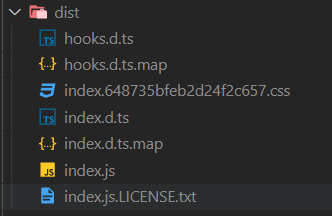
}构建放在dist文件夹中,它似乎在dist中完美地成功构建了。
截图:
最小再现案例:
通过使用上述相同的配置。我创建了一个测试项目(请参阅下面的结构)。
我运行npm run build来使用webpack构建组件。
然后npm link将测试项目链接到新的ts响应项目。试图导入,但却产生了相同的错误。
用例
import Test from 'npm-test';
...
<Test />
文件结构
npm-test/
  dist/
  node_modules/
  src/
    declarations.d.ts
    index.tsx
    style.module.scss
  .babelrc
  .gitgnore
  .npmignore
  package.json
  tsconfig.json
  webpack.config.js
index.tsx
import React, { CSSProperties } from 'react'
import styles from './style.module.scss';

interface TestProps {
    className?: string,
    style?: CSSProperties,
}
const Test = ({className, style}:TestProps) => {
    return (
        <div className={`${styles.test} ${className}`}
            style={{...style}}
        >
            Test
        </div>
    )
}
export default Test;
出口index.d.ts
import { CSSProperties } from 'react';
interface TestProps {
    className?: string;
    style?: CSSProperties;
}
declare const Test: ({ className, style }: TestProps) => JSX.Element;
export default Test;
//# sourceMappingURL=index.d.ts.map
谢谢你阅读这篇长篇文章!
回答 1
Stack Overflow用户
发布于 2021-12-31 20:21:48
我已经解决了问题。谢谢JaredSmith帮我。
我和webpack混在一起,但最后,我决定继续使用rollup,它更容易使用。
找到了Portexe的汇总教程,这很有帮助。
因此,我将文件结构改为
npm-test-hellow-world/
  src/
    component/
      hello-world.tsx
    index.ts
  .babelrc
  .gitgnore
  .npmignore
  package.json
  tsconfig.json
rollup.config.js因为在hello-world.tsx中,函数组件被导出为默认
declare const HelloWorld: React.FC<HelloWorldProps>;
export default HelloWorld;不知何故,编译器没有导出组件。所以我把它放在src/component/文件夹中,然后从src/index.ts导出它
export {default} from './component/hello-world';
// notice:
// export * from './component/hello-world';
// didn't work
而且起作用了!不知道为什么。如果有人能解释的话,我会非常感激的。
如果您想了解更多细节,可以查看GitHub回购。
https://stackoverflow.com/questions/70530390
复制相似问题
腾讯云开发者

Copyright © 2013 - 2026 Tencent Cloud. All Rights Reserved. 腾讯云 版权所有
深圳市腾讯计算机系统有限公司 ICP备案/许可证号:粤B2-20090059  粤公网安备44030502008569号
腾讯云计算(北京)有限责任公司 京ICP证150476号 | 京ICP备11018762号