
VictoryLabel显示没有在胜利本地人中工作(反应本地)
VictoryLabel显示没有在胜利本地人中工作(反应本地)
提问于 2021-12-30 08:40:00
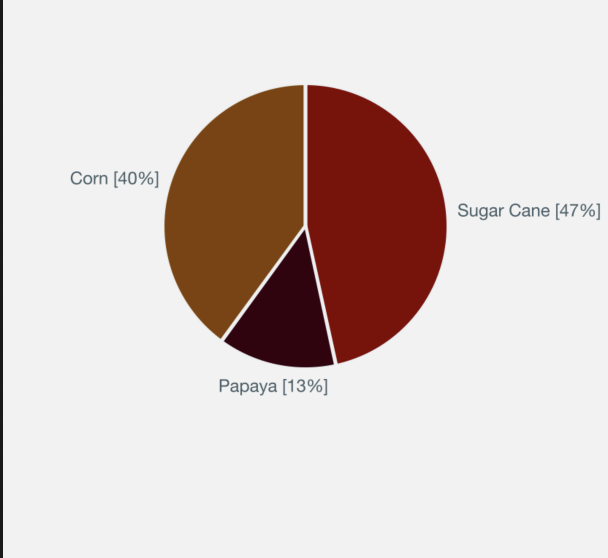
在VictoryPie中,图表需要使用CustomLabel显示VictoryTooltip和VictoryLabel,但CustomLabel组件只显示VictoryLabel ,而不显示VictoryTooltip
直接使用labelComponent支柱的VictoryTooltip和VictoryLabel工作得很好
示例:labelComponent={<VictoryTooltip />}和labelComponent={<VictoryLabel />}
这是代码
import React from 'react'
import { StyleSheet, View, Text } from 'react-native'
import {
 VictoryChart,
 VictoryTheme,
 VictoryPie,
 VictoryAxis,
 VictoryTooltip,
 VictoryLabel,
} from 'victory-native'
import { useSelector } from 'react-redux'
import { useTranslation } from 'react-i18next'
import Svg, {G} from 'react-native-svg'

// This is CustomLabel which include VictoryLabel and VictoryTooltip
const CustomLabel = (props) => {
const { datum, text, y, style } = props
const { t, i18n } = useTranslation()
const selectedLanguage = i18n.language
return (
  <G>
    <VictoryLabel
      {...props}
      text={`${datum.displayName[selectedLanguage]} [${datum.percent.toFixed(0)}%]`}
    />
    <VictoryTooltip
      {...props}
      label={`${text}\n`}
      renderInPortal={false}
      x={200} y={250}
      orientation="top"
      pointerLength={0}
      cornerRadius={50}
      flyoutWidth={100}
      flyoutHeight={100}
      flyoutStyle={{ fill: "red" }}
    />
  </G>
 )
}

const Chart = ({pieAnalysisData}) => {
const { minusTags } = useSelector((state) => state.settings)
const { t, i18n } = useTranslation()
const selectedLanguage = i18n.language
return (
  <View style={styles.container}>
    <View>
        <VictoryChart
          padding={{ top: 0, bottom: 10, right: 110, left: 110 }}
          theme={VictoryTheme.material}
        >
          <VictoryPie
            data={pieAnalysisData.minusData || []}
            labels={({ datum }) => {
              let label = ''
              for(let i of datum.tags) {
                let key = Object.keys(i)[0]
                label = label + '\n' + `${minusTags[selectedLanguage][key]}: [${i[key].toFixed(0)}%]`
              }
              return label
              }
            }
            padding={0}
            innerRadius={1}
            labelRadius={105}
            padAngle={1}
            animate={{
              duration: 2000,
            }}
            labelComponent={<CustomLabel />}
          />
        </VictoryChart>
    </View>
  </View>
 )
}

export default Chart
以下是未显示工具提示的ios模拟器屏幕截图
回答 1
Stack Overflow用户
发布于 2021-12-31 02:33:12
工具提示通过将VictoryVoronoiContainer作为containerComponent支柱传递到VictoryChart中来显示。
containerComponent={
   <VictoryVoronoiContainer/>
}页面原文内容由Stack Overflow提供。腾讯云小微IT领域专用引擎提供翻译支持
原文链接:
https://stackoverflow.com/questions/70529258
复制相关文章
相似问题
腾讯云开发者

Copyright © 2013 - 2026 Tencent Cloud. All Rights Reserved. 腾讯云 版权所有
深圳市腾讯计算机系统有限公司 ICP备案/许可证号:粤B2-20090059  粤公网安备44030502008569号
腾讯云计算(北京)有限责任公司 京ICP证150476号 | 京ICP备11018762号