
改变TabbedPage的高度
改变TabbedPage的高度
提问于 2021-12-29 09:30:20
我为我的Tabbar创建了自定义呈现。现在我想增加身高。不知道我能在哪里换高度。因为文本被裁剪了。
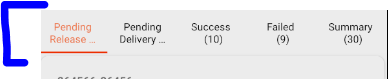
在我的MainActivity.cs里
TabLayoutResource = Resource.Layout.CustomTabbar;
我的styles.xml
  <style name="CustomTab"
        parent="Base.Widget.Design.TabLayout">
    <item name="android:gravity">center</item>
    <item name="android:textSize">500sp</item>
    <item name="android:layout_height">wrap_content</item>
  </style>
我的CustomTabbar.axml
<?xml version="1.0" encoding="utf-8"?>
<android.support.design.widget.TabLayout
    xmlns:android="http://schemas.android.com/apk/res/android"
    xmlns:app="http://schemas.android.com/apk/res-auto"
    android:id="@+id/sliding_tabs"
    android:layout_width="match_parent"
    android:layout_height="match_parent"
    android:background="?attr/colorPrimary"
    android:theme="@style/ThemeOverlay.AppCompat.Dark.ActionBar"
    app:tabIndicatorColor="#FF3300"
    app:tabTextAppearance="@style/CustomTab"
    app:tabMode="fixed" />
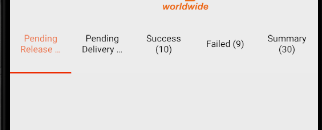
编辑:添加了minHeight,但标签没有显示为整体。
回答 1
Stack Overflow用户
发布于 2021-12-29 09:41:12
您可以为android:minHeight设置一个TabLayout。
TabLayout的代码供您参考。
<?xml version="1.0" encoding="utf-8"?>
<com.google.android.material.tabs.TabLayout
xmlns:android="http://schemas.android.com/apk/res/android"
xmlns:app="http://schemas.android.com/apk/res-auto"
android:id="@+id/sliding_tabs"
android:layout_width="match_parent"
android:layout_height="wrap_content"
android:minHeight="200dp"
android:background="?attr/colorPrimary"
android:theme="@style/ThemeOverlay.AppCompat.Dark.ActionBar"
app:tabIndicatorColor="#FF3300"
app:tabGravity="fill"
app:tabMode="fixed" />
更新:
更改:
app:tabMode="fixed" 至:
app:tabMode="scrollable" 页面原文内容由Stack Overflow提供。腾讯云小微IT领域专用引擎提供翻译支持
原文链接:
https://stackoverflow.com/questions/70517524
复制相关文章
相似问题
腾讯云开发者

Copyright © 2013 - 2026 Tencent Cloud. All Rights Reserved. 腾讯云 版权所有
深圳市腾讯计算机系统有限公司 ICP备案/许可证号:粤B2-20090059  粤公网安备44030502008569号
腾讯云计算(北京)有限责任公司 京ICP证150476号 | 京ICP备11018762号