
UIAlertController标题和消息在iPhone12中不显示
UIAlertController标题和消息在iPhone12中不显示
提问于 2021-12-29 06:23:54
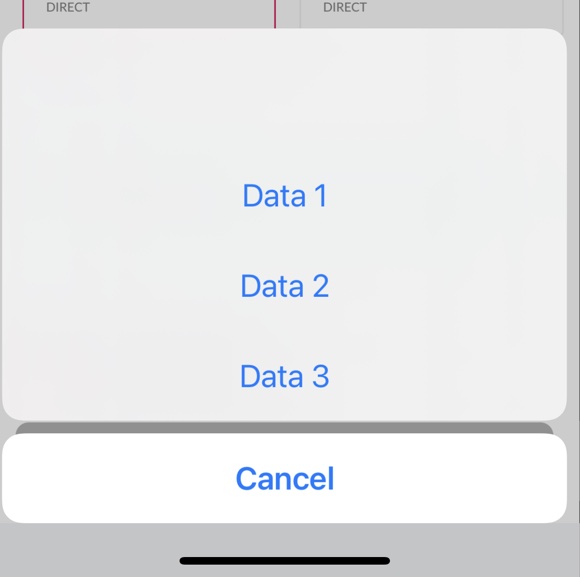
我用UIAlertControllerStyleActionSheet样式显示了UIAlertControllerStyleActionSheet。当使用XCode 13构建时,UIAlertController标题和消息不能在iPhone 12上使用,它可以在其他设备上使用。与以前在iPhone 12上工作的代码相同。
-(void)alertSheetUI{
dispatch_async(dispatch_get_main_queue(), ^{
    UIAlertController *actionSheet = [UIAlertController alertControllerWithTitle:@"Static Title" message:@"Static Message" preferredStyle:UIAlertControllerStyleActionSheet];

    [actionSheet addAction:[UIAlertAction actionWithTitle:@"Data 1" style:UIAlertActionStyleDefault handler:^(UIAlertAction *action) {
    }]];
    [actionSheet addAction:[UIAlertAction actionWithTitle:@"Data 2" style:UIAlertActionStyleDefault handler:^(UIAlertAction *action) {
    }]];
    [actionSheet addAction:[UIAlertAction actionWithTitle:@"Data 3" style:UIAlertActionStyleDefault handler:^(UIAlertAction *action) {
    }]];

    [actionSheet addAction:[UIAlertAction actionWithTitle:@"Cancel" style:UIAlertActionStyleCancel handler:^(UIAlertAction *action) {

        [[[UIApplication sharedApplication] delegate].window.rootViewController dismissViewControllerAnimated:YES completion:^{
        }];
    }]];
    [[[UIApplication sharedApplication] delegate].window.rootViewController presentViewController:actionSheet animated:NO completion:nil];
});}
iPhone 12
iPhone SE
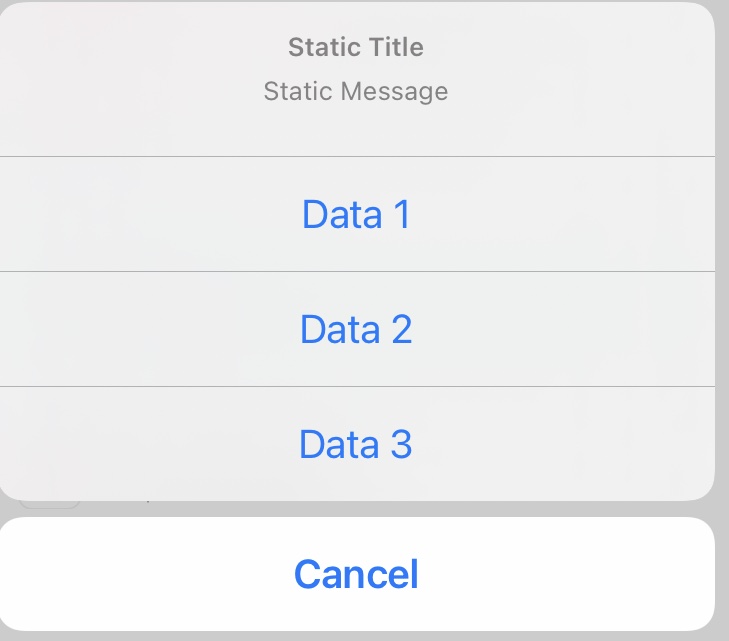
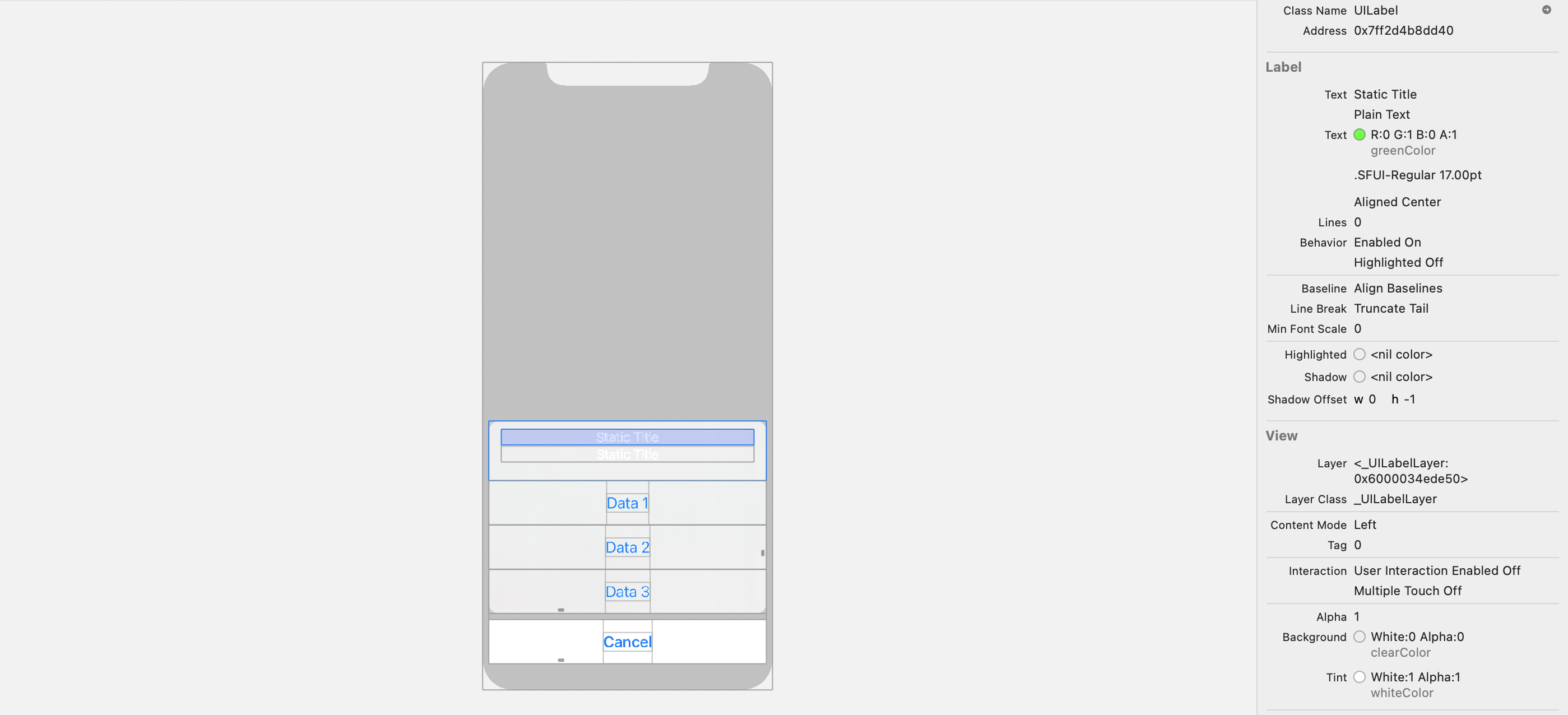
视图层次结构将标题和消息显示为白色。因此,只有标题和消息是不可见的。我尝试使用下面的代码使用属性文本将标题和消息设置为绿色。但是标题和消息颜色也不会在其他设备上更新。其他设备显示为灰色。
更新代码
-(void)alertSheetUI{

dispatch_async(dispatch_get_main_queue(), ^{

        NSString * string = @"Static Title";
        NSMutableAttributedString * attrString = [[NSMutableAttributedString alloc] initWithString:@"Static Title"];
        [attrString addAttribute:NSForegroundColorAttributeName
                                 value:[UIColor greenColor] range:NSMakeRange(0, [string length])];
        UIAlertController *actionSheet = [UIAlertController alertControllerWithTitle:@"Static Title" message:@"Static Message" preferredStyle:UIAlertControllerStyleActionSheet];
        [actionSheet setValue:attrString forKey:@"attributedTitle"];
        [actionSheet setValue:attrString forKey:@"attributedMessage"];

        [actionSheet addAction:[UIAlertAction actionWithTitle:@"Data 1" style:UIAlertActionStyleDefault handler:^(UIAlertAction *action) {
        }]];
        [actionSheet addAction:[UIAlertAction actionWithTitle:@"Data 2" style:UIAlertActionStyleDefault handler:^(UIAlertAction *action) {
        }]];
        [actionSheet addAction:[UIAlertAction actionWithTitle:@"Data 3" style:UIAlertActionStyleDefault handler:^(UIAlertAction *action) {
        }]];

        [actionSheet addAction:[UIAlertAction actionWithTitle:@"Cancel" style:UIAlertActionStyleCancel handler:^(UIAlertAction *action) {

            [[[UIApplication sharedApplication] delegate].window.rootViewController dismissViewControllerAnimated:YES completion:^{
            }];
        }]];
        [[[UIApplication sharedApplication] delegate].window.rootViewController presentViewController:actionSheet animated:NO completion:nil];
    });}
回答 1
Stack Overflow用户
发布于 2021-12-31 12:52:36
您的代码确实要求uiapplication显示警报。您可以尝试使用:
 dispatch_async(dispatch_get_main_queue(), ^{
    [self presentViewController:actionShert animated:YES completion:nil];
});
只有在显示或显示警报时才需要主异步队列。
关于这个问题,这里也有不同的答案。
页面原文内容由Stack Overflow提供。腾讯云小微IT领域专用引擎提供翻译支持
原文链接:
https://stackoverflow.com/questions/70515825
复制相关文章
相似问题
腾讯云开发者

Copyright © 2013 - 2026 Tencent Cloud. All Rights Reserved. 腾讯云 版权所有
深圳市腾讯计算机系统有限公司 ICP备案/许可证号:粤B2-20090059  粤公网安备44030502008569号
腾讯云计算(北京)有限责任公司 京ICP证150476号 | 京ICP备11018762号