
如何在nextcord中创建链接按钮?
如何在nextcord中创建链接按钮?
提问于 2021-12-25 04:09:43
这是我想要的链接按钮。
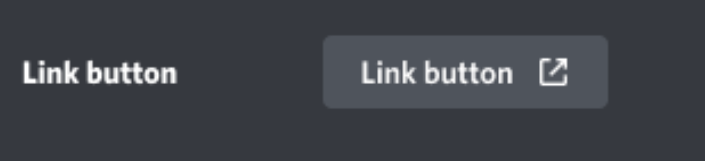
这是我的密码:
class helpcmd(nextcord.ui.View):
    def __init__(self):
        super().__init__()

    @nextcord.ui.button(label='create thread', style=nextcord.ButtonStyle.link ,url='https://github.com/lmjaedentai/KaiCheng-Bot#commands')
    async def help(self, button: nextcord.ui.Button, interaction: nextcord.Interaction):
        #my code
错误:
  File "d:\Desktop\coding\discordpy\main.py", line 226, in helpcmd
    @nextcord.ui.button(label='create thread', style=nextcord.ButtonStyle.link ,url='https://github.com/lmjaedentai/KaiCheng-Bot#commands')
TypeError: button() got an unexpected keyword argument 'url'回答 3
Stack Overflow用户
回答已采纳
发布于 2021-12-25 11:38:38
您不能这样做,因为不和谐不返回,或支持回调的URL按钮。相反,您可以在def __init__和self.add_item中这样做。你可以在文档里查到更多。
class SomeView(View):
    def __init__(self):
        super().__init__() #you can do timeout here
self.add_item(url = "some url", label = "This is a url button") #using this method doesn't have any callback.Stack Overflow用户
发布于 2022-01-16 11:37:09
实现这一目标的正确方法是使用类似的方法
class MyView(ui.View):
    def __init__(self, *args, **kwargs):
        super().__init__(*args, **kwargs)
        self.add_item(ui.Button(style=nextcord.ButtonStyle.link, url=<YOUR-URL>, label="Click Me"))
Lim最初的回答是错误的。
Stack Overflow用户
发布于 2022-03-27 08:45:52
作为一个全班的学生,你应该这样做。
from nextcord.ui import View
from nextcord import Interaction,Button,ButtonStyle

class helpcmd(View):
  def __init__(self):
    super().__init__()
    self.add_item(nextcord.ui.Button(style=nextcord.ButtonStyle.link, url='https://www.youtube.com/watch?v=dQw4w9WgXcQ', label="Create Thread"))
    self.value = None
    @nextcord.ui.button(label='Create a thread', style=nextcord.ButtonStyle.blurple)
    async def rickroll(self, button: nextcord.ui.Button, interaction: nextcord.Interaction):
      await interaction.response.send_message('got rickrolled', ephemeral=False)
      self.value = True
self.stop()页面原文内容由Stack Overflow提供。腾讯云小微IT领域专用引擎提供翻译支持
原文链接:
https://stackoverflow.com/questions/70477924
复制相关文章
相似问题
腾讯云开发者

Copyright © 2013 - 2026 Tencent Cloud. All Rights Reserved. 腾讯云 版权所有
深圳市腾讯计算机系统有限公司 ICP备案/许可证号:粤B2-20090059  粤公网安备44030502008569号
腾讯云计算(北京)有限责任公司 京ICP证150476号 | 京ICP备11018762号