
Uncaught : this.props.forecast.map不是函数
Uncaught : this.props.forecast.map不是函数
提问于 2021-12-24 17:31:14
我是新的反应,看到了一些类似的问题,但还没有找到为什么会发生这种情况。我得到了“TypeError: this.state.data.map不是一个函数”。这是密码。请帮忙找出问题所在。
  import React from "react";

    class Forecast extends React.Component {
        render() {
            const forecastItems = this.props.forecast.map((f) => {
                const url = `http://openweathermap.org/img/wn/${f.wather[0].img}@2x.png`;
                let ampm = 'AM';
                let hour = new Date(f.dt * 1000).getHours();

                if (hour > 12) {
                    hour = hour - 12;
                    ampm = 'PM';
                }
                return (
                    <div className="forecast-item">
                        <p className="forecast-item__hour">{hour}:00 {ampm}</p>
                        <p className="forecast-item__temp">{f.temp}</p>
                        <img src={url} alt={f.weather[0].description}/>
                        <p className="forecast-item__description">{f.wather[0].main}</p>

                    </div>
                );
            });
            return (
                <div className="forecast">
                {forecastItems}
        </div>);
        }
    }

    export default Forecast;
这里是我的母公司,在这里我使用我的代码来获取天气api,它似乎做的一切都是正确的。
import React from "react";
import './App.css';
import SearchMenu from "./Components/search-menu/search-menu";
import CurrentWeather from "./Components/current-weather/current-weather";
import Forecast from "./Components/forecast-weather/forecast-weather";

import {getCurrentWather, getForecast} from './Components/api/weather.api';

class App extends React.Component{
    constructor(props) {
        super(props);
        this.state = {
            location: "",
            temp: "",
            feelsLike: "",
            description: "",
            img: "",
            hourlyForecast: ""
        };
    }

    onInputChange(e) {
        this.setState({
            location: e.target.value
        });
    }

    async onFormSubmit() {
      const weatherRes = await getCurrentWather(this.state.location);
      const lat = weatherRes.data.coord.lat;
      const lon = weatherRes.data.coord.lon;
      const forecastRes = await getForecast (lat,lon);

        this.setState({
            temp: weatherRes.data.main.temp,
            feelsLike: weatherRes.data.main.feels_like,
            description: weatherRes.data.weather[0].main,
            img: weatherRes.data.weather[0].img,
            hourlyForecast: forecastRes.data.hourly
                });
            }
    render() {
        return (
            <div className="App">
                <header className="App-header">
                    <SearchMenu
                        location={this.state.location}
                        inputChange={(e) => this.onInputChange(e)}
                        formSubmitted={() => this.onFormSubmit()}
                        />
                    <CurrentWeather
                        currentTemperature={this.state.temp}
                        feelsLike={this.state.feelsLike}
                        description={this.state.description}
                        img={this.state.img}
                    />
                    <Forecast forecast={this.state.hourlyForecast} />
                </header>
            </div>
        );
    }
    }


export default App;
回答 3
Stack Overflow用户
发布于 2021-12-24 17:47:17
在构造函数中初始化状态,如下所示
...
this.state = {
            location: "",
            temp: "",
            feelsLike: "",
            description: "",
            img: "",
            hourlyForecast: []
        };
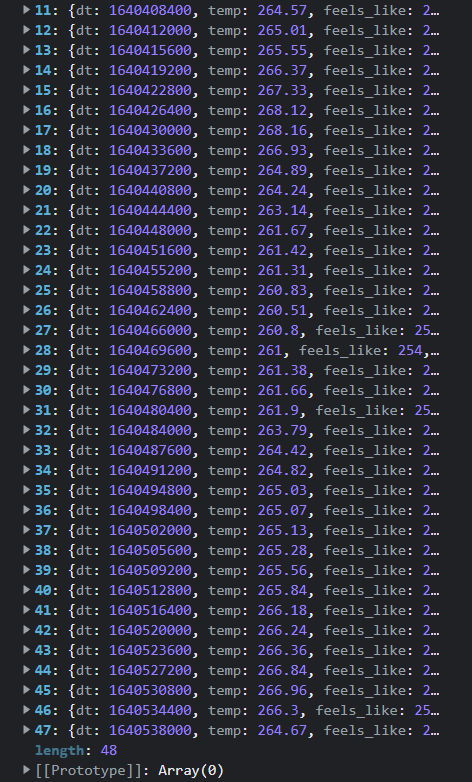
不同的是,hourlyForecast现在是一个空数组,而不是空字符串。
Stack Overflow用户
发布于 2021-12-24 17:49:54
在具有字符串初始值的父组件中为hourlyForecast设置状态,而不是数据数组。您应该将状态设置如下:
this.state = {
 ...
 hourlyForecast: []
};Stack Overflow用户
发布于 2021-12-24 17:39:09
我认为下面应该是这样的,我猜您将hourlyForecast作为数组映射函数不理解并抛出类型错误的字符串传递。
import React from "react";
import './App.css';
import SearchMenu from "./Components/search-menu/search-menu";
import CurrentWeather from "./Components/current-weather/current-weather";
import Forecast from "./Components/forecast-weather/forecast-weather";

import {getCurrentWather, getForecast} from './Components/api/weather.api';

class App extends React.Component{
    constructor(props) {
        super(props);
        this.state = {
            location: "",
            temp: "",
            feelsLike: "",
            description: "",
            img: "",
            hourlyForecast: []
        };
    }

    onInputChange(e) {
        this.setState({
            location: e.target.value
        });
    }

    async onFormSubmit() {
      const weatherRes = await getCurrentWather(this.state.location);
      const lat = weatherRes.data.coord.lat;
      const lon = weatherRes.data.coord.lon;
      const forecastRes = await getForecast (lat,lon);

        this.setState({
            temp: weatherRes.data.main.temp,
            feelsLike: weatherRes.data.main.feels_like,
            description: weatherRes.data.weather[0].main,
            img: weatherRes.data.weather[0].img,
            hourlyForecast: Array.isArray(forecastRes.data.hourly) ? forecastRes.data.hourly : [forecastRes.data.hourly]
                });
            }
    render() {
        return (
            <div className="App">
                <header className="App-header">
                    <SearchMenu
                        location={this.state.location}
                        inputChange={(e) => this.onInputChange(e)}
                        formSubmitted={() => this.onFormSubmit()}
                        />
                    <CurrentWeather
                        currentTemperature={this.state.temp}
                        feelsLike={this.state.feelsLike}
                        description={this.state.description}
                        img={this.state.img}
                    />
                    <Forecast forecast={this.state.hourlyForecast} />
                </header>
            </div>
        );
    }
    }


export default App;页面原文内容由Stack Overflow提供。腾讯云小微IT领域专用引擎提供翻译支持
原文链接:
https://stackoverflow.com/questions/70475314
复制相关文章
相似问题
腾讯云开发者

Copyright © 2013 - 2026 Tencent Cloud. All Rights Reserved. 腾讯云 版权所有
深圳市腾讯计算机系统有限公司 ICP备案/许可证号:粤B2-20090059  粤公网安备44030502008569号
腾讯云计算(北京)有限责任公司 京ICP证150476号 | 京ICP备11018762号