
未使用工具提示组件的Component
未使用工具提示组件的Component
提问于 2021-12-23 22:30:40
我试图在工具提示组件中使用反应门。没有错误,但它似乎不起作用:
- 工具提示仍然被带有
overflow:hidden的父容器部分隐藏。 - 我没有看到它添加到
#root之外的新div中。
import { Portal } from 'react-portal';

return (
    <>
      <Wrapper
        onMouseEnter={showTip}
        onMouseLeave={hideTip}
        ref={triggerRef}
      >
        {children}
      </Wrapper>

      {render && (
        <Portal node={triggerRef.current}>
          <Content
            placement={placement}
            fade={active}
          >
            {content}
          </Content>
        </Portal>
      )}
    </>
);这是完整代码的码箱。
回答 1
Stack Overflow用户
发布于 2021-12-23 23:45:12
我认为没有什么问题,问题在于您的风格,我对您的portal.js文件做了一些修改:
  if (typeof window === "object") {
    if (target) {
      root = document.getElementById("root");
    }
    el = document.createElement("div");
    el.setAttribute('style', 'position:relative'); // this line
    el.id = "portal-root";
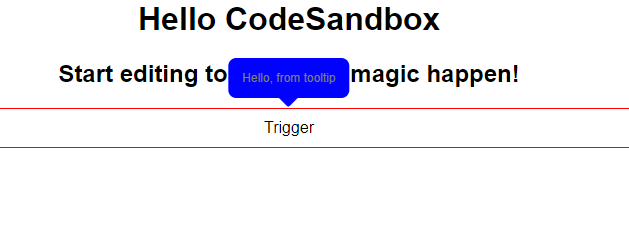
} 因为您的工具提示显示在文本上,onMouseLeave立即被调用,工具提示再次隐藏,因此在样式组件中和在顶部情况下,当我更改底部样式时:
  ${({ placement }) =>
    placement === "top" &&
    css`
      bottom: calc(100% + 50px); // this line
      &::before {
        top: calc(100% - 10px);
      }
    `}
及其工作:
页面原文内容由Stack Overflow提供。腾讯云小微IT领域专用引擎提供翻译支持
原文链接:
https://stackoverflow.com/questions/70467997
复制相关文章
相似问题
腾讯云开发者

Copyright © 2013 - 2026 Tencent Cloud. All Rights Reserved. 腾讯云 版权所有
深圳市腾讯计算机系统有限公司 ICP备案/许可证号:粤B2-20090059  粤公网安备44030502008569号
腾讯云计算(北京)有限责任公司 京ICP证150476号 | 京ICP备11018762号