
Microsoft :基于证书认证的Azure AD客户端凭据流
Microsoft :基于证书认证的Azure AD客户端凭据流
提问于 2021-12-23 17:10:55
我是连接到图形API与微软标识网(MSAL)库。https://github.com/AzureAD/microsoft-identity-web
为此,我使用基于证书的身份验证的客户端凭据流。
我的配置如下
服务注册
  services.AddMicrosoftIdentityWebApiAuthentication(Configuration)
           .EnableTokenAcquisitionToCallDownstreamApi()
           .AddMicrosoftGraph(Configuration.GetSection("DownstreamApi"))
           .AddInMemoryTokenCaches();
appSettings.json
"AzureAd": {
    "Instance": "https://login.microsoftonline.com/",
    "Domain": "mydomain.onmicrosoft.com",
    "TenantId": "xxxxxxx",
    "ClientId": "yyyyyyyy",
    "ClientCertificates": [
     {
       "SourceType": "Path",
       "CertificateDiskPath": "c:\\cert\\my-cert.pfx",
       "CertificatePassword": "password"
     }
 ] }
为此,我将得到以下错误
IDW10104:客户端机密证书和客户端证书都不能为空或空白,在调用web时,只能在web应用程序的配置中包含一个。例如,在appsettings.json文件中。
但是,我可以使用Microsoft.Identity.Client (使用客户端凭证流和基于证书的auth)来累积令牌并与Graph连接。
    private GraphServiceClient GetGraphServiceClient()
    {
        var token = GetToken();
        GraphServiceClient graphServiceClient =
            new GraphServiceClient(new DelegateAuthenticationProvider(async (requestMessage) =>
            {
                // Add the access token in the Authorization header of the API request.
                requestMessage.Headers.Authorization =
                        new AuthenticationHeaderValue("Bearer", token);
            })
            );
        return graphServiceClient;
    }

    private string GetToken()
    {
        var x509Certificate2 =
            new X509Certificate2(System.IO.File.ReadAllBytes("MyCert.pfx"), "password");

        IConfidentialClientApplication app =
            Microsoft.Identity.Client.ConfidentialClientApplicationBuilder.Create("my-client-id")
                .WithTenantId("my-tenent-id")
                .WithCertificate(x509Certificate2)
                .Build();

        // With client credentials flows the scopes is ALWAYS of the shape "resource/.default", as the
        // application permissions need to be set statically (in the portal or by PowerShell), and then granted by
        // a tenant administrator
        string[] scopes = new string[] { "https://graph.microsoft.com/.default" };

        AuthenticationResult result =
                    app.AcquireTokenForClient(scopes)
                        .ExecuteAsync().Result;
        return result.AccessToken;
    }
我在这里缺少任何配置吗?
回答 1
Stack Overflow用户
发布于 2021-12-24 10:41:48
论解决办法
尝试在Azure应用程序注册中添加证书
1)去Azure门户。在左侧导航窗格中,选择Azure Active服务,然后选择应用程序注册。
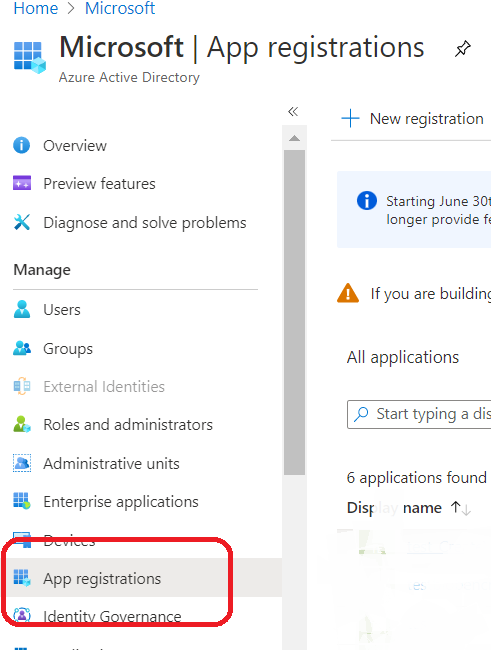
2)在结果屏幕中,选择选择您的应用程序。
( Certificates 3)3)在证书和机密选项卡中的,转到部分:
4)选择上载证书,并在右边的浏览按钮中选择现有证书。
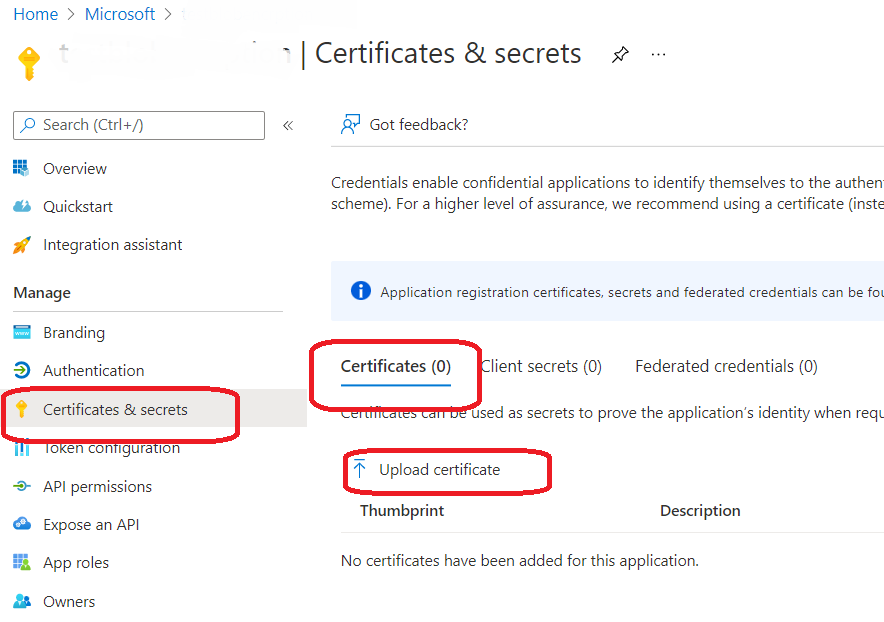
5) Select添加。
页面原文内容由Stack Overflow提供。腾讯云小微IT领域专用引擎提供翻译支持
原文链接:
https://stackoverflow.com/questions/70465345
复制相关文章
相似问题
腾讯云开发者

Copyright © 2013 - 2026 Tencent Cloud. All Rights Reserved. 腾讯云 版权所有
深圳市腾讯计算机系统有限公司 ICP备案/许可证号:粤B2-20090059  粤公网安备44030502008569号
腾讯云计算(北京)有限责任公司 京ICP证150476号 | 京ICP备11018762号