
Spreadsheetlight:单元范围周围的边界,没有内部边界
Spreadsheetlight:单元范围周围的边界,没有内部边界
提问于 2021-12-23 13:52:12
使用SpreadsheetLight,我希望在单元格范围周围添加一个边框(仅)。在这个范围内不应该有任何边界。
我想要的:
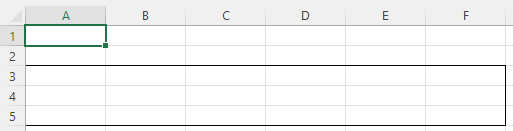
我得到的是:

我使用的代码:
var testDoc = new SLDocument();

var testStyle = testDoc.CreateStyle();
testStyle.Border.Outline = true;
testStyle.Border.SetLeftBorder(DocumentFormat.OpenXml.Spreadsheet.BorderStyleValues.Thin, Color.Black);
testStyle.Border.SetRightBorder(DocumentFormat.OpenXml.Spreadsheet.BorderStyleValues.Thin, Color.Black);
testStyle.Border.SetTopBorder(DocumentFormat.OpenXml.Spreadsheet.BorderStyleValues.Thin, Color.Black);
testStyle.Border.SetBottomBorder(DocumentFormat.OpenXml.Spreadsheet.BorderStyleValues.Thin, Color.Black);
testDoc.SetCellStyle("A3", "F5", testStyle);

return testDoc;
我做错了什么?我期望选项Border.Outline = true只生成一个大纲。将其设置为false不会改变输出中的任何内容。我在3.5.0版中使用SpreadsheetLight (NuGet上的最新版本)。
回答 1
Stack Overflow用户
发布于 2021-12-23 14:36:43
我无法解决样式的问题,但我找到了另一个绘制边框的选项,这个选项实际上按照我的意愿绘制了一个大纲。也许这有助于其他有同样问题的人:
testDoc.DrawBorder("A3", "F5", DocumentFormat.OpenXml.Spreadsheet.BorderStyleValues.Thin, Color.Black);页面原文内容由Stack Overflow提供。腾讯云小微IT领域专用引擎提供翻译支持
原文链接:
https://stackoverflow.com/questions/70463059
复制相关文章
相似问题
腾讯云开发者

Copyright © 2013 - 2026 Tencent Cloud. All Rights Reserved. 腾讯云 版权所有
深圳市腾讯计算机系统有限公司 ICP备案/许可证号:粤B2-20090059  粤公网安备44030502008569号
腾讯云计算(北京)有限责任公司 京ICP证150476号 | 京ICP备11018762号