
VMWARE ESXi -以编程方式取消“覆盖”
VMWARE ESXi -以编程方式取消“覆盖”
提问于 2021-12-22 14:57:17
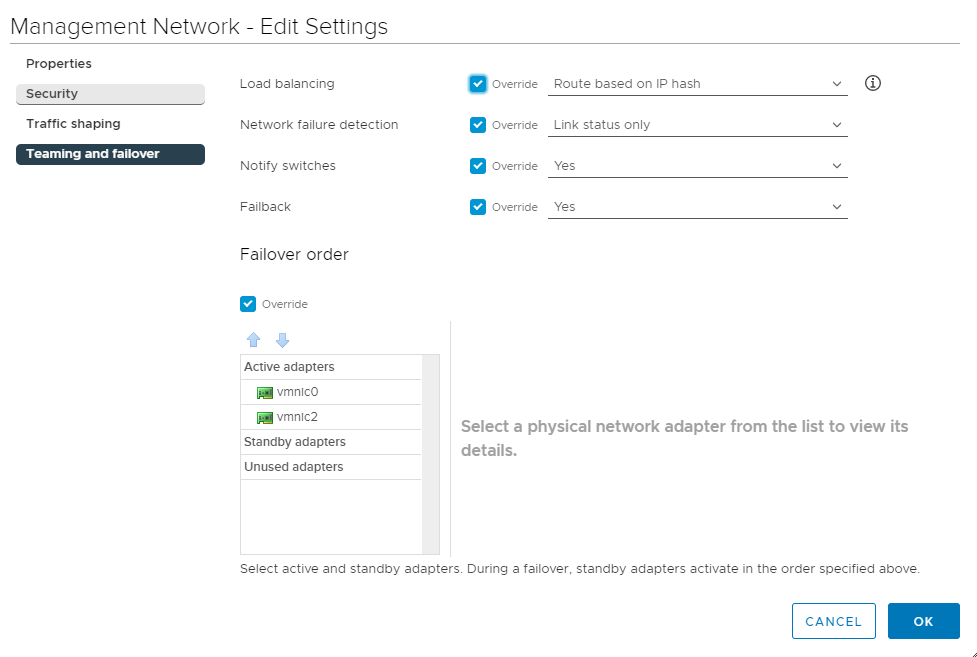
这是连接到vSwitch0的网络之一。我想取消“重写”,因为我希望它从主设置继承。问题是,我有几十个这样的东西,我想通过一个脚本来完成。我无法通过ESXCLI找到如何做到这一点。当您为portgroup创建特征时,会发生覆盖,请参阅下面的2注释删除。
esxcli network vswitch standard portgroup add --portgroup-name=Grid --vswitch-name=vSwitch0
esxcli network vswitch standard portgroup set --portgroup-name=Grid --vlan-id 123
#esxcli network vswitch standard portgroup policy failover set --portgroup-name=Grid --active-uplinks=vmnic0,vmnic2
#esxcli network vswitch standard portgroup policy failover set --portgroup-name=Grid -l portid
我真的不想重新创造一切。一定有办法解开那些盒子。
回答 2
Stack Overflow用户
回答已采纳
发布于 2022-01-18 14:42:47
你可以用powercli做到这一点:
$vs = Get-VirtualSwitch -VMHost $vmhost -Name "vSwitch0"
$nics = (Get-VirtualSwitch -VMHost $vmhost).Nic
$policy1 = Get-VirtualPortgroup -VirtualSwitch $vs -VMHost $vmhost -Name 'net2' | Get-NicTeamingPolicy
$policy1 | Set-NicTeamingPolicy -MakeNicActive $nics[0] -MakeNicStandby $nics[1] # this will set the order
$policy1 | Set-NicTeamingPolicy -InheritFailoverOrder $true # this will uncheck/check the failover inherit tick
如果使用esxcli:
首先,我们得到当前的设置(没有选中覆盖)
[root@esx:~] esxcli network vswitch standard portgroup policy failover get -p net2
   Load Balancing: srcport
   Network Failure Detection: link
   Notify Switches: true
   Failback: true
   Active Adapters: vmnic5, vmnic4
   Standby Adapters:
   Unused Adapters:
   Override Vswitch Load Balancing: false
   Override Vswitch Network Failure Detection: false
   Override Vswitch Notify Switches: false
   Override Vswitch Failback: false
   Override Vswitch Uplinks: false
接下来,我们运行这个命令来设置我们想要的好顺序,并再次检查。
[root@esx:~] esxcli network vswitch standard portgroup policy failover set -a vmnic5 -s vmnic4 -p net2
[root@esx:~] esxcli network vswitch standard portgroup policy failover get -p net2
   Load Balancing: srcport
   Network Failure Detection: link
   Notify Switches: true
   Failback: true
   Active Adapters: vmnic5
   Standby Adapters: vmnic4
   Unused Adapters:
   Override Vswitch Load Balancing: false
   Override Vswitch Network Failure Detection: false
   Override Vswitch Notify Switches: false
   Override Vswitch Failback: false
   Override Vswitch Uplinks: true
这将勾选覆盖复选框,并将活动nic设置为vmnic5,将stby设置为vmnic4。
祝你好运帕吉特
Stack Overflow用户
发布于 2022-01-18 16:47:03
我用PowerCLI编写了一个脚本。真不敢相信我没想过用它..。
$vmhost = 'server_name'
$portgroups = Get-VirtualPortGroup -VirtualSwitch vSwitch0 -VMHost $vmhost | select -ExpandProperty Name | sort

foreach ( $portgroup in $portgroups ) {

    $portgroup
    Write-Output ""

    $policy1 = Get-VirtualPortGroup -VirtualSwitch vSwitch0 -VMHost $vmhost -Name $portgroup | Get-NicTeamingPolicy

    Write-Output "Load Balancing: "
    $policy1.IsLoadBalancingInherited
    if (!($policy1.IsLoadBalancingInherited)) { $policy1 | Set-NicTeamingPolicy -InheritLoadBalancingPolicy $true }


    Write-Output "Network Failure Detection: "
    $policy1.IsNetworkFailoverDetectionInherited
    if (!($policy1.IsNetworkFailoverDetectionInherited)) { $policy1 | Set-NicTeamingPolicy -InheritNetworkFailoverDetectionPolicy $true }

    Write-Output "Notify Switches: "
    $policy1.IsNotifySwitchesInherited
    if (!($policy1.IsNotifySwitchesInherited)) { $policy1 | Set-NicTeamingPolicy -InheritNotifySwitches $true }


    Write-Output "Failback: "
    $policy1.IsFailbackInherited
    if (!($policy1.IsFailbackInherited)) { $policy1 | Set-NicTeamingPolicy -InheritFailback $true }

    Write-Output "Failover Order: "
    $policy1.IsFailoverOrderInherited
    if (!($policy1.IsFailoverOrderInherited)) { $policy1 | Set-NicTeamingPolicy -InheritFailoverOrder $true }


    Write-Output ""
    Write-Output ""
}页面原文内容由Stack Overflow提供。腾讯云小微IT领域专用引擎提供翻译支持
原文链接:
https://stackoverflow.com/questions/70450990
复制相关文章
相似问题
腾讯云开发者

Copyright © 2013 - 2026 Tencent Cloud. All Rights Reserved. 腾讯云 版权所有
深圳市腾讯计算机系统有限公司 ICP备案/许可证号:粤B2-20090059  粤公网安备44030502008569号
腾讯云计算(北京)有限责任公司 京ICP证150476号 | 京ICP备11018762号