
在移动版本中垂直对齐内容
在移动版本中垂直对齐内容
提问于 2021-12-22 11:50:53
我对引导和它的工作方式非常陌生,我一直试图在移动版本中垂直对齐网站内的内容,当前的输出如下:当前输出:
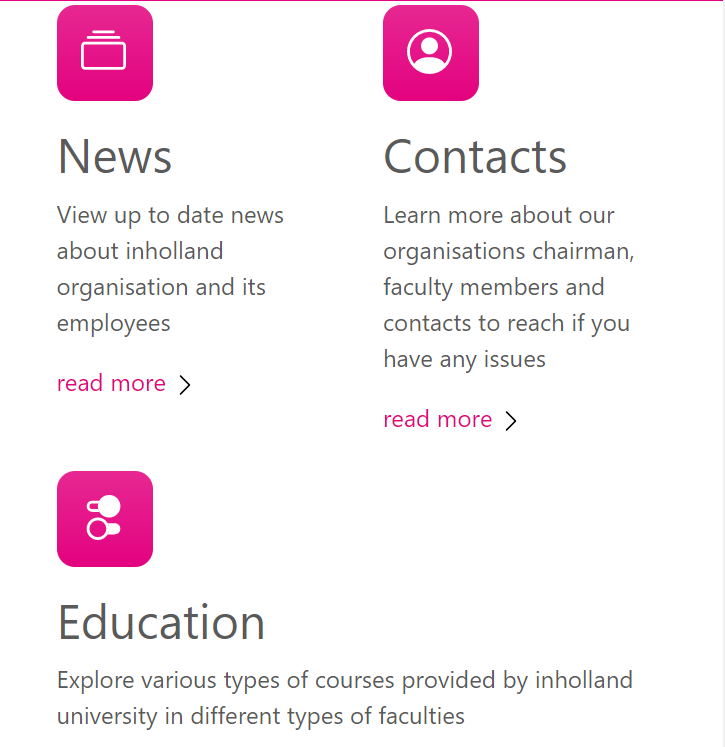
如何垂直对齐联系人部分,使其恰好位于新闻部分和教育部分之上。
如能提供任何帮助,将不胜感激。
到目前为止,我使用引导代码的HTML:
<div class="container px-4 py-5" id="featured-3">
  <h2 class="pb-2 border-bottom">About Inholland</h2>
  <div class="row g-4 py-5 row-cols-1 row-cols-lg-3">
    <div class="feature col">
      <div class="feature-icon bg-#e3027f bg-gradient">
        <!--<svg class="bi" width="1em" height="1em"><use xlink:href="#collection" /></svg>-->
        <svg style="color: #fff" class="bi text-white" width="1em" height="1em">
          <use xlink:href="#collect-icon" class="bi bi-collection"></use>
        </svg>
      </div>
      <h2>News</h2>
      <p>View up to date news about inholland organisation and its employees</p>
      <a style="color: #e3027f" href="#" class="icon-link">
        read more
        <svg class="bi" width="1em" height="1em">
          <use xlink:href="#chevron-right" />
        </svg>
      </a>
    </div>
    <div class="feature col">
      <div class="feature-icon bg-#e3027f bg-gradient">
        <svg class="bi" width="1em" height="1em">
          <use xlink:href="#people-circle" />
        </svg>
      </div>
      <h2>Contacts</h2>
      <p>
        Learn more about our organisations chairman, faculty members and
        contacts to reach if you have any issues
      </p>
      <a style="color: #e3027f" href="#" class="icon-link">
        read more
        <svg class="bi" width="1em" height="1em">
          <use xlink:href="#chevron-right" />
        </svg>
      </a>
    </div>
    <div class="feature col">
      <div class="feature-icon bg-#e3027f bg-gradient">
        <!--<svg class="bi" width="1em" height="1em"><use xlink:href="#toggles2" /></svg>-->
        <svg class="bi" width="1em" height="1em">
          <use xlink:href="#toggle-icon" />
        </svg>
      </div>
      <h2>Education</h2>
      <p>
        Explore various types of courses provided by inholland university in
        different types of faculties
      </p>
      <a style="color: #e3027f" href="#" class="icon-link bg-#e3027f">
        read more
        <svg class="bi" width="1em" height="1em">
          <use xlink:href="#chevron-right" />
        </svg>
      </a>
    </div>
  </div>
</div>回答 1
Stack Overflow用户
发布于 2021-12-22 14:03:12
在容器行中添加align-items-end:
<div class="row g-4 py-5 row-cols-1 row-cols-lg-3 align-items-end">页面原文内容由Stack Overflow提供。腾讯云小微IT领域专用引擎提供翻译支持
原文链接:
https://stackoverflow.com/questions/70448613
复制相关文章
相似问题
腾讯云开发者

Copyright © 2013 - 2026 Tencent Cloud. All Rights Reserved. 腾讯云 版权所有
深圳市腾讯计算机系统有限公司 ICP备案/许可证号:粤B2-20090059  粤公网安备44030502008569号
腾讯云计算(北京)有限责任公司 京ICP证150476号 | 京ICP备11018762号